Lighting African American on black background

Reading Time: < 1 minute

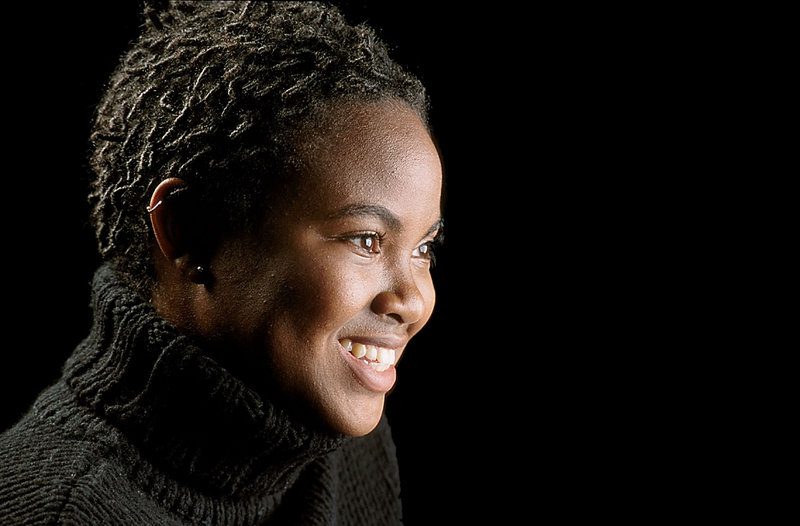
This is one of my favorite photos that I have ever made. I think the model brought as much to this session as I did lighting her.

I love her hair, the turtle neck and her wonderful skin and smile.

Simplicity is what makes this work so well.  You need to have the background far away from the soft boxes.  There is easily 10 feet from the model to the background.  So the amount of light hitting the subject drops off pretty quickly and what little light is hitting the background isn’t enough to register in the photo.

She is around f/8 on the Mamiya RZ 6×7 camera system. I was using a 100-200mm zoom lens and shooting with Provia 100 transparency film.  I didn’t know how good it was until I got the film back from the lab a day or so later.

Sure I shot a test shot. I shot that with a Polaroid back using Fuji’s Polaroid film.

What clothing works best for a portrait?

Reading Time: 2 minutes

Pick your clothing carefully

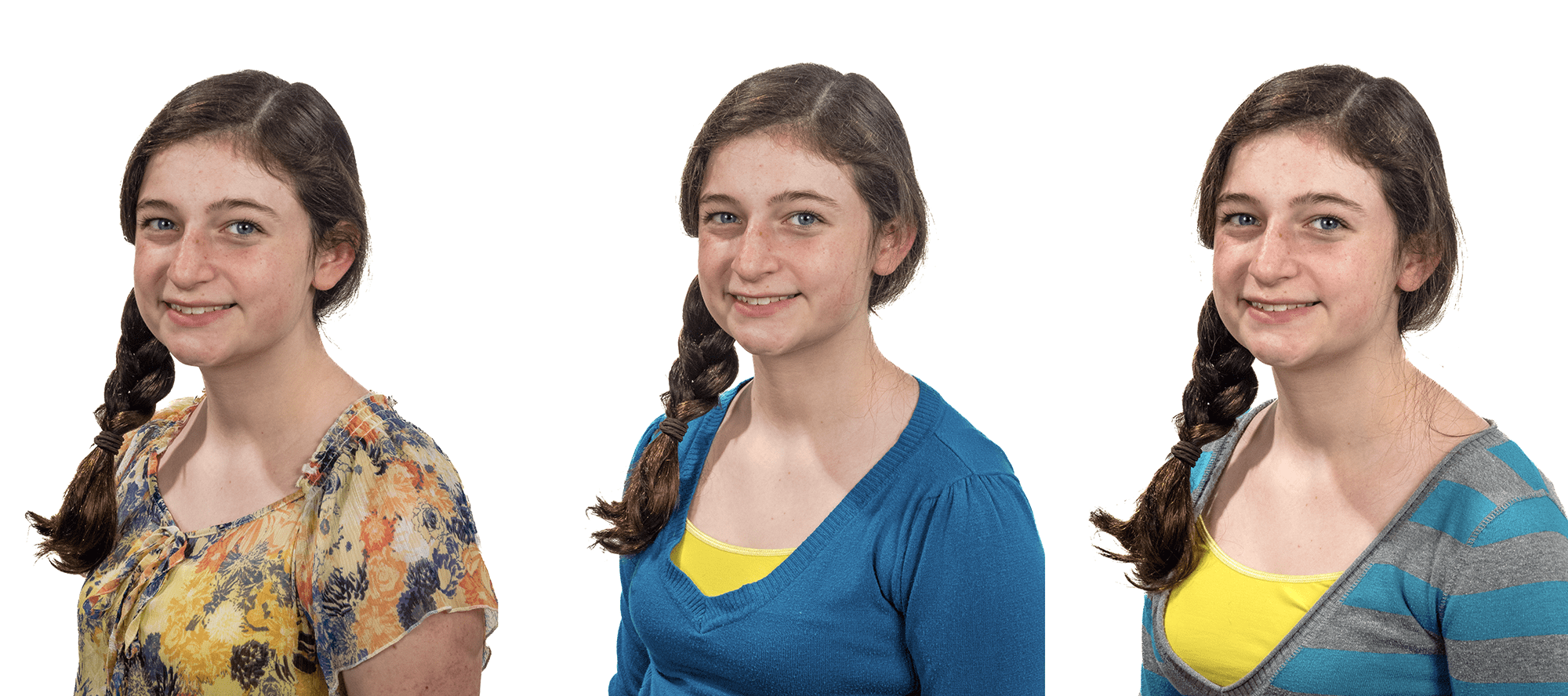
There are two types of photos when it comes to clothing: 1) For Portraits and 2) For Fashion.

If the photo shoot is for portrait you need to be sure that the clothing doesn’t distract, but rather compliments the person’s face. The fashion photo shoot is all about the clothing and the model is just there to make the clothing look good.

Look at these three examples of tops for a typical head shot.

Photo #1
Photo #2
Photo #3

To be sure we are concentrating on how clothing can add or distract from a portrait I shot these all the same so that the only difference is really the clothing.

First of all all three outfits look good on the model and the point isn’t about which one you like the most. The point in a portrait photo is which one makes you look more at the model’s face and less about the clothing?

Simple Tips:

  1. Avoid busy patterns as in Photo #1
  2. Choose a solid as in Photo #2
  3. Avoid Stripes as in Photo #3

Each person will look best in one of the following necklines: v-neck, oval or round.

Color choices can be tricky as well. Everyone will look good in Aqua. The reason for this is this is the closest to the complementary color for the skin.

While different ethnic groups have different skin, the general rule is it is more about how light or dark the skin is more than color differences.

However the other factor is our eyes and hair color. Complimentary and the same color are generally good on a person. Complimentary colors tend to make you pop more than the same colors.

The general rule which is often the most difficult to follow is always keeping it simple.


Lighting diagram used for examples

Items:
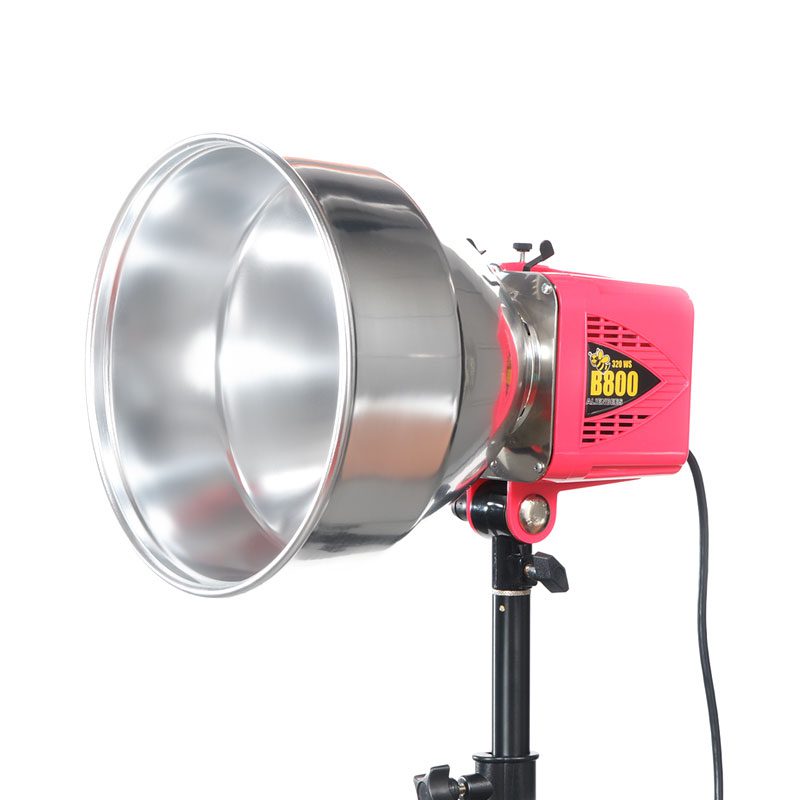
(2) Alienbees B1600
1-stop brighter on background than lights on subject

White backdrop
I recommend not having it perpendicular to the camera. Slight angle will help avoid light flare caused by light bouncing off background

(2) Alienbees B1600 with bounce white umbrellas

Nikon D4 with 28-300mm
No description for this item.

Studio strobes or Hot Shoe Flash outside

Reading Time: 4 minutes

Walk and Talk with Hot Shoe Flash 

One of my favorite shots for organizations is doing what I call the “Walk and Talk.” This is where two or more people walk next to each other towards me.

I encourage them to feel each other barely next to each other. This keeps them from walking further and further apart. Their closeness also helps communicate that they are friends. This is using the body language of touching or almost touching to help communicate their relationship.

Here are examples I did while teaching in Kona, Hawaii, in February this year. In these first ones, I was showing the students how to use two hot shoe flashes as fill lights. I have included the assistant carrying the lights for these examples to show you what they are doing as well.

I talk to the subjects and explain what I want them to do—no flash when off here.


The photo assistant is carrying a Nikon SB900 and a Nikon SB800. They are zoomed out to 200mm for the SB900 and 120mm with the SB800. This helps the light go farther but also keeps the light mainly on their faces.


Notice that the assistant must be pretty close to the subjects for the flash to work properly. In addition to the flashes, I am using the RadioPoppers PX system to help relay the infrared signal from the Nikon SU800 on my camera to the flashes.


We switched out the subjects so everyone could experience what it felt like doing this exercise and see it being done.


While showing the class how to use the hot shoe flashes, there were a few times when I got ahead of the flashes’ recycling. By not waiting long enough between flashes (2 seconds), the flash wouldn’t fire.

Walk and Talk with Studio Strobe

To help everyone see the difference in flashes, I also used an AlienBee 1600 powered by a Vagabond Mini Lithium battery. I borrowed the Photo Schools radio remotes, but I now mostly use the Pocket Wizard Mini TT1 Transmitter on my Nikon Camera and the Pocket Wizard Plus II transceiver on the flashes.


The MiniTT1 will let me shoot at 1/500 sync speed rather than just 1/250.


Another thing you will notice that is different in these examples is how far away the photo assistant is from the subjects. 


The AlienBee 1600 has the reflector that comes with it, so notice that the flash lights more of the subject. I can change that by just adding a grid, but I didn’t for these photos.

The flash is set at about 1/8 power. I can almost shoot on the motor drive setting for these photos, which is why the recycle time is so short.


When I shot these photos, not a single time did the flash fire. I think that when it comes to getting the best expression, you need to be able to shoot at any moment and not just when your flashes are ready. 


I would highly encourage using the studio strobe over the hot shoe flash for this reason alone.

Just like I did above, I talk to the subjects and do a few test shots before I have them walk towards me.


After we did some tests to get them moving, I had them start over where they were talking to one another.


As you can see, it doesn’t take long for people to relax, and the photos look pretty natural. I would have changed one thing in these photos. I would have had the assistant put the light on a light stand and raise the light a little higher to help avoid the glare in the glasses.


This is to show that the flashes fired every time. 

Now look at the photos where the flashes didn’t fire. Besides their faces in the shade, the color on their faces isn’t as good. I think that using flash helps you get the best skin tones outside.

Go out and try this yourself.

When flying around the world, it is often easier to carry the Nikon SB900 and a Nikon SB800 than the AlienBee 1600 and the Vagabond Mini Lithium battery. So, depending on the situation, I can still take a photo with either system.

Why Learn Ratio Lighting?

Reading Time: 5 minutes

First of all, there are times you need to be sure your photos can be adequately reproduced. For example, the headshot is the most used picture I know of in publications.

There are some pretty cool lighting setups you can use, but if you are unaware of how this will affect the photo in print, your client will be sorely disappointed with your photos.

Take this first photo where I am lighting the person with one light on a grid. This classic Rembrandt Lighting gives you a nice triangle on the cheek.

All the photos here were taken during a class I taught in Hawaii on lighting.


You can do this assignment yourself to understand how to understand ratio lighting. You need to first start with one light and then add other lights. Use this lighting diagram and the instructions below to duplicate this with your camera and off-camera flash.

Description:
Rembrandt portrait using one grid light

Items:

  • Monobloc with ten or 20-degree grid
    • You may use any power setting you choose. Be sure your skin tone is adequately exposed and correct white balance.
  • White backdrop
    • You may use a black background as well. No other lights are to be used in this assignment.
  • Woman
    • Please get the best possible expression. For example, if they see a triangle on their cheek would be best. Be sure the triangle includes lighting their eye.
  • (D)SLR
    • Choose the lowest ISO setting for your camera. For example, use a portrait lens 85mm – 100mm, or if you don’t have a full frame, then 50mm will be OK.

The first place the above photo becomes a problem is in your newspaper. Especially when it runs in black and white, you see that everything without a light on it in the subject will be black in newspaper print.

To still get the excellent shape that takes place with an off-camera flash, you need to add fill light to help soften those harsh shadows so you can still see detail.

It would be best if you used the lighting diagram below to get the second photo here and follow the instructions. Then, shoot your subject with your camera and two lights.

Description:
1:3 lighting ratio. This photo is classic lighting.

Items:

  • Woman
    • Your subject should have the main light lighting only part of the face, and the shadows should be just a little to show the 1:3 Ratio.
  • (D)SLR
    • Choose the lowest ISO. Use a portrait lens of 50mm if you don’t have a full-frame camera that can work. No more than 100mm.
  • Octobox
    • This is your fill light, and get a reading of this 2nd. Be sure it is 1/2 the power (1 f/stop less) than the leading light. After this is done, get a 3rd light reading of both lights, which will be the setting for the camera. It can be level with the eyes, but you may have to move up with glasses to avoid glare.
  • Softbox
    • This light is your leading light. Get a light reading with just this first. The light should be 45 degrees off the axis of the camera and 45 degrees above the subject’s eyes.
  • White backdrop
    • Keep the subject a few feet from the background, and do not use more lights to light it.

How to figure the Ratio

It would be best if you changed your f/stops into ratios. What I do is first understand that your leading light is putting out twice the light as your fill. You would think that this means you have a 2:1 ratio, but this isn’t the case.

The reason is you must figure not by what each light is putting out but by how much light is hitting the subject. 

Everywhere the leading light hits, so are your fill light from the camera’s angle. You then need to add the leading light and the fill for all those places, adding 2 + 1 = 3. The fill only lights the shadow, so there is no need for addition or subtraction.

On the subject, the brightest areas being lighted by the main and fill get three times the light compared to the shadows getting illuminated by just the fill, which we say is one amount of light.

This is what we call the 3:1 lighting ratio, and very printable in a newspaper.

Adding a hair light

Go ahead and then shoot this third shot and add a hair light. Use the diagram below and play with the exposure of the hair light till you get something you like.

Description:
1:3 lighting ratio. This photo is classic lighting with hair light.

Items:

  • Woman
  • Your subject should have the main light lighting only part of the face, and the shadows should be just a little to show the 1:3 Ratio.
  • Monobloc with grid on boom
  • With dark hair, start at the same f/stop as the main up to about 1 or 2 stops more. With bald or light hair, be careful using hair light. Sometimes better not to use one.
  • (D)SLR
  • Choose the lowest ISO. Use a portrait lens of 50mm if you don’t have a full-frame camera can work. No more than 100mm.
  • Octobox
  • This is your fill light, and get a reading of this 2nd. Be sure it is 1/2 the power (1 f/stop less) than the leading light. After this is done, get a 3rd light reading of both lights, which will be the setting for the camera. It can be level with the eyes, but you may have to move up with glasses to avoid glare.
  • Softbox
  • This light is your leading light. Get a light reading with just this first. The light should be 45 degrees off the axis of the camera and 45 degrees above the subject’s eyes.
  • White backdrop
  • Keep the subject a few feet from the background, and do not use more lights to light it.

Background Light

You can add color to your background by just putting a colored gel over a light and pointing it to the background. It would be best if, first, you were sure your other lights were not lighting the background. For the photos below, we used the first lighting setup with one morning with a grid and then added the background light.

Using a white background, be sure your value on the background from the background light is -2 stops as compared to the leading light. This will give you the same color as your gel. Suppose you want a darker color, then even less light. If you prefer a lighting color, add more light.

Here is a photo of some students having fun with their assignments in Kona, Hawaii.

One Light: Group Shot

Reading Time: 4 minutes
Students helped me demonstrate the issues of a problem with one light close to the group. The person closest is brighter than the others.
Here, all I have done is repositioned everyone, but the lady on the far left is still darker than the other two in the photo.
This is the lighting setup for the two photos above.

After seeing the photos above, one of the first things people think they need to do is add another light. No question this would help solve our lighting problem.

Now let’s be realistic here. Most photographers starting will have just one light and cannot justify another until they begin earning income. How do you solve the problem in just one morning?

Inverse-Square Law

We need to first start with understanding the Inverse-Square Law of Light.

In physics, an inverse-square law is any physical law stating that a specified physical quantity or strength is inversely proportional to the square of the distance from the source of that physical quantity. (Wikipedia)

In photography, an object twice the distance from a point source of light will receive a quarter of the illumination.

How this is most often used in photography is to determine your exposure. If you want to keep the same f/stop when you move a light twice the distance from the subject, you must increase the power four times. Inversely, if you move the lamp twice as close, you will need to power down the light to 1/4 the power to keep the same f/stop.

Using the Inverse-Square Law of light for a group photo

The further you move the light from a group, the less the light falling on the subjects’ faces will differ. The reason is that the distance of each subject to the light source, as compared to others in the group, will be so small a difference that they will appear to be more evenly lighted.


The only thing that changes from the first diagram to this one is that the light source is moved farther from the group and to the left.

As shown in the lighting diagram, I have moved the light source further from the group. I suggest moving the light as far away from the group as possible to get the most even light.

You can now see that the light is more even on everyone in the photo. One person said it is light, creating a depth-of-field effect with the flash.
While this would have solved the lighting problem by keeping the lighting the same as in the first photo, it would limit your creativity when posing with a single light. This is why moving the light back gives you more posing options and more light in a group photo.

Technical Changes

  • ISO: You may need to use a higher ISO to keep your flash effective. You may change from ISO 100 to ISO 3200. Remember that, since you are using a flash, the noise is different and can actually seem to disappear. (link to earlier blog on this)
    • Aperture: For group photos, use f/8 or higher to ensure everyone is in focus. If you use f/2, for example, your group photo above would look more like a solo act with backup singers than a musical group.
    • Studio Strobe vs Hot Shoe Flash: This is when it makes more sense to own a studio flash than a hot shoe flash. You can get more power, and the recycling time is much quicker. (Earlier Blog Post comparing hot shoe flash and studio light)

You can buy hot shoe flashes for under $90. These hot shoe flashes are not TTL, but you can use them in manual mode just as you would a studio strobe. They are just less powerful and take a while to recycle.

This is the Vivitar 285, which you get at B&H Photo for $87

Practice making a group photo and evenly lighting everyone with just one flash. Understanding and mastering this skill will help you when you have limited equipment and still need a professional group photo.