Photo Tips For Camp Photographers

Reading Time: 4 minutes

When you drive into the WinShape Camp at Berry College in Rome, GA, you will be greeted by many deer. I understand the ratio of deers to students is 8:1.

I spent the day with WinShape summer camp photographers, training them to get better photographs.

Here are some camera settings that we all made on the cameras.

ISO settings on the camera
  • Quality of Image. We set the camera to the most extensive JPEG file at the highest quality. (The camp did not provide the software for all the computers to use RAW)
  • Auto ISO. We all set our cameras to Auto ISO; our lowest ISO on the camera default preferences is 50 to 200 ISO. We then set the highest ISO on what the camera is realistically capable of shooting. For most of the cameras, this was between ISO 1600 and 6400. Both Canon and Nikon also allow you to set your highest shutter speed. We put this according to the situation.
  • Shutter speeds (Using auto ISO): The camera will raise the ISO to get the optimum shutter speed and drop it once it hits the maximum ISO.
    • If shooting under fluorescent or sodium vapor lights, we recommended shooting at 1/100 shutter speed unless they had to shoot sports.
    • For shooting sports, we recommended setting a 1/2000 shutter speed
    • For general shooting, we recommended a 1/250 shutter speed
  • White Balance
    • We recommended getting a custom White Balance as the primary choice
    • Our second choice was to use a preset like Fluorescent, Daylight, or tungsten, for example
    • When we were changing lighting that affects white balance often, we recommended using Auto White Balance
  • Aperture
    • For general shooting, we recommended not shooting wide open but using f/4 or f/5.6 so that your subject is in focus.
    • When your subject can cooperate more with you, we recommend shooting wide apertures if you choose for artistic reasons. This is when f/1.4 is more appropriate. We have found the trend of too many shooters buying 50mm f/1.4 lenses shooting wide open all the time and having very few in-focus photos due to the shallow depth of field.
  • Inside Flash or when dark. Use a higher ISO to help open up the background. Here is an earlier blog post on how using the higher ISO helps open the background up.
  • Flash outside in daylight. When it is the middle of the day, and the sun is straight up, you will most likely get dark circles around the eyes. I call this the raccoon eye look. If you are less than 10 feet from the subject, you can use your built-in Flash or hot shoe flash to fill those shadows. In addition to filling in the shadows, you will get a nice catch light in the eyes. You can also use Flash when the subject is backlighted by the sun on a subject. (I wrote about this in an earlier blog post here)  This helps them to avoid looking directly into the sun and squinting. Since the shadow side of the face is now towards the camera, a flash can help balance the light.
Camp staff photographers are discussing ideas they will do with the campers in a couple of weeks. [NIKON D4, 28.0-300.0 mm f/3.5-5.6, Mode = Aperture Priority, ISO 2000, 1/100, ƒ/5, (35mm = 28)]

Some camp photographers are photography students or recent graduates of photography programs, but not all are photography majors. Due to the range of talent, we showed them settings that would help them get more photos in focus that are correctly exposed and have good skin tones.

The staff of one of the boy’s camps shows the camp cheer they will teach the campers. [NIKON D4, 28.0-300.0 mm f/3.5-5.6, Mode = Aperture Priority, ISO 200, 1/400, ƒ/5.3, (35mm = 112)]

After practicing with these settings, we covered the three composition stages. I will refer you to my earlier blog about what we covered.

The last thing we did during our time was go out and practice shooting, looking for photos that tell a story. Then, we reviewed everyone’s best five pictures for our last hour together.

Staff play some games with each other after dinner. [NIKON D4, 28.0-300.0 mm f/3.5-5.6, Mode = Aperture Priority, ISO 200, 1/500, ƒ/5.3, (35mm = 112)]

Call me if you would like me to come to your organization and do this workshop. I am doing the workshop for the Boy Scout troop that meets at my church in a few weeks. We meet for class and then complete four weeks after they shoot a photo story.

The cool thing about WinShape camps is the emphasis on relationships. As you can see, the staff enjoy each other, which spills over to the campers. [NIKON D4, 28.0-300.0 mm f/3.5-5.6, Mode = Aperture Priority, ISO 4500, 1/500, ƒ/5, (35mm = 28)]

Tips for the PR Professional when a photojournalist is sent to cover you

Reading Time: 3 minutes

For more than thirty years I have been a photojournalist.  I started working for newspapers as a staff photographer and now work as a freelancer for the media and corporate clients.

Many times, the public relations office is not ready when I show up. Most PR professionals love to show how much free space they got for their company in a magazine. They show this to the company leaders and then show them how much it would have cost to buy that space. This helps with their job security.

The smartest PR people know the value and are prepared. They treat this moment as if they hired an advertising agency to produce an advertisement for them.

Take advantage of this free publicity and invest in it. You will be glad you did.

While a photojournalist is trained to be truthful and unbiased, it is difficult not to respond to negative or positive behavior towards them. If you want the best story on you, then I have some tips for you.

This is what sometimes I show up on a job with in addition to a photo assistant. Getting this gear from my van to the photo shoot can be difficult. Help out the photographer by a good parking space, knowledge of where the elevators are located and handicap ramps to avoid stairs.

Tips

  1. Have your subject ready. Often your photojournalist has multiple assignments during a day. You not being ready and delaying them will have them rush your coverage. If computers and technology are part of the subject, be sure to have them running before the photographer arrives. Too many times I have arrived nothing is setup and ready to go. I have spent 4 hours waiting for a researcher to set everything up.
  2. Know where the subject is located. Too often I will show up at a corporation and be led around a building or property while they are trying to find the room, we are to meet the subject. Do this before the photographer arrives. It shows you value their time.
  3. Scout for options. Go a few days early and work with the subject. What is the best setting to help tell the story? Are there items that you may need to collect before the photo shoot? Be careful not to remove everything. Photographers are sent to you to capture the subject in their environment.
  4. Take a few photos yourself. Evaluate the photos you take for what is in the background and can we clean that up for example. Check to see if you have enough room to move around while taking photos. Too often the subject is in such a small room that photographer cannot move to get a good angle. See if you can take photos without a flash. This may alert you to some lights that are burned out and need new bulbs.
  5. Plan for parking. Often magazine photographers will bring lighting gear. Don’t expect just a photographer to show up with just a camera and on camera flash. If they are showing up with a cart of gear, know where the elevators are in the building and where the handicap entrance is located. This will help them avoid carrying material up and down stairs. If you need a key to access the elevator, get the key before the photo shoot is to start.
  6. Pay attention to clothing. Solid colors are better than patterns. Avoid white due to the difficulty of reproduction process for printing press. The one time you may want white is where the white lab coat helps add information to the photo. Avoid red if there is more than one subject. Red is such a dominate color that it makes the eye go to it first. This is why it is used for emergency lights and signs. Fine patterns like haring bone can create moiré patterns. (Here is a link to an earlier blog I did on clothing for portraits.)
  7. Have business cards or printed names and titles of the subjects to help with accurate spelling.
  8. Plan adequate time for the photojournalist. Let the photographer know how much time the subject has for them. Maximize their time if it is very small amount by saying the subject only has 30 minutes and since it is a limited time, why don’t we just let you start and anything I can help you with just ask.  This is better than you talking and taking away valuable time of them shooting. You can always help them with information after the shoot or if you know you have limited time be sure they know they can come a few minutes early and you can help them prepare.

These are just a few of the things that I have noticed over the years that would really help me get the shot needed for the media outlet. 

Think of yourself as a host or hostess in your home entertaining guests. Make the photojournalist feel welcomed and treated as your guest, because they are your guest.

No Surprise: Sports Photography is a Deteriorating Market

Reading Time: 2 minutes

One of the hot topics on SportShooter.com these past few years has been USPresswire. While many are upset with them, they are just like Getty or Walmart. Their business model is working but affecting many professional sports photographers. 

Much of this blog is based on reading Richard Anthony D’Aveni’s book Beating the Commodity Trap: How to Maximize Your Competitive Position and Increase Your Pricing Power. Please read it for a more comprehensive understanding of avoiding being a commodity than I am giving here.

D’Aveni says, “The arrival of a dominant low-end player shakes up the industry’s market power, as Southwest did in the airline industry, Dell once did in computers, or Walmart is still doing in retailing. It is tough for incumbents to compete with these disruptive players using their existing cost structures.”

These are the signs of a Deteriorating Market for D’Aveni

  • A dominant low-cost competitor has emerged in your market, disrupting the status quo.
  • The economies of scale enjoyed by the disrupting company make it impossible for you to compete on price.
  • Customers are less willing to pay for additional benefits such as superior service and industry expertise.
  • Your margins are falling, and you are losing market share despite lowering prices and product benefits to catch up with the competition.

We have to concede the low-end price market and step aside. Photographer John Harrington talks about a client who chose another photographer for something he did annually for them and was disappointed. When they returned to John the following year, he realized he had a niche. John got the job and raised his price, knowing they didn’t want to get burned again.

There isn’t a quick fix to the deterioration of prices paid for sporting event coverage.

I do think where there are no spec shooters and lowball photographers, shooting events are places for profit to be found.

 We will become like moths drawn to a flame if we are not careful. Remember the saying, “Don’t fall in love with the car.” It will make it difficult for you to make a sound business decision.

If you have fallen in love with standing on the sidelines of sporting events with your camera, you are likely to contribute even more to the industry’s deterioration. You will also deteriorate your bank account to support your habit.

If your offering (photography) is similar to that of a large group of photographers, then you are just a commodity, and the low price will always get the job. You can’t tell the difference between one company’s product and another’s. The price tag is generally the only difference when something is viewed as a commodity.

If you cannot distinguish yourself from other photographers in a way that customers desire, you will have difficulty making a living. Due to saturation, you may have to leave a specific niche.

Most organizations need a stock photography library

Reading Time: 5 minutes
 
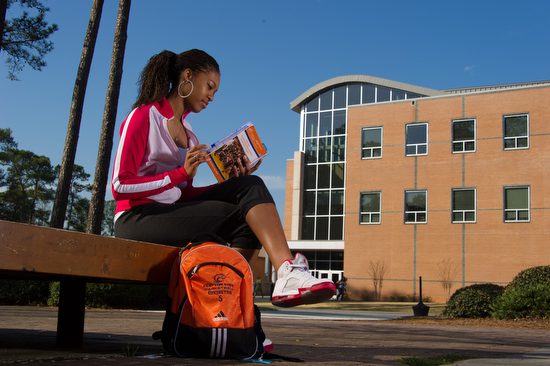
Photos like this one above have many uses for this college. They are showing some of the facilities, the idea of a small campus (not many people in the photos), and other ways how this photo can communicate for the school.

One of the best things any organization can do is to create a stock photo library. These are photos people can use for a variety of uses.

If your organization has specific main themes or initiatives, you need images to help illustrate the concept. “Seeing is believing” is the old saying we all know to be true.

Your company may be in the service industry where you want to emphasize good eye contact with the customers. You would benefit from having not just a few but a variety of photos to use for your website, PowerPoint presentations, and training manuals, and even use these to drop into videos.

This college wants to emphasize they have trees and lakes on their campus. Even tho they are only minutes from downtown Atlanta, this campus offers a piece of nature and relaxation to its students.

Plan your photo stock shoots

Take some time to plan those photo stock shoots, and you will be amazed at how much of a resource this will become for the organization.

Start by making a list of your major initiatives. Maybe your company talks about a particular value-added concept you do that distinguishes you from your competition.

Create a list of things your clients are looking for that you address. For example, high school students looking for colleges look for a few things. See which of these might apply to your organization.

The small ensemble helps to communicate faculty to teacher ratio. It also shows they have the arts at this school, and it shows off the facility.

Things schools typically show.

  • Teacher-student ratio. Most schools will try to have many photos of their faculty teaching one-on-one or in small seminars.
  • Diversity. Most schools not only want to show what they are, but many will also shoot stock photos to recruit for what they want to become.
  • Technology. Schools want to show their state of art labs and classrooms, which communicates to High School students they have an opportunity to work with different techniques.
  • Living Spaces. Students want to know where they will live and play—showing dorm rooms, coffee shops, fitness centers, and more to help entice students to your campus.
  • Community. While many schools do not show the community they are a part of, most schools that want to show all available to a student would like to show things from skyline shots, professional sports teams nearby, the arts, and anything that helps recruit their ideal student.
  • Extracurricular activities. Students want to know about flying clubs, sporting clubs, or anything else that can complement their time in the classroom.
This living space in a women’s dorm is surprising to some folks and looks like a home atmosphere.

Getting ready for the shoot

  • Recruit more models than you think you will need. The best reason to have more models than you need is many will have last-minute reasons they cannot make it. Another good reason is some models you picked may not look all that good in photos. Rather than taking many pictures of students, you will not use them. You not only get images you can use, but more photos you can use.
  • Ask models to bring a change of clothes. Two or more outfits can help you when someone is wearing something inappropriate or so busy or loud that it draws too much attention to the photo. You may also want some solid-colored polo shirts to offer.
  • Ask models to wear solids. Also, avoid red and solid white. The red draws your eye too much, and the white can sometimes be complex for printing later.
  • When planning locations, remember to give time to transition from one place to another. It would be easier to use the same classroom and switch out teachers and students than to move from building to building. Unless there are some particular features in a school, you are showing off, showing a class is about showing the diversity of your students, the engaging faculty, and them enjoying themselves. Plan enough time for a photographer to pack up, move and then reset things like lights, tripods, and light stand.
  • Give time for the situation to work. Give enough time once the photographer starts to shoot for people to get into it. Giving time means the photographer can shoot a while, look at the images and suggest changes (like switching out people) to get you usable photos.
School showing their TV studio facilities.

Your Stock Images are Old

Be very careful to plan stock shoots annually or every other year. Hairstyles and clothing styles will quickly date your photos. If your audience is the same, you will need to update more often. Years ago, colleges updated their materials every other year. They were mainly shooting for recruiting materials.

With today’s internet, you need to have even a larger stock file replenished more often. One organization I work with puts a new photo on its home web page daily. By rotating this daily, the number of people going to the website has increased. They are creating excitement by having people wanting to see what is new.

One photographer has about 175,000 hits daily on his blog, and the draw is a daily photo. Check out Trey Ratcliff’s site, Stuck in Customs. Having lots of images is an excellent reason to have more stock images to help drive people to you.

Product shots 

Don’t forget to have fresh images of your products as well. You will help create a mood and ambiance for your product line with photos.

Use as graphic elements.

When it comes to photos, they can be used as much for their graphics as for their content.

Some of your products can look cool. So be sure and get detailed shots into your library.

Close-up images can add impact to a presentation. But, of course, you can also use them as a background.

Keep it Current

A sound photo library you are constantly updating is one of the best resources for your organization.

These photo shoots will become your way of having visual images to compliment the initiatives and messaging you need to be doing daily for your organization. Call me if you need help. I can not only help in the shooting but help you create an online database for storage and searching.

Nikon D4: Tethering & 11 FPS Tips

Reading Time: 4 minutes

Nikon D4 with 85mm f/1.4

Photoshop is complex

Photoshop got its start with a father and his two sons Glenn, John and Thomas Knoll back in 1988.  Not even the Knolls know all you can do with Photoshop.

It is quite common to go to some of the Adobe Photoshop users conventions and have a speaker show you how they got a result and on the same stage are the developers saying this is knew to them.

Nikon Cameras are complex

About two years ago when the Nikon D3S was just introduced, I was at a basketball game shooting with my new Nikon D3S. Next to me was Bob Rosato, who was a staff photographer for Sports Illustrated, getting a phone call just before the game started.

I could hear Bob saying he didn’t know the answer to the caller. After hanging up, Bob looked at me and said that was Nikon calling asking him what settings he was using for sports.

This has been the case for many years with these new cameras that have complex computers in them. You have so many focusing modes to choose from. You can shoot is S, CL, or CH modes for how many frames the camera will fire when you push the shutter. Then you have which focusing modes you can choose from. Single, 9 group, 21 group, 51 group, Auto and then each of these in combination with the shutter mode gives you different results.

On top of those setting you have back focus settings for tracking your focus.

Who wants to be a millionaire?

Once you buy one of these cameras you will be heavily invested in learning all you can do the type of photography you do. This is important to point out that the cameras will do more than most any pro would ever use them to do. However, you must master it for your niche´.

Very quickly you will want to use a life line like they do on the TV hit show “Who wants to be a millionaire?” Sooner or later most pros will phone a friend to help them out. Even after reading the huge camera manual you will find yourself overlooking a detail.

So this week I get a call from my friend Paul Abell, a sports photographer, who shoots most of the pro teams and college teams in every sport. “Hey Stan, are you having trouble with your Nikon D4 follow focusing?” was the question from Paul.

Paul figured he had some setting in the camera not set correctly, because he knew Nikon would not introduce a camera with focusing issues after Canon had done so just recently.

I had not experienced the issue and told him I would look into it. Next day, I get another phone call from Paul. He had figured out the problem and wanted to tell me.

The answer is on page 112 of the camera manual.

Nikon D4 Camera manual page 112

My camera came from Nikon set on 10fps, but Paul’s came with it set on 11fps. Once he switched to 10fps he was getting great results.

Camera manual stays with the camera

Most pros keep their new camera manual with their camera these days because of the situation Paul ran into. I don’t know anyone who has memorized those huge manuals. My Toyota Sienna, which costs a lot more than my camera has a manual about half the size of the Nikon D4.

Until you have mastered all you need on the camera, keep your manual in the camera bag with you.

Tethering with Nikon D4

I have been tethering my camera to the laptop for studio shoots for many years. One of the main reasons l like to do this is with headshots. I may go to a company and do over 100 headshots in a day.  The department hiring me wants to match each headshot up to a name.

I use the Nikon Camera Control Pro 2 when I tether. It lets me put into the IPTC fields the name of each person before I shoot and then every time I shoot a photo the name of the person is embedded into each photo. I put in the name of each person before I shoot.

When I got my D4 I continued to do the same thing. However, now I had to change something. Earlier I wrote how with the Nikon D4 you can now embed this IPTC in the camera. (Earlier Blog)

I have enjoyed doing this, but now when I tether I must turn this off or the IPTC I use in Nikon Capture Control Pro 2 will not embed.

Nikon does a great job of telling the camera owner about what can and cannot be done, but for those of us who have trouble learning by reading, you need to practice.

Practice before you perform

It is very important to sit with your camera manual and read everything that you need to do what you shoot. Then practice shooting situations that are exactly like you will do for a job.

Paul was practicing in the backyard with his kids running at him to check the follow focus on his Nikon D4. He was having trouble. He sat down with his manual and then walked through all the settings and this is when he say parenthesis around his problem.

I hope by me sharing here about what I and other pros are learning about their Nikon D4 cameras will help you get the most out of your camera. Read your camera manual and then practice shooting changing the settings to see how you can get the most out of your camera in any given situation.

Shooting under fluorescent requires you to slow down

Reading Time: 4 minutes

Shooting under fluorescent lights can give unpredictable results if you do not slow down.

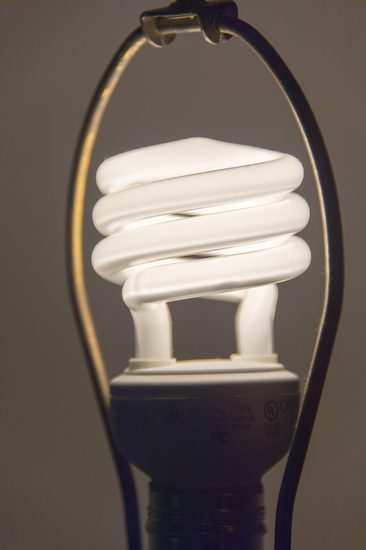
Fluorescent lamps using a magnetic mains frequency ballast do not give out a steady light; instead, they flicker at twice the supply frequency. This results in fluctuations in light output and color temperature, which may pose problems for photography and people who are sensitive to the flicker.

When the fluorescent light is at the end of its life, it can flicker more, and for those with photosensitive epilepsy, it can trigger a seizure.

Today, there are a range of types of fluorescent lights. You may have gone into a Home Depot or Lowe’s and noticed displays showing you different color temperatures of fluorescent lamps.


Color Temperature

Typical incandescent lighting is 2700 K, which is yellowish-white. Halogen lighting is 3000 K.

Fluorescent lamps are manufactured to a chosen color by altering the mixture of phosphors inside the tube. Warm-white fluorescents have a color spectrum of 2700 K and are famous for residential lighting. Neutral-white fluorescents have a color spectrum of 3000 K or 3500 K. Cool-white fluorescents have a color spectrum of 4100 K and are renowned for office lighting. Daylight fluorescents have a color spectrum of 5000 K to 6500 K, bluish-white.

On my Nikon D4, in the menu for White Balance, you can choose up to seven different presets for fluorescent. I have found a significant problem trying this method; it isn’t easy to pick the right color because the monitor on the back of the camera isn’t that easy to see color in all situations.

Flicker problem

Incandescent lights burn constantly, so your color temperature is consistent, regardless of your shutter speed. However, since fluorescent tubes act as light a flash and flickering, you will get an effect different than with flash where above your sync speed part of the frame is dark.

Look at these two different photos and see the color difference.

Everything is set the same (Nikon D4, ISO 12,800, f/5.6, 1/500) in each photo, but you can see the color difference is due to the flickering of the fluorescent.

Now, besides a color shift on the whole picture, you may end up with a band across the photo. I find this more annoying since it isn’t as easy to fix in post-production. Has this happened a few times, and you are screaming at that computer and camera?

Slow Down

You can get consistent color under fluorescent if you shoot at 1/100 or slower shutter speed.

Anytime you are under Fluorescent, Sodium-Vapor, or High Temp Mercury-Vapor, be sure to shoot slower than 1/100. You may need to shoot at 1/60 with some older model lights.

Why Strobes Are Used

Sometimes, shooting at 1/100th of a second isn’t going to cut it. A great example of this is shooting sports inside under those Sodium-Vapor lights in most arenas. This is why many pro photographers are using strobes for shooting sports. They need a consistent color without streaks or bands of color shift in the photograph.

If not for this flickering problem with these lights, it would be much more practical not to use strobes with today’s high ISO cameras.

Custom White Balance

The best solution I have found shooting under these lights that flicker like fluorescent is to do a custom white balance.

My favorite way to get a custom white balance is using my ExpoDisc.


ExposDisc goes in front of the lens, and then you use it to get an incident reading rather than a reflective reading of the light.
Notice the direction of the light hitting the subject. You move to the same position to get the light reading below.
Point the camera toward the direction of the light falling on the subject.

If the subject is facing me and the light is from the side, I face the camera with the ExpoDisc on it so it is pointing toward the camera position. The chart above is to help you understand the concept, but you can modify it.

Now, do a custom white balance if you are shooting in an arena with Sodium-Vapor lights. However, do the custom setting at a shutter speed lower than 1/100. You can then raise your shutter speed to higher than that for shooting, but this will give you more consistent color over your images. Even doing this will cause problems with about 5 – 10% of the photos.

Now you know to slow down your shutter speed when shooting under this light source.

How much you can make as a photographer

Reading Time: 3 minutes

My stepson looked at his first paycheck and asked, “Who is FICA?” This was his first hard lesson about where the money goes – the cost of doing business.

Much of the money we pay for a service doesn’t stay with the service provider.

According to Dun & Bradstreet, “Businesses with fewer than 20 employees have only a 37% chance of surviving four years (of business) and only a 9% chance of surviving ten years.” Of these failed businesses, only 10% close involuntarily due to bankruptcy. The remaining 90% close because the business was unsuccessful, did not provide the level of income desired, or was too much work for their efforts.”

So many good photographers have to turn to other ways to make a living, not due to a lack of photographic skills but because of poor business practices.

Two things caused their businesses to fail:

  1. They didn’t know the actual cost of doing business and
  2. They failed to promote themselves.

In 2001, I left a staff position and started full-time freelancing. Over the past 11 years, my business has averaged a 20% annual growth rate. Many of my colleagues ask me how I do it.

I often speak to photographers about business practices, many of whom are college students. When I teach workshops on the business of photography, we conduct practical exercises to help participants.

First, I require students to calculate the cost of living for a year. I’ve found that even the older students who have been on their own for a time typically do not know what it costs them to live.

Regardless of profession, if you do not know your cost, you cannot estimate your value in the marketplace.

Once you’ve known your cost and decided how much net income you want to earn, it is easy to determine what to charge for each project to reach that goal.

Take a moment and think of everything needed to do your job. Here are some categories from the National Press Photographers’ Association list I use. Just substitute your terms for similar types to figure out your annual cost of doing business.

  • Office or Studio
  • Phone
  • Photo Equipment
  • Repairs
  • Computers (Hardware & Software)
  • Internet (Broadband, Website & email)
  • Auto Expenses (Lease, Insurance & Maintenance)
  • Office Supplies
  • Photography Supplies
  • Postage
  • Professional Development
  • Advertising and Promotion
  • Subscriptions & dues
  • Business Insurance
  • Health Insurance
  • Legal & Accounting Services
  • Taxes & Licenses
  • Office Assistant
  • Utilities
  • Retirement Fund
  • Travel
  • Entertainment (meals with clients)

Add your desired net income to your annual business expenses, and divide that total by the number of projects you reasonably expect to do in a year. The answer gives you the average per project you must charge clients to pay those bills, stay in business, and live the way you want.

Dueling Pianos is OK when it is an act, but not when you are competing for a solo show.

Now you must determine whether the marketplace will sustain this charge.

On average, you need to charge $1,000 per project to reach your goal. If the services you provide are available elsewhere, people will shop for price. If the going rate in your community is $1,200, you are in good shape. If the going rate is $900, you need to cut your overhead—you’re hoping for income, business expenses, or both.

The key to earning what you want comes down to service. You must be able to demonstrate to potential clients that you offer something more if you want/need to charge more than other photographers do.

I have found that I need to know about the subjects I cover more than other photographers do. In addition, I deliver my images much faster than most others. I also listen carefully to what clients say they want and try to meet their needs and go beyond their expectations.

It was a revelation when I first determined my cost and income goals, just as my stepson’s response to FICA and other deductions from his pay was for him.

I do my best to keep my overhead low, but even close to 50% of my gross goes to business expenses. It was shocking to see what I must charge to pay the bills. This knowledge was the fire I needed to put in the time and effort to identify ways to increase my value to clients and to attract those clients by seriously marketing myself.

Do you know what you cost?