Nikon D4 Video Settings

Reading Time: 3 minutes

This is based on my experience, and others may have other suggestions that might contradict my comments.

I recommend a few settings when shooting a video on your Nikon D4. When this becomes critical, you decide to shoot multiple cameras and need everything to match when you get into post-production.

I think editing RAW images in Adobe Lightroom and getting ideas to match from different cameras is much easier and more accurate than using the video editing software of Adobe Premiere or Final Cut Pro X.

Before you go to the Movie settings on the camera, I recommend creating a menu bank for Video, as I have done here. This way, once you have made all the settings, they are saved.

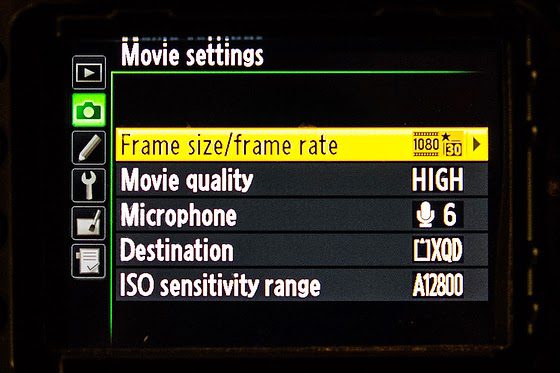
In the movie Settings, choose your Frame Size/Frame Rate. The standard Frame Rate for movie theaters and TV is 24 fps.

When you pan or right to left, you will see Frame Rate affect the look and feel of the image. The public is so used to 24 fps that this is the best default. Some use 30 fps.

People often shoot higher Frame rates to make a slow motion by slowing it down to 24 fps.

Your shutter speed on the camera should be set to twice the Frame Rate for the movie settings. If you shoot 24 frames, you will be at 1/60 since this is the closest. If you hit 60 fps, then 1/125 should be your setting.

I usually shoot on 1080/30fps and set it for high quality.

Most of the time, the microphone setting must be set manually, and the sound levels must be used to adjust the recording volume. I highly recommend using headphones and looking at the audio meter on the viewfinder. Be careful because the recording level and the headphone volumes are set separately.

I have my color space set on Adobe RGB. You also want to set the Picture Control, then.

Some of this is personal preference, but the key is if using more than one camera, all the settings are set the same, or you will have trouble matching the Video, and color can look off switching between the cameras.

You can adjust your microphone levels and exposure when you go to Live View in movie mode. To prevent light entering via the viewfinder from interfering with exposure, close the viewfinder eyepiece shutter.

It would help if you went to manual mode to have the most control over the settings. A subject’s movement can change the exposure even when the light stays the same. Use manual mode.

As you can see from this chart, you can control more in manual mode.

Regarding focus, I use autofocus when I have a subject framed and then go to the manual guide.

The motor for the lens tends to make a noise I don’t want to pick up.

Microphone

I recommend using a Lavalier microphone for interviews, and for natural sound and quick-moving situations, I recommend a shotgun microphone.

Here is an earlier blog post I did to help you with the audio recording.

How good are you? Ask those you impact.

Reading Time: < 1 minute
 
Nikon D4, 14-24mm, ISO 1600, ƒ/9, 1/100

While in Honduras, we interviewed some of the dignitaries to put later into a larger video package.

Nikon D4, 14-24mm, ISO 400, ƒ/6.3, 1/25—Off-camera fill-flash using the Nikon SB-900 & SB800. The flash is on the Pocketwizard TT5 and triggered by the Mini TT1 on the camera with the AC3 to control the flash’s output.

Suppose HOI, the organization I was working with, went on camera and said that the community loves its work. In that case, it doesn’t have the exact authenticity that interviewing the local mayor would add to the package.

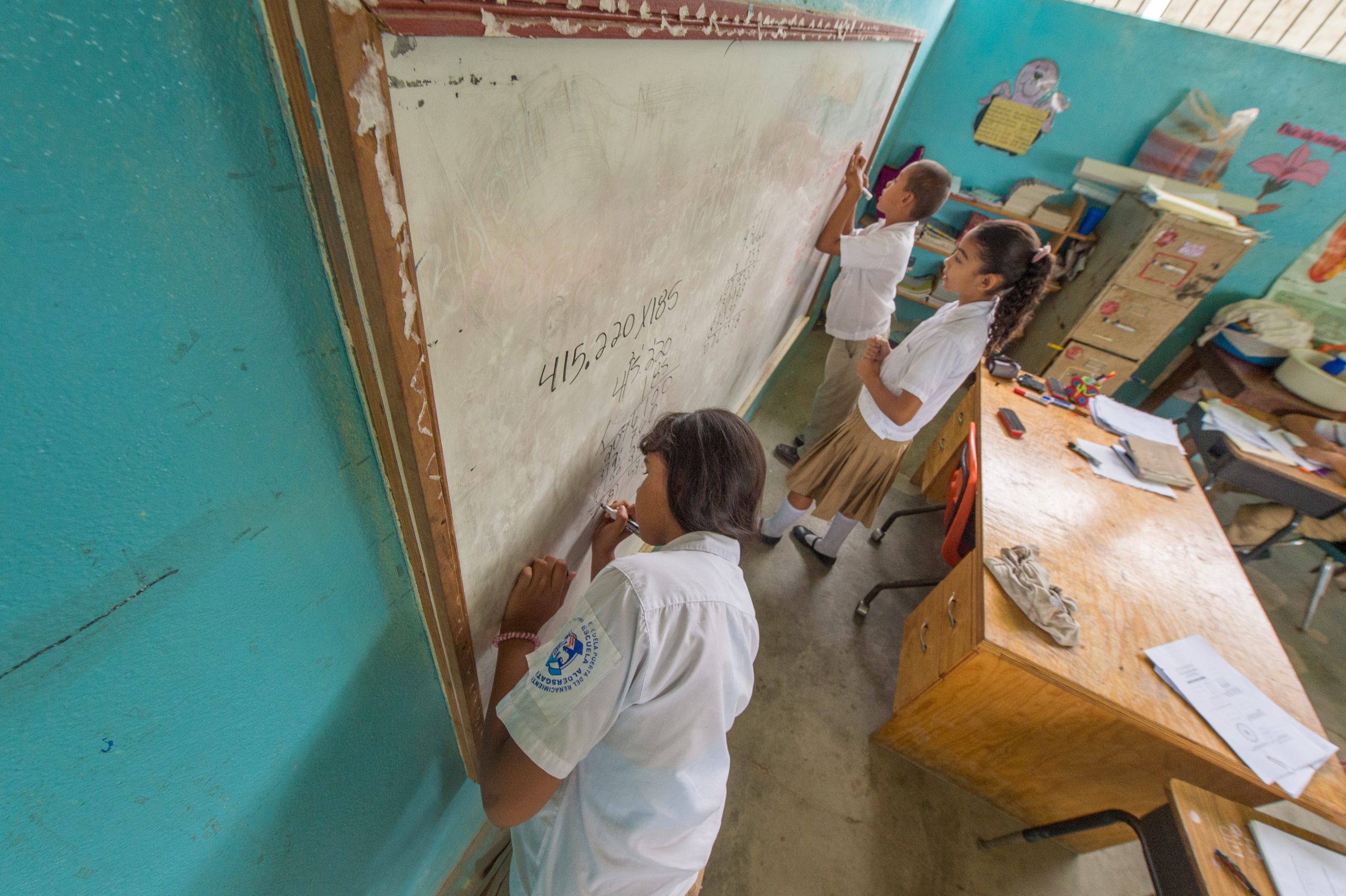
So, I interviewed the mayor at the grand opening of the new school that HOI helped to build. Listen to his interview here.

[youtube https://www.youtube.com/watch?v=fohG5M-xxlk]
The key to documentary work is letting each person speak for themselves as much as possible.

Nikon D4, 28-300mm, ISO 12800, ƒ/5.6, 1/160

#1 Complaint in Multimedia/Motion Packages

Reading Time: 5 minutes
 

Context

Every time I sit down and start editing a package, I come up short with B-Roll. B-Roll is the supplemental or alternative footage intercut with the main shot in an interview or documentary. So, for example, when Larry King interviews Bill Clinton, and the footage appears of Clinton playing the saxophone on Arsenio Hall in 1992, that is a b-roll.

B-Roll goes back to the film days of labeling the 16mm film when editing. Around the 1980s, many editors would mark the decks in the edit suite when the Video was on tapes. For example, the A-Deck would contain the primary interview, and the B-Deck would often include the footage that the editor would use to compliment the interview.

All this is to say the term B-Roll isn’t new.

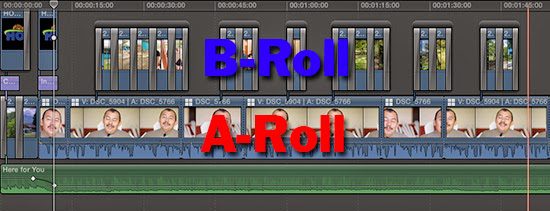
Today with our digital editing like Final Cut Pro X, I like to think of A-Roll as the main track on the timeline. Below it might be some voice-over or background music. Above the A-Roll is the B-Roll which can be still images or motion footage that I use to compliment the interview.

Remember that A-Roll is the interview, and B-Roll is the images you use to compliment the interview.

General Editing Guidelines

Here are some guides I use when editing my motion package:

  • Titles 4 seconds [enough time to read them]
  • Still Images 3 – 10 seconds
  • Motion Interview 5 – 10 seconds
Keeping the Titles short and simple is critical. If it takes longer to read the title slide than 4 seconds, consider changing it.
 
 
I like to use the Ken Burns effect, a type of panning and zooming effect used in video production from still imagery. For example, in the photo above, you can see the start and end of a pan/zoom that I implemented.
 
I try and keep images up between 3 – 10 seconds. The only time I am really using 10 seconds is when I must pan across a photo that looks choppy if I speed it up. So the time is also keeping the movement smooth.
 
The advantage of most of my motion [Video] is that it has moved in the frame. So this can be much longer if there is a decent amount of movement in the shot.
 
 
I try to use two cameras when I am interviewing someone. There are a few reasons I do this. First, having a second angle helps keep the visual from becoming too stale. Second, I can switch between the two angles.
 
In Final Cut Pro X, I combine the two camera angles into a Multicam clip. Now I can choose which Video or audio I want to select. The two cameras sync off of the audio files on each camera.
 
 
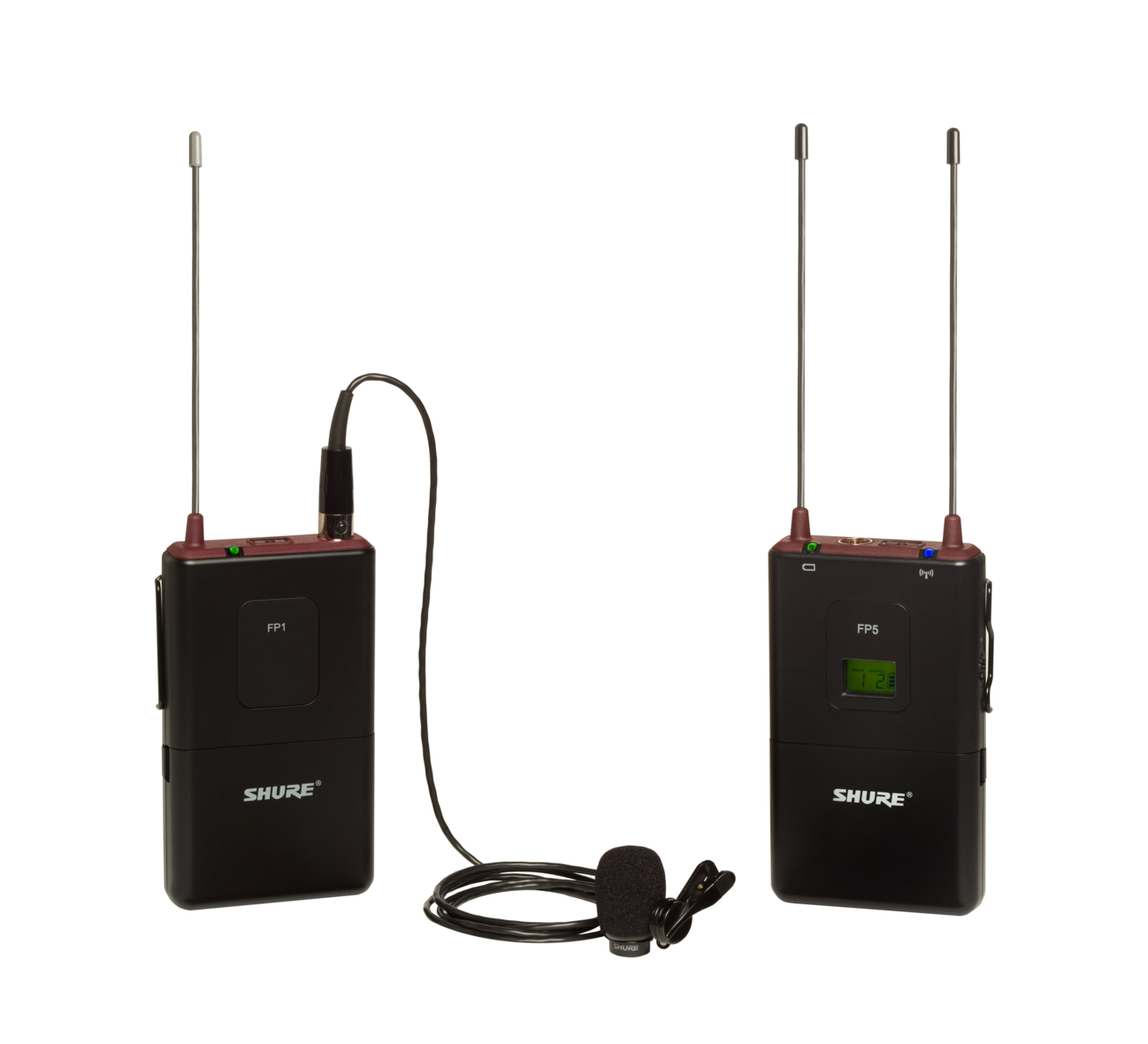
I used two types of microphones for the interview. First, I use the wireless lavalier Shure FP1 microphone on one camera with the WL183 (Omnidirectional).


On the second camera, I use the shotgun Røde Video Pro microphone. I can later choose one or blend the sound if I choose.

The best sound would be a third choice of using a sound guy with a shotgun above the person pointed slightly down 45º at their face in front of the subject.

Since I work alone, I use the second best, the lavalier. Sometimes I blend the lavalier and the shotgun, but most of the time, I prefer the sound from the lavalier for the human voice.

 
The Crisis
 
If you try not to bore the audience with the same long visual, you need B-Roll. Unfortunately, I have never been sitting at my computer using Final Cut Pro X or Adobe Premiere and have not been kicking myself for not shooting enough B-Roll.
 
The problem is not just the volume of B-Roll but the VARIETY of it.
 
When you do your interview can impact the quality of your B-Roll. If you start with the interview and the person talks about what is getting ready to happen and then a lot of what they talked about doesn’t happen, then you have little opportunity to get that B-Roll.
 
After experiencing this a few times, I started trying to interview at the end of my time shooting and asked the subject to summarize what we had seen that day. Now the B-Roll worked more often than before.
 
However, in the last scenario, I still found that subjects would mention things I would want to shoot, specifically B-Roll.
 
Tips:
  • Try and keep your interview around the present unless you have a lot of B-Roll about the past.
  • Have a rough outline of your story before you shoot
    • to create a list of B-Rolls shots based on what you think you may need
  • Shoot the subject’s environment
    • If they have family photos on the walls or tables, get B-Roll. I suggest stills and motion.
    • Photograph the home or office from the outside and inside
  • Shoot for sound
    • If you hear birds in the background during the interview, get some photos of them to drop in to help the audience.
    • If people are coming in and out of a screen door on a porch, get some motion of someone coming in and out and use it to help the audience with that sound.
  • Intro and endings
    • Shoot some scene setters to start your package, end it or use them as bumps between interviews
  • Shoot textures
    • Textures make great title slides or backgrounds under the lower third titles to help the text be readable.
  • Shoot transitions
    • Moving the story along often means the subject will talk about childhood and when they went to college, for example. This part of the interview might be a great place for showing your subject: getting in their car; getting out; going through a door; walking in a hallway; walking to you, or walking away
    • Watch TV shows to see how they transition from one scene to another, and this can give you more ideas.
  • Play the interview right after you do it, listen for all the visual cues you can think of, and write them down. Then go and shoot them.
  • Ask the subject for old photos and get copies of them or shoot a copy of them.
I find that for most of my projects where I have an interview that 90% of the work goes into the B-Roll and not the interview.

Storytelling best in the voice of the subject

Reading Time: < 1 minute

 
Nikon D4, 14-24mm, ISO 100, ƒ/8, 1/125

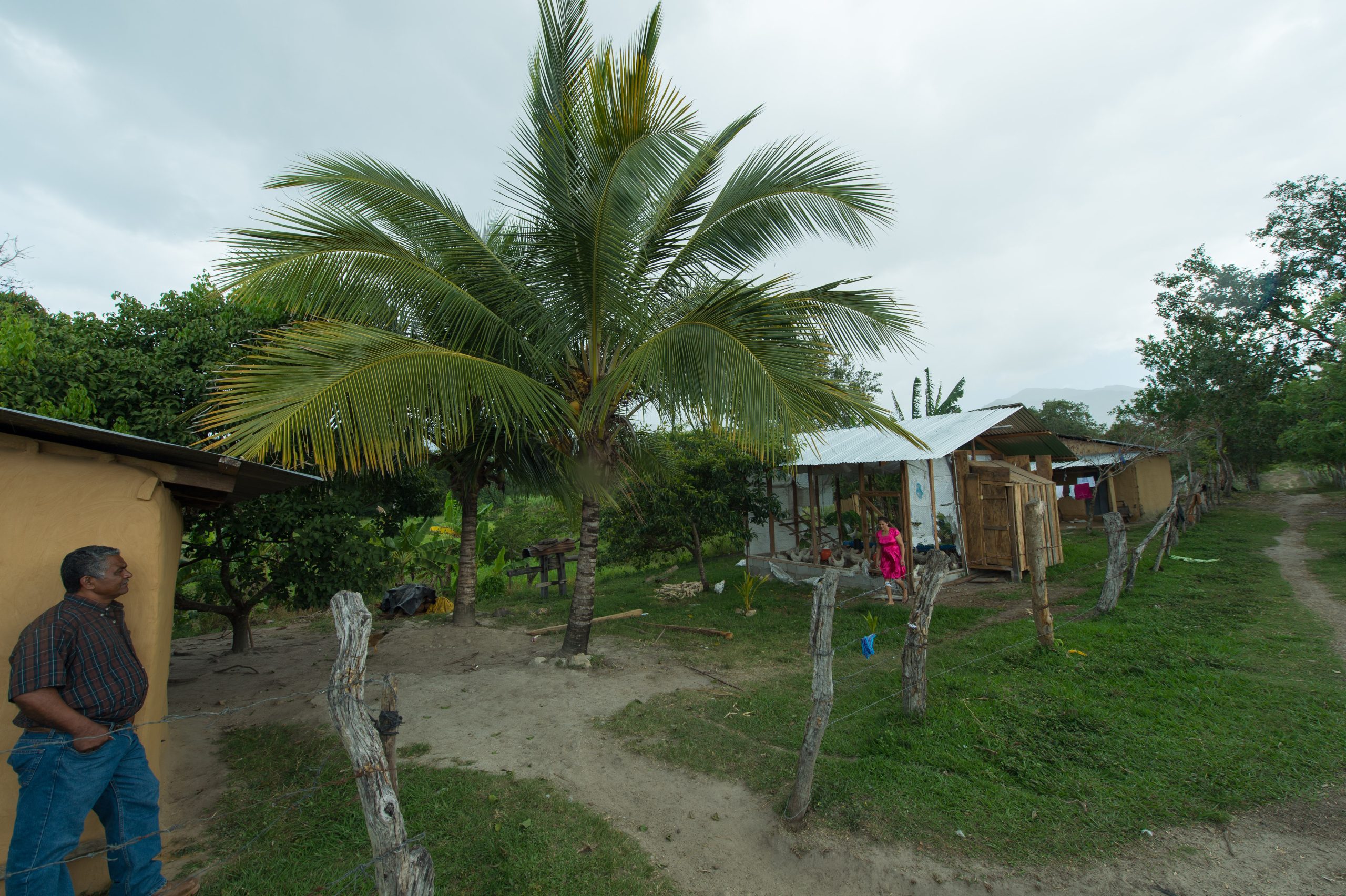
After arriving in the Agalta Valley in Honduras, my first location was at this community chicken coop.

The community, with some guidance, formed its community development committee. They assessed all their resources and the needs of the community. They came up with the idea of a chicken coop.

Nikon D4, 28-300mm, ISO 3200, ƒ/5.6, 1/250

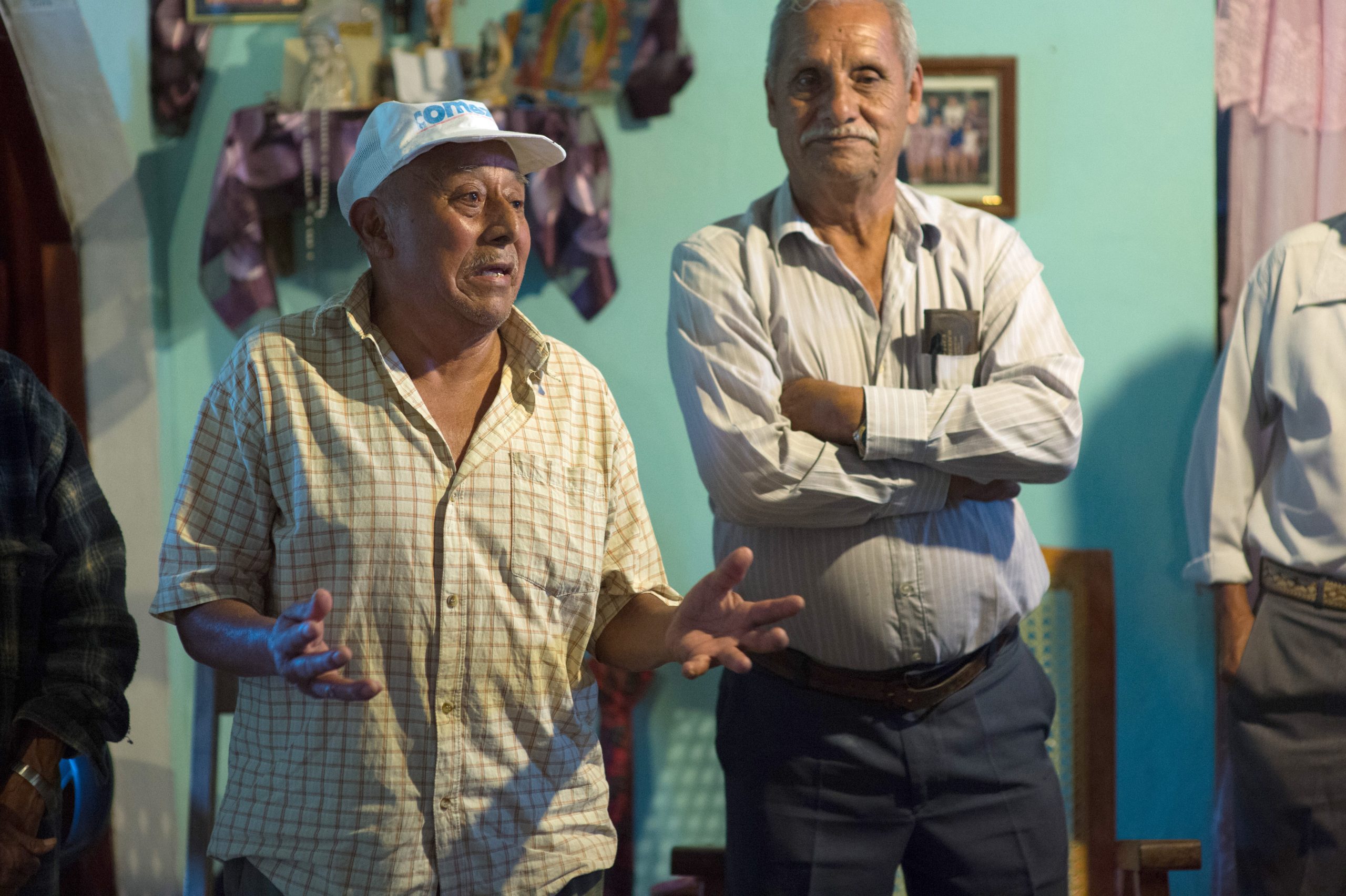
I interviewed the president of community development. He is also one of the four families running the chicken coop.

Please pardon the voice-over by me.

I believe that the subject’s voice is one of the most powerful tools available to the storyteller. Are you letting your subject speak for themselves? Do you think the audio captures more of the story than the text?

The Human Voice: Storytelling

Reading Time: < 1 minute
Nikon D4, 14-24mm, ISO 100, ƒ/6.3, 1/320

Here is a photo of Jose Mondragon, Director, Rancho el Paraiso in Honduras, talking with Laurie Willing, the Executive Director of HOI in Tucker, GA.

No matter how well I capture their conversation, the most potent part of the storytelling is the human voice.

Listen to Jose in this package talk about the work of HOI in the Agalta Valley in Honduras.

If you want to learn more about HOI, go to their website [http://hoi.org/] and see how you can get involved.

#1 mistake made with multimedia/video

Reading Time: 3 minutes


Our teaching team for our International Missions Photography Workshop in Lisbon, Portugal, started prioritizing the subjects we teach. Poor sound is the number one technical mistake we see most often in multimedia projects.

Your audience will tolerate poor-quality images more than poor audio in a multimedia presentation.

Before teaching people how to make better audio for their projects, you must ensure they have a good microphone.

Simple Solution

For the best recording, it would help if you got the microphone as close as possible to the source. Recording with a DSLR or a video camera’s built-in microphone requires you to be on top of someone to get a sound recording of them during an interview.

Clipping a Lavalier microphone on their clothing as close to their mouth as possible will give you the best, consistent results. The best way to go is to have a wireless system, so you don’t have cables all over and don’t need to pack many extension cables.

Today’s software makes it easy to sync an audio recording with a video recording in post-production. Be sure to clap when all the recording devices are rolling, and then you can quickly line up the spikes in the software. I would even go so far as to say clapping two or three times will make it even easier.

Align the two tracks using the spikes.

So, what do you record with? My number one recommendation is based on the assumption that most of those taking our workshop will have a smartphone. The second assumption is that there is no need to spend much money on recording gear; instead, buy those things that will complement what you already have in your bag.

You can buy the RØDE smartLav microphone, designed to work with a smartphone. If you look at the link, you will notice the 1/8 plug has four connections rather than the typical 2 or 3 connections. This design makes the microphone work with your smartphone.

You can use the microphone with any recording app on your phone, including the RØDE Rec App for iPhone users. There are many apps for Android and iPhone users to choose from. You want to use a recorder that controls the gain setting and avoids the Auto Gain setting.

Practice, Practice, Practice

After buying the gear, you need to test it repeatedly. You need to practice recording with your video and audio. It would help if you got used to starting and stopping the sound and camera together. It would help if you always practiced having claps.

The clapboard has been the standard for movies. You show this in the video so that you can match the sound spike of the clap to the visual. But, of course, clapping your hands together in the camera’s frame will also work.

Practice putting those clips together in the software. Next, practice getting the sound file from your smartphone to your computer. Finally, you can email it or use Evernote or Dropbox to transfer the file.

Put those files in software like iMovie, Final Cut Pro X, or Adobe Premiere and practice lining up the two files. You may discover that the auto-sync will not always work because the sound is so faint on the camera compared to your smartphone recording.

Practice any recording scenario that you might want to use. For example, you may want to do interviews where people are sitting still or walking toward you. Always practice before you do this on the job when you must have the sound for the project.

Storytelling using multimedia to tell the story

Reading Time: < 1 minute

How many times have you been called to talk to a group, and you have either said or wanted to say, “You just had to be there to know what I am talking about?”

When I traveled to see the coffee growers in Salvador Urbina in the southernmost part of Mexico in Chiapas, I was there to help tell their story.

Here is one of the latest packages I just had translated into English from Spanish. The video is David Velázquez, the current president of the cooperative Just Coffee. Please go there and buy their coffee. For those who are coffee enthusiasts, it is premium arabica coffee.

[youtube https://www.youtube.com/watch?v=TAUNXl1IBUQ]
I decided to use primarily still photos for the b-roll for a reason. I think those moments allow you to pause and listen to David simultaneously.

The human voice is the most powerful audio I know for video, especially when you can hear it in their voice. Here the voice-over talent Craig Carden did a great job capturing the mood of David Velázquez.

I am blending Video, Audio, and Still, images which I think together is a better package than any of these alone would be by themselves.

I let David tell his story, and then I went through the shooting days and picked as many images as possible that related to what he was talking about.

I hope you enjoyed it. Then, call me if you want to take a class from me on how to do storytelling using multimedia.

Learning Curves and Personal Projects

Reading Time: 5 minutes

Learning Curves

A few things impact our success as photographers and creatives in general. First, no matter the subject, two things affect our understanding of that subject. First is our book knowledge of the subject, and the second is our experience with the subject matter.

One thing is to understand the inverse square law, and another is to put it into practice. Even seeing a picture of the Inverse Square Law will not make it usable knowledge without some training.

In Malcolm Gladwell’s book Outliers, he addresses this concept of experience. He talks about how the Beatles were playing twice as long sets in nightclubs as most in the industry. He then points out this is how they were able to crunch their 10,000 hours of experience which usually takes about ten years to accomplish, playing 3 hours a day for the average work week, and cut that time in half by playing 6 hours a night at clubs.

There are a few places in my career where I was able to crunch some knowledge. For example, when I ran one-hour labs for a few years, I was processing and printing around 40 to 80 rolls of film each day. As a result, I became pretty good at looking at a negative and knowing when something looked magenta, it would print green, and when something looked cyan, it would turn out red. So the years of printing color negatives helped me understand my colors.

Now, if I had stayed in my first job at a newspaper where I shot 8 to 10 rolls of film a day, it would have taken me 5 to 10 times longer to learn what I did while processing film at a one-hour lab.

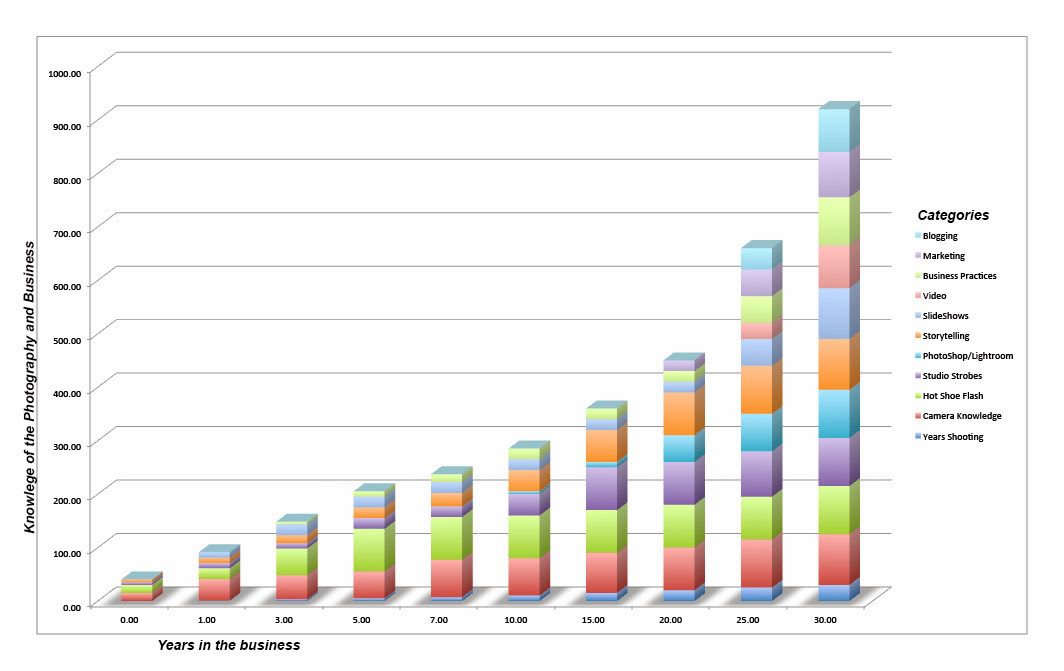
If you look at that top chart, you will see that I knew almost nothing about photography in my first year. While I started to grow, it wasn’t even in all business areas. Each room had its learning curve.

As assignments and responsibilities came my way, those learning curves were growing in new areas. Working at a newspaper, photo studio, photo lab, magazine, college public relations department, and now as an independent photographer, all were very different from each other and had their learning curves.

I believe the more learning curves you have in your life, the more success you will have. When you stop learning, you stop growing. When you stop learning is when you start to die.

Personal Projects

While you learn because you get new responsibilities, you don’t get these responsibilities given to you without a good reason. People hire you to do what they know you can do, not because of what they don’t know you can do. The best way to get a job shooting jobs overseas is to shoot one to show them.

People hire me to shoot projects that are dear to their hearts or at least unique to their paychecks. But, they need someone to help them be successful and do their job better.

There are two reasons people hire me. First, they know what they need, and I fit the bill. They need a headshot and see if I can do what they need and hire me. The second reason I get hired is people see what I am doing and want it.

Needs vs. Wants

I believe needs-based hires are based on what they have seen work for themselves or others and know that this will give them the desired result. Steve Jobs is one of the best to come along in years and created a want for many people. The introduction of the iPhone was a smartphone that made it cool to do certain functions we do every day. Later, when he introduced the iPad, it was introduced to solve problems I didn’t even know I had until I saw how it worked.

For the most part, most Apple products are much more expensive than their competition. How can they do this? They continue to deliver. Many competitors with lower prices don’t provide the quality experience that Apple has consistently. The quality experience is why now when Apple introduces a new product, there is a line at their stores to buy what no one has used before. They know, based on experience this is worth the risk, and the rewards are sure to come.

The best way for creatives to duplicate what Steve Jobs did with Apple products is to create something where you are speaking as passionately about it as Steve did when he introduced a new product. For example, just listen to his presentation on the iPad launch here on YouTube.

[youtube https://www.youtube.com/watch?v=Ndnmtz8-S5I]
The key is to find your passion. What gives you the most joy and happiness? What disturbs you the most and makes you so mad you want to do something about it? Whatever you pick must be emotionally essential, or you will not be able to stay on that subject long enough to capture another person’s interest.

Social Justice is a topic that motivates my heart more than just about anything. I wouldn’t say mistreating or unjustly Is what I like. I want to tell their story. My packages help to communicate total despair or victory.

Many nonprofits are trying to help people just like me. They see my passion for a topic and now want me to help them tell their story and hopefully move their audience as much as I moved them.

One of my passions is immigration. Migrants, for the most part, just follow where the work is, and having work available where they live was my concern. So providing multimedia and still photography coverage for the Just Coffee group based in Agua Prieta, Mexico, was a good fit for my passion.

As corporations and nonprofits saw my coverage, more and more of them wanted similar coverage. I created a want. They were not seeing this type of storytelling coverage to help brand a company.

I was using emotion-packed photos and emotion in the voices of the videos to help communicate despair and triumph.

I think my project graph would look like the above. While I am doing more personal projects than before, I am now seeing a direct correlation between showing what I am passionate about and job growth in the number of clients and projects I am doing today.

When your projects are a way of giving back to your community, as mine has, you also benefit. For example, the movie Pay It Forward helped to start a movement. At first, many thought it was just a fad. Years later, we are seeing people pay it forward in the drive-thru lines, and this string of gestures often goes all day long.

We see TV ads today showing that paying it forward and being contagious.

Why not do a personal project that has the potential to pay it forward in many ways? If you do, then others will want to work with you. They want what you got, which is a heart for others.

Summary: Find your passion and create a package that shows what you can do when you do something to your best ability. Share this with everyone you can. Significant learning curves may be associated with your project as you discover that doing what you need to do to show your passion in the best possible way may require some new skills. The good thing is because you are so passionate about the topic, your ability to learn these further skills increases. After all, your desire is much stronger than when it is just a job. If your project pays it forward, you may even start something that goes viral.