Why I photographed them this way (Part 3)

Reading Time: 3 minutes


Flash Outside

I love to use two different Flash systems outside.

1) I use the Nikon SB900 with SU800 on my Nikon DSLR or on my Nikon P7000. I also use the Radio Popper PX system to be sure the signal consistently fires outside.

2) I fire the Alienbees 1600 with a Vagabond Mini Lithium battery and the CyberSync system.

The first photo was taken with the SB900 to shoot the images. I could quickly shoot the picture, fill-flash with the hot shoe flash, and move around. The flash had to be very close to the people outside to be useful.

Walk and Talk photo I like to use. [NIKON D3, 24.0-120.0 mm f/3.5-5.6, Mode = Manual, ISO 200, 1/250, ƒ/11, (35mm = 100)]

Walk-and-Talk

The following two photos use a technique I learned from Jeff Smith, a corporate photographer, years ago. I was shooting film back then, and this is easier to do with today’s flashes.

I like having the subjects walk side by side, talking to each other. Sometimes, as in the first photo, they walk straight at me, and other times, like in the last photo, they follow the path of a sidewalk, for example.

I have an assistant carrying either the Nikon Speedlite system or my Alienbees system.   The advantage of the Alienbees is that I can have the assistant further away and still have the power of this flash fill in easily. Ultimately, the Alienbees are firing at 1/16 or 1/8 power.

The assistant walks off to the side, usually lighting them at a 45-degree angle to the camera. Eye walk just outside the picture frame and keep an even pace with them as they walk. For this technique, you need to hire an assistant who can walk and chew gum simultaneously.

My portable system for Walk-and-Talk. AlienBees 1600, Vagabond Mini, CyberSync radio remote control
CyberSync Radio Remote Control
Vagabond Mini

I like the Walk-and-Talk technique because it gives the subjects something to do. This not only helps me focus on them, but after a couple of times, they tend to relax, and I get great expressions.

Tip

If you use this Walk-and-Talk technique, I recommend that you tell them to walk close enough to each other that they feel each other occasionally touching. In addition, I recommend that one person talk and the other listen. Last, I ask them to look into each other’s eyes or at each other’s faces. People tend to look at the ground or somewhere else. I want them to look interested in each other.

Why I photographed them this way (Part 2)

Reading Time: 2 minutes

This first photo may not make much sense on its own. Taking the picture this way requires a lot of light. However, when I was asked to help my son with all his friends on prom night, I had to take a lot of couple shots and group shots in a short time.

If you look at the lighting diagram, you will notice that I have placed lights behind the people and up the stairs behind them. This allows me to shoot without having to drag the shutter for too long to capture the background. It also helped me by having a shadow that didn’t receive any light, which meant that the dynamic range was, in some ways, compressed.


I hope you are seeing that I didn’t move. What I did do is use the Nikon 24-120mm lens so I could stay put and zoom in and out to accommodate the size of each grouping.

If I were to step forward, I might cast a shadow into the photo.  By standing back, you avoid the problem of the photographer casting a shadow on the subject.


Nikon D3S, 14-24mm, ISO 200 f/9 1/60


This last photo helps you understand one more reason I set the lights one way and left them as they were.  I placed the lights on light stands and positioned them as high as possible. I then added sandbags to the bottom of the stands.

This helped ensure the light would drop off behind people and prevent any shadows from falling on those in the back rows.  Additionally, by having steps to follow, I could arrange everyone in the photo and capture their faces.

Summary

Often, what determines how you photograph groups is the time you have with the group and the number of different groups you have in that time frame.  I have learned to set up for the largest group and then place the smaller groups in the same space, getting closer with the camera.

Why I photographed them this way

Reading Time: 4 minutes

Why did you light it that way, and why did you compose it a certain way? I am often asked these questions and ask myself them as I work.

I was asked to photograph the two lady researchers’ microorganism research in the photo of them. When I get to these labs, they do not usually have the equipment set up. I first have a conversation and then listen for visual cues to help tell their story.

The computer screen is a photograph taken through a microscope of the laser passing through and making some measurements.  They wouldn’t have this in the room set up like this for their research, so  I asked to put it there so you could quickly read what they are working on. I also wanted to show the laser, so I made it appear in the photo.

I chose blue to set the tone for the research, but I also realized it would complement the laser’s red color.

Do you think the photo reads quickly yet simultaneously makes you stop to look at it?


Jack Wood, a researcher for GTRI, was part of the team that integrated the wearable captioning device. The National Institute on Disability and Rehabilitation Research is the project’s principal sponsor. This device assists those with hearing disabilities with captioning in public venues.

This research is about a cyborg.  This is where the human and machine are intertwined with each other. The wearable computer’s small screen is at the eye, where the subject can use the information to do something. Here, the information is to help the subject navigate around a city with information.

When I showed up, I asked to see the information on the screen. I then asked if the information could be seen on another monitor, and the researcher pulled out their small monitor. I tried to bring everything closer to help communicate what the researcher saw in their heads-up display.

How did I do with this one?


Chris Thompson and his colleagues at the Georgia Tech Research Institute have developed a prototype electronic performance support system that combines job performance support software, wireless communication, and a hands-free wearable computer.

This photo was taken a couple of years before the one above. One thing I noticed is that wearable devices are getting smaller.

In this photo, I was able to show the operator using the device to help repair a circuit board, with the schematic visible in the viewfinder.

If I could redo this photo, I would have used a small monitor to show what was in the viewfinder. Do you think it works this way, or would you prefer to see the contents on a screen in the photo?

Over time, I have discovered that each new technology builds upon earlier research. I can see the evolution, which often helps me understand some of the nuances of the advances in research.

While the story in each situation was about what is on the screens and how wearable technology is being embraced in more industries, the photo helps communicate another aspect over time—the size changes and maybe even how they develop more style with each new device improvement.


Using virtual reality to help cure the fear of flying

Sometimes, many of the research projects I get to photograph work better as a video. However, your significant newspapers and magazines’ primary audience is often the printed page. You still need to capture as much of the story as possible in a single image and in a way that engages the viewer.

Combining elements into one image helps tell the story much better. Here, the virtual headgear display with the computer screen in the background helps communicate a little about what is happening for the subject. What would you suggest to make this more successful?


Beth Judson, Ph.D. Student Utilizes Rapid Prototyping Technique to Fill Her Mold with Aluminum Oxide Powder for Ceramics Project

Does it get your attention? That is the first point of all reasonable photography—it has to stop the reader. I used separate light and gel on the mold to draw your attention. The grid light on the subject also catches the front of the mold.

The researcher is trying to help make more accurate parts through injection molds. Depending on the materials, a mold may have to be adjusted to compensate for how the part shrinks or grows bigger while being made. These parts are often removed, put into a kiln, and heated to very high temperatures. This is done with ceramics, which are significantly used in our products.

How did I do with this photo?

Value Established – Not Added

Reading Time: 4 minutes

Clients must feel they are getting value for their money, or you won’t get the job. You won’t stay in business unless you get the job.

What values are clients considering? Most of the time, clients are not necessarily looking for the best photographer; instead, they are looking for photographers who pass a good enough quality bar, whatever that is for them.

This means you might be the best-quality shooter, but considering everything, they can live with a level just below you.

Most clients who hire you will likely need to justify their hire to someone above them or consider other things to make them feel good about their choice.

Your branding through all your materials can help set you apart. If you have a clean logo and design in all your materials, this packaging of your photos will give you an X in your column if another photographer lacks this.

If they can remember you easily, it is most likely because you have defined your niche. He/she is the photographer who does X, and thus, this will go into your column again.

Clients often direct others on their team or their superiors to the photographer’s website. If your website is something they would want to see, you can get an X. Your website needs to have a clean design that is easy to navigate and on which to see your work.

Today, having a blog is a way to help show your expertise in your line of work, where a website alone is more of an online portfolio. It is also something they may come to more regularly to see what you are doing, and sometimes, the posts will help strike a chord with them. Put an X in your column if you have a blog and post to it at least three times a week.

If you use social networking sites like Facebook and Twitter, give yourself an X. If you do not post once daily or at least three times a week, take that X away.

If you are personally marketing to clients by addressing things specific to them, give yourself another X. Have a photographer write to a client and say you were thinking of them and had an idea for them. Your idea would be something specific, like, “I know you have an event coming up, or I noticed one of your employees just got recognized. How about a photo and story to let people know about them?”

If you like to scout and have pre-consultation conversations or meetings with your client, give yourself another X. By doing so, you are showing the client that you are trying to learn all you can about their needs and taking this into account.

You like to keep in touch with your client through newsletters, emails, social media, and traditional snail mail. Give yourself another X if you keep in touch in ways other than asking for more work only.

Clients like to get surprises. If you remember their birthday or add something that wasn’t in your estimate to the package they received, give yourself another X in your column.

If your deliverable is professional, like a printed DVD/CD, and not just a Sharpie on a disc, for example, give yourself another X.

Handwritten thank you cards are so rare today that this is another example of a way to separate yourself from the pack. You might choose to send one after a consultation, not just when you have finished the job.

If you have experience or a specialty that most other photographers cannot deliver, give yourself an X if this is part of the consideration for a project.

Do your clients talk about you to their friends? If you have gotten jobs due to referrals in the past and continue to do so, give yourself another X.

Are you professionally groomed for the situation? You don’t need to be dressed in a black tie, and sometimes being overdressed is as much a kiss of death as being underdressed. So, if you are fashionably conscious and well-groomed, give yourself another X.

These were just a few of the things that I know have helped me in situations where I have had to get jobs and lose jobs to my competition.


When you buy fine jewelry, they don’t just throw it in a plastic bag with the receipt.

The high-end jewelers clean the jewelry and place it in a nice case with their logo on top. That case goes into a form-fitting box with their logo on it. They often put a ribbon and bow on that box. They give you a signed certificate, which puts their name behind the authenticity of the quality of the jewelry. They put all of this in a fine bag with their logo and often tie this off with a bow as well.

Compare this to how many photographers drop off a handwritten CD with maybe Sharpie-written text.

If you are struggling with your business model, what are things that you can do that really don’t cost that much but give more value that the customer understands comes with every job you do for them? Establish your value, and don’t try to add it later.

Depth of Field Preview – A tool underused by many photographers

Reading Time: 3 minutes

One of the creative controls you have on the camera is aperture. We also refer to this as the f/stop.

As you change this from f/1.4 to f/16 the things become more in focus in front of the focus point and behind it. We call this area the “Depth-of-Field.” You may have heard photographer’s say they like a shallow Depth-of-Field. This means very little is in focus.

When looking through the viewfinder of a DSLR you are seeing the scene at the widest f/stop. So if you have a f/1.4 lens on the camera you are seeing the scene at f/1.4 even if you have chosen to record the scene at f/16.

If you want to see what it looks like at f/16 before you take the photo then you can depress the Depth-of-Field Preview Button (See photo above) to see the effect. In the days of film this was so important because until you developed the film you couldn’t see your results, unless you used the button.

Today you can always take the photo and evaluate it on the LCD and then make changes to your f/stop to get the effect you are looking for.

If you want to include two points in the photo at different depths and be sure they are sharp, but the background and foreground in the photo are out of focus you might need to have the focus point set in between those points. A good example is a group photo with two rows of people.  You want the front and back row in focus.

It would be quite easy to just crank the f/stop up to f/22, but then everything is in focus.  If you use manual focus and adjust the f/stop while depressing the Depth-of-Field Preview Button you can adjust until just the two rows of people are in focus and the sharpness falls off just in front and behind them.

Another way to see this today is on cameras that have ‘Live View” like the Nikon D3S. I have recorded what you can see doing this exercise in the video. You don’t have to have your camera hooked up to a computer to use this function. I did this so I could record what you would see on the screen and also the camera controls so you can see them all in action.

The white arrow points to the bishop which is the focus point in the video. At f/40 the front and rear focus points are in blue as to where the photo is still sharp. You will notice this is about 1/3 in front of the focus point and 2/3 behind the focus point.

Click on the video to see the Depth-of-Field in action on the camera, great way to see how it affects the sharpness in a photo before clicking the shutter.

Have you been using the Depth-of-Field creatively when you shoot?  Do you always shoot wide open at f/1.4 or always at f/8? How often are you using this creative tool to give you different results in sharpness in your photos?

Remember that the less you use these tools and modify them the more you have a simple box camera or closer to what your camera phone gives you. Use these controls to get something better with your DSLR

How to develop muscle memory for photographers

Reading Time: 5 minutes

Pam Goldsmith, world renowned violist plays her viola from the 1600s.
[NIKON D4, 28.0-300.0 mm f/3.5-5.6, Mode = Aperture Priority, ISO 5600, 1/125, ƒ/4.5, (35mm = 28)]

This is a great clip of the Famous trumpet players Dizzy Gillespie and Louis Armstrong playing together. Listen to the fast sections by Dizzy. This is a great example of muscle memory.

Dizzy Gillespie was the king of the lightning fast riffs of Bebop. No one ever thought of playing the trumpet the way he did. Not even Louis Armstrong played as fast and complex as Gillespie.

I studied trumpet from elementary school through college. I never could play the trumpet like Dizzy Gillespie. What I do know from playing all these years are how to train myself to play music took practice until I could play things using muscle memory.

Muscle memory isn’t something stored in your muscle but your brain. It is a form of procedural memory where practicing something over and over slowly and then as you pick up the speed can then perform something quickly.

Stanley in traction for a month to help with broken neck.
Here I am in the body cast that I would be in for 8 weeks. That made learning to walk even more difficult.

Another thing about muscle memory is if you don’t use it you can loose it. When I was in third grade I broke my neck. They put me in the hospital for a month in traction. After getting a body cast they had me try and stand. I had to have help.

For the next few days I had to learn how to walk again.

Elementary violin student practices and learns to reach with his left hand to create chords and how to do certain chords back to back so later this is effortless. Early when learning the process is just making it work.

Professionals continue to keep their skills at the highest level so when they need to perform, the muscle memory can kick in and help them tackle the most difficult things thrown at them.

Professional photographers need to take on projects that they can move at slower paces to help keep those muscle memories sharp and accurate. If you practice over and over the wrong way to do something then when you tap into your muscle memory you will perform poorly.

One of the best things I have learned to help me stay sharp is shooting photo stories on my own time. It maybe me shooting a self assigned project or taking on an assignment that gives me the luxury of time verses a quick deadline.

The best things to work on are those that I can shoot edit and then have time to go back and fill in the holes.

Early on in my career I practiced shooting with feature stories. Some of these features would be on a person who had a large collection. I could shoot the photos looking for the seven things I outlined in an earlier post on “Variety the spice of life.”

Today I find I need more of these type of detail shots to help round out a multimedia package than I did in the printed story.

When I started producing multimedia packages I soon realized I needed even more images. Why? Audio drives the multimedia package. If you have an interview you want the images to compliment the audio. Sometimes you want to show some of what they are talking about and then sometimes you just need another image so as to help keep the story moving.

With multimedia you use transition images more than you do in a printed story. This is where photos showing transition from one part of the story to another might be helped with a visual. Sometimes the audio has a background noise that having an image of this will help the audience where not including the photo makes the background noise more annoying. Example of this might be hearing of a screen door opening and closing to a country store. You can hear that in the background of the interview of the storeowner. I would include a shot showing someone coming in through the screen door to help resolve this sound for the audience. You don’t need a photo for every time you hear it, but having one will help the story move along.

Why?

Why take stories that you can work on for longer periods of time? This is how you develop that muscle memory for the fast moving deadline story. You need to take things slow and do them right over and over before you can make this part of muscle memory.

Why do this over and over through your career? Don’t you learn how to do this once and you know it?

Just as I forgot how to walk due to inactivity, so too will your storytelling abilities go to atrophy if you do not continue to tell stories.

This is a project I worked on in Mexico on coffee growers. I was able to take my time and like the results.

I watched my mentor Don Rutledge come back from overseas story coverage’s for his staff job and then go out the following week and shoot some stories for syndication through Black Star. I often went with him to watch and learn. Some of those stories didn’t have endings. Because we were able if necessary to go back and fill things in since these were more evergreen stories we could talk about what was missing. What I learned is sometimes a story doesn’t fit the classic beginning, middle and end.

Are you working on stories that you can take slowly and be sure all the elements are there on a regular basis, or are you just shooting the assignments given to you on deadline?

Put on your calendar some self-assignments if necessary for you to slow down and take the story at a slower pace so you can practice the art of storytelling. As we all know practice makes perfect.

Overuse of the smile with photos can lead to feeling of setup

Reading Time: 4 minutesI find people who smile all the time creepy. I also find people who are in the same mood all the time just as disturbing. When I say I have a real friend, I see all the sides of my emotions with them. They smile, frown, tear up and even get mad in our relationship.

Take a moment and look at your communications, especially your photos. Is everyone only smiling in all your photos? Are they all sad? Do people ever have puzzled looks on their faces?

Maybe your company is slipping because your communication style is creepy and disturbing on some level.

I have been working with higher education for years and even have my master’s in communication through the education department of a seminary. I see my role as an educator as much as a communicator and storyteller.

I want to chase a rabbit here, so you might see where this thought came from.

Lev Vygotsky believed children’s thinking is affected by their knowledge of the social community. As a result, one of the things he helped to develop was the Zone of Proximal Development (ZPD). The ZPD is the distance between a student’s ability to perform a task under adult guidance and peer collaboration and the student’s ability to solve the problem independently.

The concept also applies to adult learning. When you look at what you can do right now with no one’s help and compare this to what you could do with someone who is an expert on the subject, you see the gap between the two. Vygotsky believed the teacher’s role is to be the scaffolding to help the student reach things alone they would not be able to do in the present moment.

I look to others who are experts to help me process the material I want to understand. I love going on tours of places and having tour guides give me the information I wouldn’t have gotten without them. It enriches the experience.

Many organizations I see have a gap between their present communications and what they could be doing. One of these areas is the overuse of the smile in photos.

Sometimes I walk into a classroom with a person from the school organizing the photo shoot, and they will tell everyone why we are there and please look natural. Then after a couple of minutes of shooting, they stop everything and ask everyone to smile and look like they are having a good time. They may be dissecting a frog in a biology lab, but they must smile.

This example is when I am reminded I see the bigger picture, and they are just starting the journey of using images to communicate.

Now I want to contrast this with a recent photo shoot. The client gave me the class schedule, and I was to walk around and get photos of the classes. But instead, they told everyone I was there and to go on as usual.

They even said you know what you are doing, and I trust you. The client wanted what I produced for other clients and let me have the freedom to gather the content for them.

I went from classroom to classroom with my photo assistant. Everyone was natural, and occasionally I had to use some flashes to get photos, which I knew were disturbing the class a little, but everyone was great.

The school was a seminary, and this was where people were stretching their comfort zone. The students come with perceptions and thoughts guided as much by pop culture as by their scripture. The seminary will challenge their faith system and help them construct one built on scripture, not pop culture. The students are often not smiling or perplexed, and I show this.

Since my wife and I both went to seminary, and in my family, we have more than 30+ who went through seminary, I consider myself more of an expert on how people pick a seminary.

I want to look for an academic school that presents me with information that challenges me. I want to go to a school where I can relate to the professors and the students. Finally, I want to go somewhere where the student population seems to be a family and enjoy one another.

People looking for a seminary tend to be much more profound in their thoughts than the general population. They are choosing to go to school, and when they graduate with this master’s will, most likely mean, their salary will go down and not up. To determine this path, one must feel called.

I wanted the photos at the end of the day to communicate some of these emotions, thoughts, and content that I had felt while there. So I think the pictures look like more than all smiles and the people look real to me.

Why is this so important to me? If I were to capture only the smiles, I would have made the seminary look more like a school for a cult than a seminary for those who will be leaders of the Christian faith.

As professional communicators, we need to understand the “big picture,” which is often beyond the reach of the present audience. We are to help them by providing those step stools to get them to reach their goals. We have to help to inspire them to look up as well.

Create drama with lighting

Reading Time: 5 minutes

I like to light parts of a scene rather than all of it. Lighting everything, as in the photo above, gives a sterile or even a feeling of the afterlife and living in heaven. If I want that look, I might use this lighting setup. The other advantage of lighting the subject is that you can move and spin, and the light will look the same. You don’t worry about shadows in the wrong places.

Figure 1 was done using this setup.  Three lights are in the background and two on umbrellas lighting the statue. (Figure 2)
Using the two umbrellas like in Figure 1, I now just used one light on the background, but now with a blue gel.  Because it takes very little light to affect the white background, the two lights on the subject are spilling over to the background and washing out the blue color. (Figure 3)
This is the lighting setup for figure 3. (Figure 4)
By changing the background from a white background to a black background and everything else the same as in Figure 3, the blue pops. The reason is the black sucks light as opposed to reflecting light like the white background. (Figure 5)

I like to have more drama as in this photo of the golfer with the blue background fading out to black around the edges. 

As you can see, everything is the same. There are two changes: 1) White to Black Background and 2) 4 times the light through the blue gel.  Just remember to get the gel to look the same color as you see it, it must be 2-stops brighter on the background than the light on the subject, assuming you expose for the subject. (Figure 6)
Just changing the gel and leaving everything else the same, I can now decide which color I like best. (Figure 7)
Here is what the setup looks like in figure 7. (figure 8)
Changing back to the white background, I again get contamination from the front lights, which goes pink instead of red. (Figure 9)

This photo is too pink and there is pink light on the subject.  This happens when you are not controlling your lights. Learn to control the lights by not lighting everything up like you do with umbrellas.

Figure 9 setup. (Figure 10)
This is shot on the white background.  I changed the setting on the background to -2 stops under the setting of the subject. I removed the umbrellas and put 10 degree grids on the lights. (Figure 11)
Here is the setup for figure 11.  Everything goes black except for where the light is hitting.  This is how you can control the light and not light the whole room. (Figure 12)

You don’t need to use gels to get a dramatic effect, but the more you learn not to light everything, but just parts of the photo, is when you can direct the audience’s attention in the photo.  There is more than just lighting parts of the image; you can ratio the light throughout the photo and have some parts that are not black but slightly darker than the subject.  This way you still see those other aspects of the scene, but they are secondary to the main subject. It is like having two or three sentences in a paragraph, and you direct the reader to who the main subject is and the supporting roles.

Here is the light powered down for the white background for figure 11. (Figure 13)
Just change the red gel to blue, leaving everything as shown in figure 11. (Figure 14)
All I changed is the gel to blue from red to get figure 14. (Figure 15)
Here you can see I have the power way up, actually 2 stops greater than the subject. This is for figure 5 photo. (Figure 16)
A tip to make your gels last longer. Cut them to the size you use for your strobes, take gaffers tape, and wrap the edges. When you use them on the lights, turn the modeling light off after checking them with the modeling light.  They will last longer and not melt or catch fire. (Figure 17)
Some of my gels I have labeled.  Here I have the gel on the left labeled 3200 Kelvin and 81B. This lets me know I can put this over a strobe to match incandescent light bulbs. The one on the right is 30G, letting me know that I can balance my strobes to color match the fluorescent for many fluorescent lights.  (Figure 18)

Use dark objects to learn how to light

Reading Time: 4 minutes

If you like this image I will walk you through the steps to get here. (Figure 1)
I started here and got the exposure to pretty close to the tones in the carving. (Figure 2)
By just adding one light off to the right I got the next image. (Figure 3)
I liked the result, but wanted a little more color in the bowl than I have in this photo. (Figure 4)
Here you can see that the statue is back lit naturally, but can see the first light to the right that I added and the second fill light I added just next to the lens on the left. (Figure 5)

The reason I chose a dark object to light is because it is much more difficult, but also shows you how the light dramatically improves the object.  It works similarly with a lighter object, but the results are harder to see sometimes.

I had the object back lighted to be sure you understand the light I am adding truly helps.  This is like having people looking at the camera and it is the best angle, but the sun is behind them.  By just turning on the flash you get a better result, but there is little to show the shape of the object as compared to getting the flash off the camera.

One flash off camera give nice shaping to the face. (Figure 6)
By adding a fill light just beside the lens on the left, we help not only fill in the shadow side, the photo transforms from an almost black and white look to a color feel. (Figure 7)

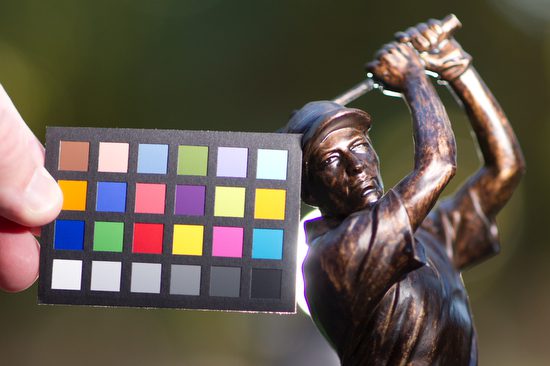
Now for all the photos above the exposure compensation was used at -2 stops under what the auto exposure was reading.  I had my flashes under exposed or 0.  The reason is the camera wants to make the statue a neutral gray when it is actually darker.  To compensate I under exposed to fool the meter to get what was correct.

I am using the Mini ColorChecker by x-rite so you can see the color as shot in each situation with this series.  This will not just help you see proper exposure, but the color space for each photo. (figure 7)
I wanted you to see you can just use a reflector to help improve the photo, but please pay attention to not just the shadows being improved, pay attention to the colors. (Figure 8)
Shot with fill and you can see not just exposure but color temperature will be different with reflector or flash. (figure 9)
Here with one flash to the right of the camera and one behind the statue you can see ho it improves the tones and the color space.  This is why I prefer using strobes over reflectors alone for portraits.  Another major benefit with strobes over a reflector, is the reflector gives a constant light source which will cause most folks to squint. (Figure 10)
This is the final result. Shot with Nikon D3s and 85mm f/1.4. (Figure 11)
This was the setup for Figure 11. By the way, I shot this with my Nikon P7000 with the flash on for fill. (Figure 12)
I thought the light behind the golfer was a little distracting, so I moved it to the left out of the photo 180 degrees opposite the main light to the right.  The Nikon TTL system is balancing the background -2 Stops under to the flashes which are normal of 0 setting. (Figure 13)
This is the setup for Figure 13.  Again I shot this on the Nikon P7000 with the pop up fill flash to help the statue and the camera gear to have some definition. (Figure 14)

Practice lighting with some objects that are dark or even black. See if you can change the mood of the situation by just positioning the lights in different places. Maybe you use the X-Rite Mini ColorChecker to see if you are setting the camera’s white balance correctly to get the best color.  If you shoot in Raw you can correct this later, but if you shoot in JPEG you can change it later, but the results are noticeably poor.

What one week of mine looked like in September

Reading Time: 8 minutes

I have been using the Nikon NPS pocket calendars since 1983. The calendars might be more telling of my camera preference than anything else.

My mentor Ken Touchton called to tell me that I needed to show what I might do during a week of my life. He knew that what we do as freelancers, if you are successful, takes more time than a 9 to 5 job with occasional evening events.

I decided to start with a busy shooting week for you and then contrast it with a slower week. I want you to see how some weeks you have no time to yourself. I am not doing this every week, but you must be willing to take on weeks like this to be successful as a freelancer. It is feast or famine in this line of work.

One Week of Shooting

August 29th, Monday

  • 6:00 a.m. Getting up, shower, eat and pack the van
    • Check emails
  • 7:00 a.m. Leave the house with Photo Assistant
  • 8:30 a.m. – 9:00 p.m. photoshoot
    • During the day, the CEO asks to get photos for a PowerPoint slide the next day. ( I contacted the person who would be getting the images that night to process the next day to meet me at the meeting and start processing all the photos early.  By the way, this person was going to watch my daughter while my wife is out of town)
  • 9:30 p.m. – 11:00 p.m. editing and creating PowerPoint slides from all the day’s images to email to the CEO for him to have three choices to pick from. Put batteries on chargers. Reformat cards and clean cameras.
    • Check emails 

August 30th, Tuesday

  • 6:00 a.m.
    • Getting up, Shower, eat and pack the van.
    • Help be sure your daughter is up and ready for the school bus.
    • Check emails
  • 7:30 a.m. leave house with Photo Assistant
  • 9:30 a.m – 5:30 p.m. cover meeting again.
  • 6:30 p.m. arrive home, cook dinner, and hand over all images to photographer/assistant to process.  She will process all the RAW images from the last two days.  Edit out bad moments and make JPEGs.  These will be burned to DVDs and put in a FedEx package (which I have already prepared) to drop off to be overnighted to the client on Thursday morning.
  • 8:00 – 10:00 p.m.
    • Unpack van and charge batteries, and then pack for the trip tomorrow
    • Check emails – Create an Invoice and send the PDF to the client with a W-9 form 

August 31st, Wednesday

  • 6:30 a.m. Up and getting daughter off to School.  My photo assistant stayed over to get the daughter off to School and be there to meet her later in the day when she came home. (wife is still on the trip)
    • Check emails
  • 9:00 a.m. leave for the airport
  • 10:00 a.m. – 12:00 Sit at the airport checking emails and corresponding about today’s trip. Also, send thank you notes to the clients on Monday and Tuesday.  Check with a Friend/Assistant watching my daughter. 
  • 12 – 3 fly across the country
  • 3:30 get to Rental Car location 45 minutes after putting in an address to GPS on the road for 2 hours to place.
  • 5:30 p.m., drop by the site. I will be shooting the next day, meeting the people, and talking for an hour to get an idea of the place. 
  • 6:30 – 8:30 go to each with the writer on the project
  • 8:30 – 10 check hotel, unpack and set up a computer as a workstation, check emails, and respond. 

September 1st, Thursday

  • 6:30 am up ate and checked emails.  (Still planning a photo shoot of the Chick-fil-A Kickoff in a couple of days)
  • 8:00 a.m. – 7:00 p.m. Shooting stills and Video interviews of story
  • 7:00 – 8:00 p.m. go eat
  • 8:00 – 11:00 p.m. editing of images and video 

September 2nd, Friday

  • 3:00 a.m., get up and  drive 2 hours to catch a 6:00 a.m. flight back to Atlanta
  • Noon – touch down in Atlanta
    • Get bags and go to the parking service to pick up the van and drive home
  • 1:30 p.m., finally home
  • 2:00 – 9:00 p.m. Edit video and still images into a 2:30 minute package and send to client for changes and approvals.
    • Checking emails and phone calls about the next day. Scan all receipts, create an expense report, and email this to the client for the trip.

September 3rd, Saturday

  • 9:00 a.m. Slept in and am exhausted
  • 11 a.m. Wife, Daughter, and I eat lunch
  • Noon drops daughter off at friends, and my wife and I drive to the Chick-fil-A Kickoff game.  Dorie, my wife, has been volunteering in the press box for 18 years, and for a much shorter time, I have covered the games for clients like the teams, wire services, and corporate clients.
  • 1:00 p.m. – 1:00 a.m. cover the pre-game events and the game and then leave 

September 4th, Sunday

  • 8:00 a.m. – noon, edit all my images from the day before
  • 1:00 – 4:00 download images from two other photographers, putting together sights and sounds in a 2-minute slide show with audio.  Send this to the client to have published on Monday morning. 

During that week of shooting, I was still checking my voicemail because I couldn’t take calls while shooting, but the moment I had a break, I would listen and see if I needed to respond. It would help if you reacted quickly to offers or clients moving on to someone else.

I still like to use the moleskins and NPS calendar even with today’s new technology, which lets you sync your phone, iPad, and computer with your calendar, notes, and contacts.

Non-Shooting Week

September 19, Monday
·      6:30 a.m. Shower, breakfast
·      8:00 a.m. – 9:00 a.m. drive to Visual Consulting client’s Corporate Offices
·      9 – 10 a.m. checking emails and talking to folks in the office by seeing how they are doing.  Building relationships
·      10 a.m. – 11:30 a.m. two meetings back to back.  I listen in on editorial meetings.  I am listening to see what they have planned for visuals on projects.  Occasionally I ask about what they have planned.  Many times I have a list of ideas that I am ready to offer as suggestions.  But most of the time I am trying to think more strategically and offering observations when appropriate in the meetings on workflow and procedures.
·      11:30 – 1:00 p.m. eat in the corporate dining room.  This is actually another long meeting. I try and sit with new folks when I can or sit with some of the team that I work with to get to know them better.  I find out what they are working on and see how they are doing.
·      1:00 p.m. – 3:30 p.m. more one-on-one meetings with different people in departments around the company trying to be sure they are all aware of how we are there to serve them.
·      3:30 – 5 commute home
o   Making and taking phone calls along the way. Often following up on a conversation earlier in the day.
·      5 – 6 p.m Checking on emails and working on connecting with clients

September 20, Tuesday
·      6:30 a.m. Shower, breakfast
·      8:00 a.m. – 9:00 a.m. drive to Visual Consulting client’s Corporate Offices
·      9 – 10 a.m. checking emails and talking to folks in the office by seeing how they are doing.  Building relationships
·      10 a.m. – 11:30 a.m. meetings
·      11:30 – 1:00 p.m. eat in the corporate dining room.
·      1:00 p.m. – 3:30 p.m. more one-on-one meetings
·      3:30 – 5 commute home
o   Making and taking phone calls along the way. Often following up on a conversation earlier in the day.
·      5 – 6 p.m Checking on emails and working on connecting with clients
·      evening sometime – write this blog and post it.

September 21, Wednesday
·      6:30 a.m. Shower, breakfast
·      8:00 a.m. – 11: 30 a.m.
o   Often posting blog or working on the next one.
o   Going through my database of 5,000+ contacts and seeing who I have not contacted. Often this then prompts me to categorize those and write an email that I can then blast out to a group that appears to be very personal, but is often to similar audience.  An example might be a letter to all those who are at magazines, working for education or maybe church organizations.
o   Check my analytics on my blog and website
·      11:30 – 1:00 try and get lunch with my wife who works from home as well
·      1: 00 – 5:00 p.m.
o   Similar to the morning, but now checking to see how many emails bounced, what links they clicked on if any.
o   Responding to the responses from the emails.  Sometimes they have something else in mind and my email just prompted a call.
o   Removing people from my database that have lost their job or moved on.  Creating a new contact for these companies. This requires some investigation through their website often or a phone call to see who is the best new contact for me.
·      5:30 – 7:30 Wednesday evening meal and bible study at our church
o   Side note. Because of my profession and working in the past on the staff of church organization, I have been asked to help curate missions photography exhibits, teach classes on how to take photos on mission trips and asked to teach Sunday School. While I could teach without a seminary degree, my seminary training helps me pull on resources I have for these classes. I often will use examples of stories I have covered to make points.  This is part of my BRANDING.

September 22, Thursday
·      6:30 a.m. Shower, breakfast
·      8:00 a.m. – 11: 30 a.m.
o   Checking emails and correspondence.
o   Combing website to look for new contacts, which then I put in database and send them an email right away.  I have created some quick form letters that I customize for the recipient.
o   Review my presentation for UGA photojournalism students
·      11:30 – 1:00 drive to Athens, GA for presentation to UGA
o   Phone calls while in car to clients and potential clients.
·      1:00 p.m. Eat quick lunch
·      1:30 p.m. show up at Professors office to catch up and prepare for class
·      2 – 4 p.m. teach class
·      4 – 4: 30 p.m. answer some questions from students
·      4:30 – 6 p.m. drive home
o   Phone calls while in car to clients and potential clients.
·      Evening – check some emails and call it a day.

September 23, Friday
·      6:30 a.m. Shower, breakfast
·      8:00 a.m. – 11: 30 a.m.
o   Often posting blog or working on the next one.
o   Going through my database of 5,000+ contacts and seeing who I have not contacted. Often this then prompts me to categorize those and write an email that I can then blast out to a group that appears to be very personal, but is often to similar audience.  An example might be a letter to all those who are at magazines, working for education or maybe church organizations.
o   Check my analytics on my blog and website
·      11:30 – 1:00 try and get lunch with my wife who works from home as well
·      1: 00 – 5:00 p.m.
o   Similar to the morning, but now checking to see how many emails bounced, what links they clicked on if any.
o   Responding to the responses from the emails.  Sometimes they have something else in mind and my email just prompted a call.
o   Removing people from my database that have lost their job or moved on.  Creating a new contact for these companies. This requires some investigation through their website often or a phone call to see who is the best new contact for me.

September 24, Saturday
·      Spend an hour checking emails

September 25, Sunday
·      Spend an hour checking emails
·      Spend an hour to couple hours writing blog

Some Tips

Keep a Journal

I try and journal as often as I can. Writing down the things on my mind is a way to help me process them. I then looked back through this to remind me of a few things. First, I see that I survived what seemed like a significant deal. Second, it keeps me humbled and thankful for all my blessings.

I can now look back and see that I worked very hard to make things happen, but also, because I am reviewing these journals see that often the jobs I have gotten were not because of something I did. ISo many often get jobs for reasons I cannot explain, and a great deal of work I did may have helped, but I can see only God could have opened some of those doors for me.

Could you write it down?

Sometimes I will have an idea, and I would forget about those great ideas in the past. So now I write them down in something similar to my journal. While I now see that some of these “Great Ideas” wouldn’t work, they have helped keep my creative juices flowing. Now I often turn these “Great Ideas” into blogs, or they become a newsletter. Sometimes they have inspired me to write emails to clients that did lead to jobs.

Summary

Have a system that keeps you connecting with your and potential clients regularly. Think often about your clients and what they are dealing with, and see if there is any way you can help lighten their load.

Remember, don’t wait for clients to call you with a project–you call them with tasks they would want to do.