|
Getting your Trinity Audio player ready...
|
For years, I’ve followed a simple rule: always have two MacBook Pros. One is my primary workhorse, the other sits ready as backup. It’s the same instinct that leads me to carry two camera bodies on a shoot — gear fails, and when it does, work doesn’t stop just because the tool did.
That rule just got tested in a way I didn’t expect.
When the Backup Failed
My backup machine, a 15″ MacBook Pro from 2016 that I bought in 2018, took water damage. I replaced the keyboard and trackpad myself and got it to chime on startup and light up the Caps Lock key—but the screen stayed black. No image internally, none on an external monitor either. PRAM reset, SMC reset, every troubleshooting step available. All signs pointed to logic board damage, the kind of failure that’s common after liquid gets where it shouldn’t.
Here’s the thing: fixing it wasn’t really the right question. The real question was whether it was worth fixing at all.
The Real Problem Wasn’t Performance — It Was Apple’s Chip Transition
This is the part that surprised me most when I sat down to think it through. The 2016 MacBook Pro’s death wasn’t really about water damage. That was just the final trigger. The deeper issue had been building for years: Apple’s move from Intel processors to its own Apple Silicon chips (the M-series) fundamentally changed what software companies like Adobe expect a Mac to do.
I’d already seen this coming. Back in 2021, I bought an M1 Max specifically because I needed to keep running the latest versions of Lightroom and Premiere for my photo and video work. That wasn’t a performance upgrade in the sense of “my old machine got slow.” It was a software compatibility upgrade — Adobe, like most serious creative software makers, builds for where the platform is going, not where it’s been. Eventually, running current versions of the tools I depend on daily meant running current-generation hardware.
How Apple’s Support Window Actually Works
If you’re not tracking this closely, it’s worth understanding the pattern, because it explains why “the computer still works fine” and “the computer can still do your job” are two very different statements.
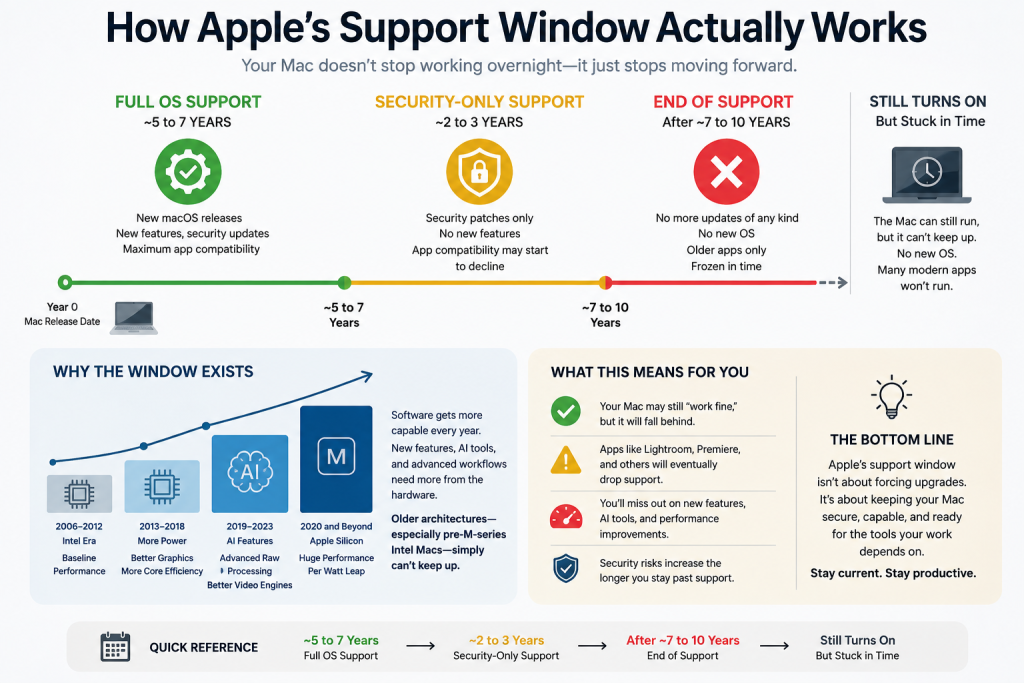
Apple typically provides full operating system updates — new features, security patches, and app compatibility — for about 5 to 7 years after a Mac model is released. After that window closes, Apple usually continues issuing security-only patches for another 2 to 3 years. Once even that ends, the machine can still technically turn on and run older software, but it’s frozen in time. It won’t run the newest OS, which means eventually it won’t run the newest version of Lightroom, Premiere, or whatever else your work depends on.
This isn’t planned obsolescence in a sinister sense — it’s simply the cost of software getting more capable and more demanding year over year. Adobe adds AI-assisted editing features, better raw processing, and improved video engines. Those features need computing power that older architectures, especially ones from before the M-series transition, can’t deliver.
Each Upgrade Has Felt Like an Emergency Procedure
In many ways, each of these upgrades has felt like an emergency medical procedure. Something necessary, but tough — because you’re not buying a computer for what it can do the moment you unbox it. You’re really buying it for what your software will demand of it three, five, seven years down the road. You’re planning for a future need using a present-day purchase, and that gap between “what I need right now” and “what I’m actually buying for” is uncomfortable. It always feels like more computer than you need, right up until it isn’t enough.
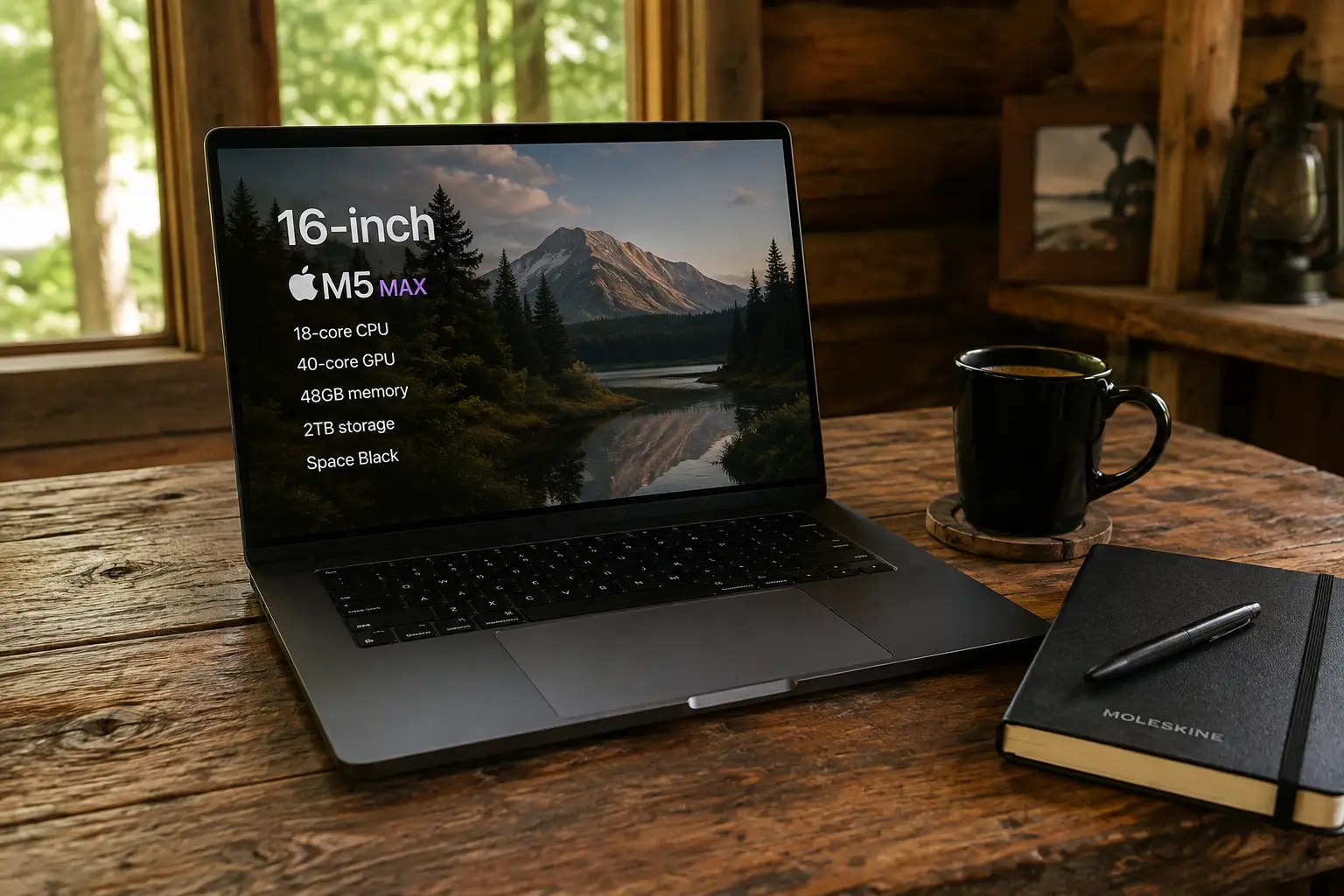
That’s exactly what happened here. The M1 Max I bought in 2021 to keep up with Lightroom and Premiere is still a genuinely strong machine today. It’s not underpowered — it’s just no longer my primary. I recently upgraded to a new 16″ MacBook Pro with the M5 Max chip, 48GB of memory, and 2TB of storage, and migrated my entire setup over from a Time Machine backup, tweaking a handful of settings that didn’t carry over cleanly. Now I’m back to my two-computer rule: the M5 Max as primary, the M1 Max stepping into backup duty.
Why This Matters for Your Business
If you make your living with a camera, or with any creative software that updates as often as Adobe’s Creative Cloud does, a backup computer isn’t optional insurance — it’s part of your infrastructure. But it only works as insurance if it can actually do the job when called upon. A backup that’s fallen behind the software curve isn’t really a backup anymore. It’s a paperweight with a keyboard.
The lesson from my 2016 MacBook Pro’s failure isn’t “buy new computers often.” It’s this: know where your current backup sits on Apple’s support timeline, and know before an emergency — not during one — whether it can still run what your work actually requires. Water damage forced my hand this time. Next time, I’d rather see it coming.