The fastest way to being a great photographer

Reading Time: 3 minutes
Fuji X-E2, 18-55mm, ISO 200, ƒ/13, 1/180

The fastest way to become successful is to study a master craftsman’s work. A few things involve learning the master’s, not just being aware of their work.

Don Rutledge (photo by Ken Touchton)

Don Rutledge, my mentor and friend for so many years until he passed away in 2013, knew more about other photographers than anyone else I have ever known. I learned about a scrapbook he put together early in his career and continued to add for many years.

Don clipped magazines for many years and studied those photos that moved him, and this was in the early 1950s. Back then the magazines like LIFE and LOOK were on almost everyone’s coffee tables across America. He also looked at magazines like Mirror, National Geographic Magazine, and Sepia to add a few more names.

Don was studying psychology at the time and used many skills that he learned about observation and things like body language to analyze the styles of those early photojournalists.

Don was creating sections on different photographers like Eugene Smith and Robert Capa. He noticed many of these photographers had credit lines that showed Black Star, a photo agency based in New York City, represented them.

Read more about my mentor Don Rutledge in my blog post about mentors.

Fuji X-E2, 18-55mm, ISO 200, ƒ/13, 1/180

My collection of photographers’ work grew and continues to grow even today. As a result, my library of photographers is more extensive than most any library I have seen.

Don and I would talk for hours about the masters’ styles, how they could consistently shoot a particular manner, and why it resonated so well with the audience.

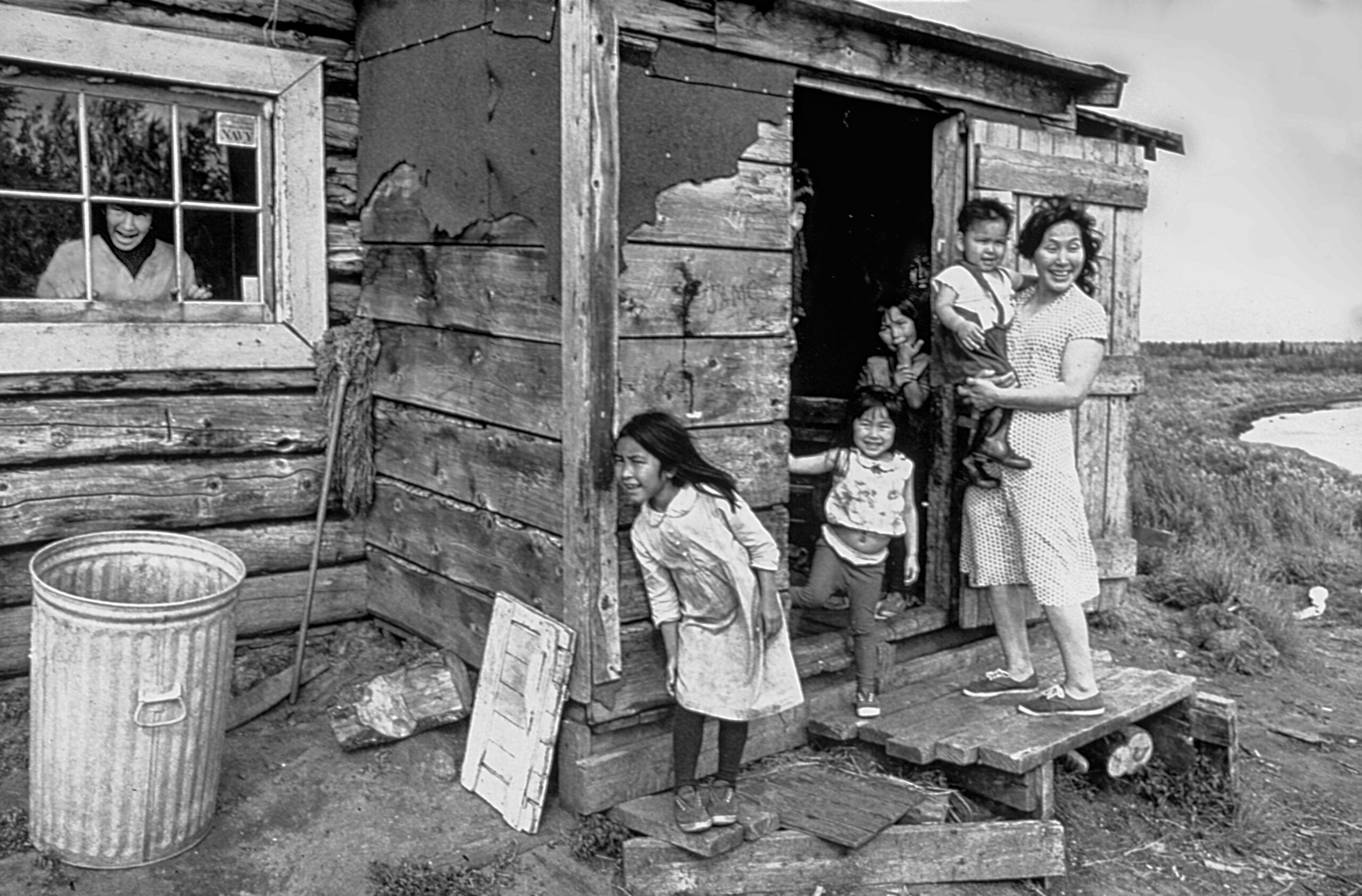
Shortly after coming to the Home Mission Board, Don spent six weeks photographing inside the Artic Circle, Alaska, in 1967. This photo was taken as Don, with two volunteer workers, visited an Eskimo house. The family was so happy to see their friends that everyone ignored Don’s click-click-click.

Here are a few tips that I think will help you start your scrapbook of the masters.

  • Find those photographers that are recognized historically as greats in the industry.
    • Read their biographies
    • Buy books of their work
    • Study their composition and figure out how this is so compelling
  • Look at those current photographer’s work that is in fad right now
    • Why is their work considered great today?
    • Read reviews by critics.
    • Hear them speak in person & if you are lucky, ask them questions
    • Buy their books
  • Copy their work. When you can copy another photographer’s approach, it helps you understand how to do it yourself. Unless you pull off another photographer’s style or technique, you may not just realize what other photographers are doing.
  • Buy prints of the masters and hang them in your home. The photographs will remind you that you are setting the bar for your work to match.
  • Learn to be a good critic yourself. Learn how to articulate each of the master’s styles and distinguish their work from each other.
  • Remember, even the masters shoot some crap. Learn to distinguish an artist’s pieces of work from other elements they produce. Be careful not to think that everything they shoot is excellent because they are big names. This skill will take many years to perfect for you.
  • Get together with other photographers and discuss the masters. Ask people to share their thoughts.

You see, the quickest way to success is to stand on the shoulders of those who went before you.

The Two Most Made Travel Photography Mistakes

Reading Time: 2 minutes
 

Batteries

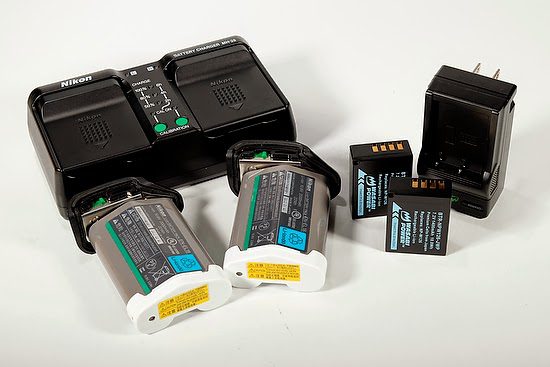
The number one mistake I see most often made by people traveling with cameras is not having enough fresh batteries.

Depending on your camera and flash, you may need more than just one extra battery. For example, my Nikon D4 camera can go most of a day shooting still images with one battery; however, if I start to shoot video or spend a lot of time reviewing images on my LCD, I can drain the battery and need a second.

My Fuji X-E2 goes through batteries, and I used all three batteries the day before.

I recommend having at least one extra battery, and before you leave for the day of shooting, be sure to charge both batteries fully.

Every evening before you turn in for bed, be sure to recharge all your batteries. That way, they will all be ready for another full day of shooting your travel in the morning.

Memory Cards

Carrying a few extra memory cards on a trip is much easier than a laptop computer.

For a once in a lifetime trip, it is wise to keep all the images on cards until you have them all on your computer and backed up in another location before formatting your cards.

Memory Card Tip

Always format your cards in your camera and not on your computer. The camera will do a better job of clearing the cards and creating the proper directories needed for the card to work correctly with the camera.

Common portrait mistake made by photographers

Reading Time: < 1 minute
 
 
Fuji X-E2, 55-200mm, ISO 1000, ƒ/4.8, 1/500

When making a person’s portrait, people often end up with a photo like the one above. Instead, they are looking for an image like the one below.


Fuji X-E2, 55-200mm, ISO 1000, ƒ/4.8, 1/500

As you can easily see, the background in the first photo is quite distracting and competes with the face of the person. In the second photo, some people might even say the subject just “pops” out of the picture.

Notice the camera settings are identical.

The difference is the distance the subject is to the background. For example, in the first photo, the person is right next to the background, and in the next one, the subject is 30 feet away from the background.

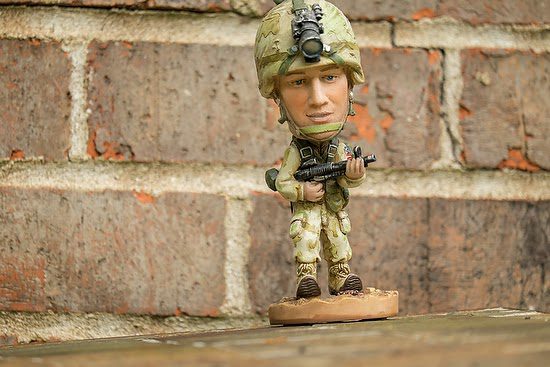
If you have a very distracting background like the brick wall, move the subject very far away to be able to throw the background out of focus.

Even if the background is a plain solid color wall, pull the person away from it, so you do not see the wall’s texture.

Don’t be a Naysayer

Reading Time: 4 minutes
 

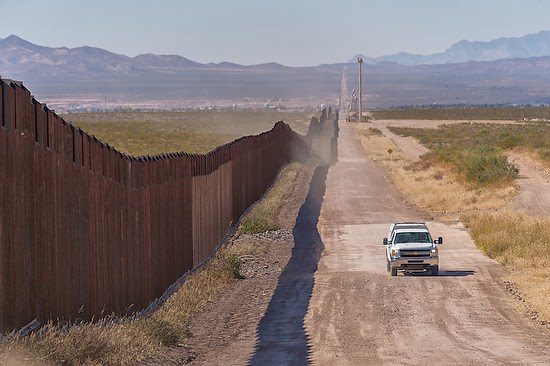
This photo is of the Mexico/US border in Douglas, Arizona. Many children are now crossing the Mexican border without their parents. You can read more about this here. Why? They are desperate to solve a problem they have, and even risking their lives in the middle of the desert is better for them than remaining in their situation.

I mention this to remind us that when people come to you with a problem, you are either part of the solution or not.

Naysayers

nay•say•er: a person who says something will not work or is not possible : a person who denies, refuses, or opposes something

For many years while I was a staff photographer, people classified me as a “naysayer” due to how often people came to me to ask me to do something, and I explained why it wasn’t possible.

I remember when it finally hit me how negative I was when my co-worker jokingly said that I always was saying no. While the comment hurt me, I realized he was right.

Are you a Naysayer?

My experience has been there are more naysayers on staff than freelance. You cannot grow your business by saying no. It would help if you learned how to say yes. Those freelancers who say no too often are soon looking for another career. However, being on staff is a little more protection than being negative. However, this has a time limit as well.

A good clue that you might be a naysayer is other people are starting to do what you perceive as your job.

“Why are they bringing in an outsider to do what I am supposed to do?” is a question you might be asking if you are a naysayer. While working as a staff photographer for a college, I couldn’t understand why the admissions office was hiring freelance photographers to shoot their recruiting catalogs.

Hiring an outsider is not always due to being a naysayer. Many colleges around the country have staff photographers who do most all the work for a school. However, when it comes to the school’s advertising, they are looking for a particular style. You should be fine if you offer to help them and the photographer is coming in to shoot.

If you feel threatened by this outside photographer, take a deep breath. Ask yourself if anyone has come to me and I answered them with reasons their request isn’t possible. If you did, then you should feel threatened.

Too often, people take the attitude that it is their job and the rules say I have this responsibility. But, unfortunately, you do have this until you become an obstacle to people in the company trying to get their projects done.

Be an Optimist

The opposite of the Naysayer is the Optimist. When people come to you with requests, learn how to turn their proposal into a reality. While someone’s request has some vast problems look first for something positive. A big clue is that if nothing seems good about their request at the bare minimum, you can start by being excited that they came to you with their idea.

“I am honored that you thought of me to help you with your project” is a great way to start on a positive note.

When addressing an obstacle, talk about a solution. For example, let’s say you don’t have a particular piece of equipment to make that happen. Tell the client if we can rent or buy a part you don’t have that would make it possible. Maybe you need an extra hand to make it happen. For example, for me to move the couch from this room to another, I need some help carrying it, would you or can you find someone to help? I am more than willing, but I am busy now and could use some service to find another person.

The trick is to let them know from your experience that we need to address something for success. I am more than willing to help you, but my boss has me working on these projects. So while I can ask them to let me help you, it would be better for you to request my time.

Remember Storyline

Looking at the storyline elements will help remind you why you need to be the Optimist and not the Naysayer.

The person coming to you has a Conflict/Task and is looking to you to help them as a Guide/Resource. If you say no, their issue doesn’t go away. Like Dorothy in the Wizard of Oz, she will move down the yellow brick road to find the solution to her problem.

The difference between the Optimist and the Naysayer is the Assignment they give to the person. Please give them the solutions [Actions] to help their story turn into a comedy, not a Tragedy. You saying no is just not an option for someone who needs to solve a problem.

When someone proposes a new program that will compete with your schedule, tell them how you want to help and need to understand their goals. Also, ask for their critique on how the current program you are doing isn’t meeting those needs. Don’t be quick to defend your program.

If you listen, you may learn that your program isn’t serving all the needs, or maybe you need to tweak the communication about your program to show how it addresses those needs. Either way, there is a perception that it is not meeting the audience’s needs.

Your role may change going forward, but learning how to listen and adjust makes you more valuable to them and the organization.

As long as you are helping the organization address the new issues facing it, you are part of the solution and will have a job in the future. If you try and protect and keep things as they are, you are not growing and slowly helping the organization die.

The most under utilized setting on a camera

Reading Time: < 1 minute
 

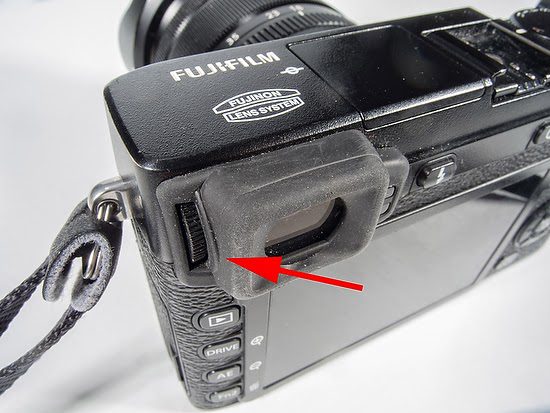
Your photos might look much better if they look sharp in the viewfinder. This dial is how you make sure they are in focus.

Most cameras today have a diopter adjustment dial near the viewfinder. For example, this arrow points to the diopter adjustment on the Fuji X-E2.

The camera comes with diopter adjustment in the rangeof  –4 to +2 m–1 to accommodate individual differences in vision. Rotate the diopter adjustment control until the viewfinder display is in sharp focus.

Fuji covers this in the basic setup of the camera, right after you set the date and time for the camera. It is more important than all the other settings like ISO, Aperture, Shutter Speed, and Focus settings. Why? You need to see the subject and know if it is in focus and read all the information they provide you in the viewfinder.

First Steps 

  1. Attaching the Strap
  2. Attaching a Lens
  3. Charging the Battery
  4. Inserting the Battery and a Memory Card
  5. Compatible Memory Cards
  6. Turning the Camera on and Of
  7. Basic Setup
  8. Choosing a Display
  9. Focusing the Viewfinder 
  10. Adjusting Display Brightness

The great advantage of the mirrorless Fuji X-E2 over a conventional DSLR is when looking through the viewfinder, you can do everything through it. So once you adjust the diopter, you don’t need your glasses to review images or change settings in the menu; use the EVF instead of the LCD screen.

Low light can be sometimes the best mood light

Reading Time: 2 minutes

Last night, some PhotogenX students were sitting outside working on the projects they are presenting this morning. It was well past sunset, and just the lights from the court were in the background, but we were sitting where, if it were not for the light from their laptops, we would be pretty much in the dark.

Fuji X-E2, 18-55mm, ISO 6400, ƒ/4, 1/13

It would help to have a camera with an ISO of 3200 or better. I shot these on the Fuji X-E2 using AUTO ISO with the peak setting at ISO 6400.

I opened up the aperture to the widest setting, and since the lens has a variable aperture, as you go to more telephoto, the aperture gets smaller; I was shooting between ƒ/2.8 and ƒ/4.

Fuji X-E2, 18-55mm, ISO 6400, ƒ/3.2, 1/20

As the subjects approached the laptops, the screen light got brighter on their faces. So, their exposure changed just slightly when they lean on the screen to see something.

You will notice that the shutter speed is slower than usually recommended—1/6 of a second is pretty slow. The subjects were not moving that much, which helped. Had this been some sporting activity, I could not have done this.

I am not using a tripod.

Fuji X-E2, 18-55mm, ISO 6400, ƒ/3.2, 1/20

The vibration reduction system designed for the Fuji X camera and lenses lets me hand-hold images almost 4 stops darker than without this system.

This means that as long as you remain as still as possible, the slight movement caused by your breathing and your heart beating will not blur your image.

If you have an older camera whose ISO is no higher than ISO 1600, this is a great reason to buy some of the newer technology. If you do, look for cameras that shoot at ISO 6400 or higher. For example, my Fuji X-E2 will go up to 25600, which I have used a few times.

Photography is about anticipating

Reading Time: 3 minutes
 
Fuji X-E2, 18-55mm, ISO 800, ƒ/5.6, 8.6 sec.

I posted this photo on Facebook last night, and a friend said, “I love this photo. It looks like a postcard. What are the settings you used?”

The Facebook comment makes me want to say Patience Young, Grasshopper. If you are not old enough, in the 1970s was a TV show called Kung Fu. Here is the scene that I loved:

It would help if you had the patience to make the photo I created. So often, when people travel, they see a beautiful scene and take a picture, and few will return to the spot to take it at a better moment.

Fuji X-E2, 18-55mm ISO 200, ƒ/22, 1/10

While I love this photo just as much as the nighttime photo, I like it for different reasons. It has a different mood in the picture.

I also took this photo later in the week while in Kona, Hawaii.

Fuji X-E2, 18-55mm, ISO 6400, ƒ/5.6, 1/5

I realized that if I could wait and capture a car driving down the hill in the frame, I could have their headlights light up the road, and the red tail lights add just a little color.

I tried the photo with cars coming up the hill but felt the headlights were too bright. Maybe you like this better. Here is one of those photos.

Fuji X-E2, 18-55mm, ISO 800, ƒ/5.6, 7 sec.

To take the photo, I put the camera on a tripod and then timed how long it was taking cars to go down the hill. I wanted between a 6 to 10-second exposure to have the lights move enough through the scene. So I played with the ISO, ƒ-stop until I found something that worked to give me about 7 to 8-second exposures.

The other thing is that this must be done at dusk and not too late, or the sky will be black.

The lesson here can apply to all photography. You must find a good composition and wait for the action to develop. You are anticipating what will happen.

Nikon D100, Sigma 15-35mm, ISO 400, ƒ/6.7, 1/180

I arrived early for a basketball game to put a camera behind the backboard and four strobes in the ceiling to light the basketball court. I then had to wait for what I had anticipated would happen in the game.

Ansel Adams called this pre-visualization. I have seen many scenes before, and now I would plan to capture them.

What will you photograph today that will require you to arrive early and wait?

How using portrait in a photo story

Reading Time: 2 minutes

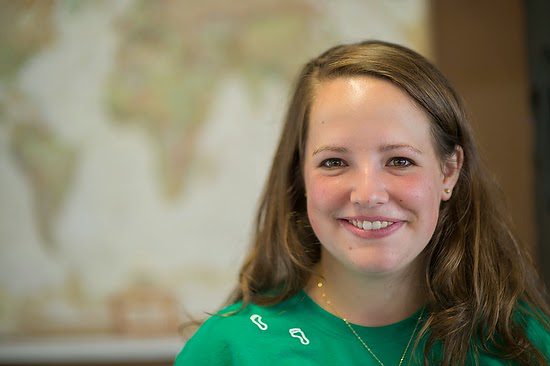
I took three quick photos of a student in class yesterday to show them two things they can do very quickly to introduce a character into the story.

We preferred not to have a posed portrait but rather something of her in action. Therefore, I did not take a photo to illustrate that point, but did want to explain lens choice and aperture.

The first photo has a shallow depth of field at ƒ/1.4. Again, the emphasis is all on the lady.

Nikon D4, 85mm, ISO 12800, ƒ/14, 1/100

I then stopped down the aperture to create a greater depth of field, making the map much sharper.

Now I told the class that my purpose was to show the students in a class with photo students, and they would then leave the course and do stories around the world.

Nikon D4, 14-24mm, ISO 9000, ƒ/14, 1/100

For the last shot, I switched to a wide-angle lens and had the class behind her. We talked about how we can then introduce her in our story this way as well.

All three are good photos in their own right, but the question was which one does the best job of helping tell the story.

Today, I will show them another technique, so stay tuned for that example.

Photographers love the triangle and for good reason

Reading Time: 2 minutes
 

Rembrandt Lighting

Rembrandt is generally considered one of the greatest painters. An illuminated triangle characterizes Rembrandt lighting under the eye of the subject on the less bright side of the face.

If you want to learn more about achieving this look, read my earlier blog post where I show some of the student’s work from a workshop I did in Kona, Hawaii, with the School of Photography at Youth With A Mission here.

Create Triangle with Off-Camera Flash

Another triangle used by professional photographers is the triangle created between the camera, subject, and flash.

Here you can see the simple setup I used for the photo above. The sun was behind the clouds. I caught this photo just in between showers. The flash also helped give that needed pop on an overcast day.

Create Triangle with Subject

Another way to use the triangle in photography is subject placement within a frame. For example, putting subjects in a group photo in triangles creates a pleasing composition.

Create Triangle with Gear

To make your camera stable, we also use a triangle. Three legs to our tripods and light stands create a stable platform for our camera and light stands.

May the triangle be present in your photographs: from lighting, composition, and support.

Photographers: Speaker’s Kit and Camera Club Kit

Reading Time: 2 minutes
 

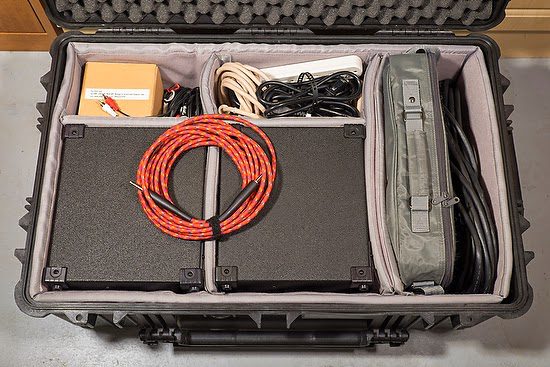
Here is my traveling speaking kit. This kit has two speakers, a projector, cables, and a spare bulb inside a Pelican 1650 case with dividers.

Be sure you have the best quality you can afford. So, for example, you would hate to continue to tell the audience if you could see it on my computer screen, you would appreciate it much better, or if we had some speakers, you could hear this much better.

If you are a camera club, invest in a kit that you use to show your member’s work. If you speak to groups, always carry your gear just in case the place you are saying isn’t prepared or has a cheap projector or sound system.

I use two of the Roland CUBE CM-30 speakers [$219]. Two speakers let me have stereo sound out of the sound system.

I have a 1/4″ jack running out of one into the other. I have the audio from the computer running into the Aux 1 jacks for Left & Right.

I can project my voice pretty well, but if needed, I plug my Shure Wireless Lavalier into Channel one and can now also project my voice if required.

This photo is my Shure FP Wireless Bodypack system.

I have an older Panasonic projector [Panasonic PT-LB20VU Projector] that works well. I recommend at least 2000 lumens for light output unless you are projecting to 10 – 12 people in a tiny dark room. Expect to pay between $500 to $1000 for a decent projector.

Here is a link to a collection that might work for your needs.

For a screen, well, this varies a great deal depending on where I am speaking. I have used 11′ seamless paper, white walls, and large screens and often will carry my 5’x7′ fold-up white/black background.