Embracing Technological Evolution: Enhancing the Storyteller’s Arsenal

Reading Time: 4 minutes

Technology has long been a double-edged sword in storytelling, empowering and limiting the creative endeavors of storytellers across mediums. From the evolution of photography to the advent of digital capture and the proliferation of video, technological advancements have continuously reshaped the landscape of storytelling, offering both challenges and opportunities for storytellers like myself.

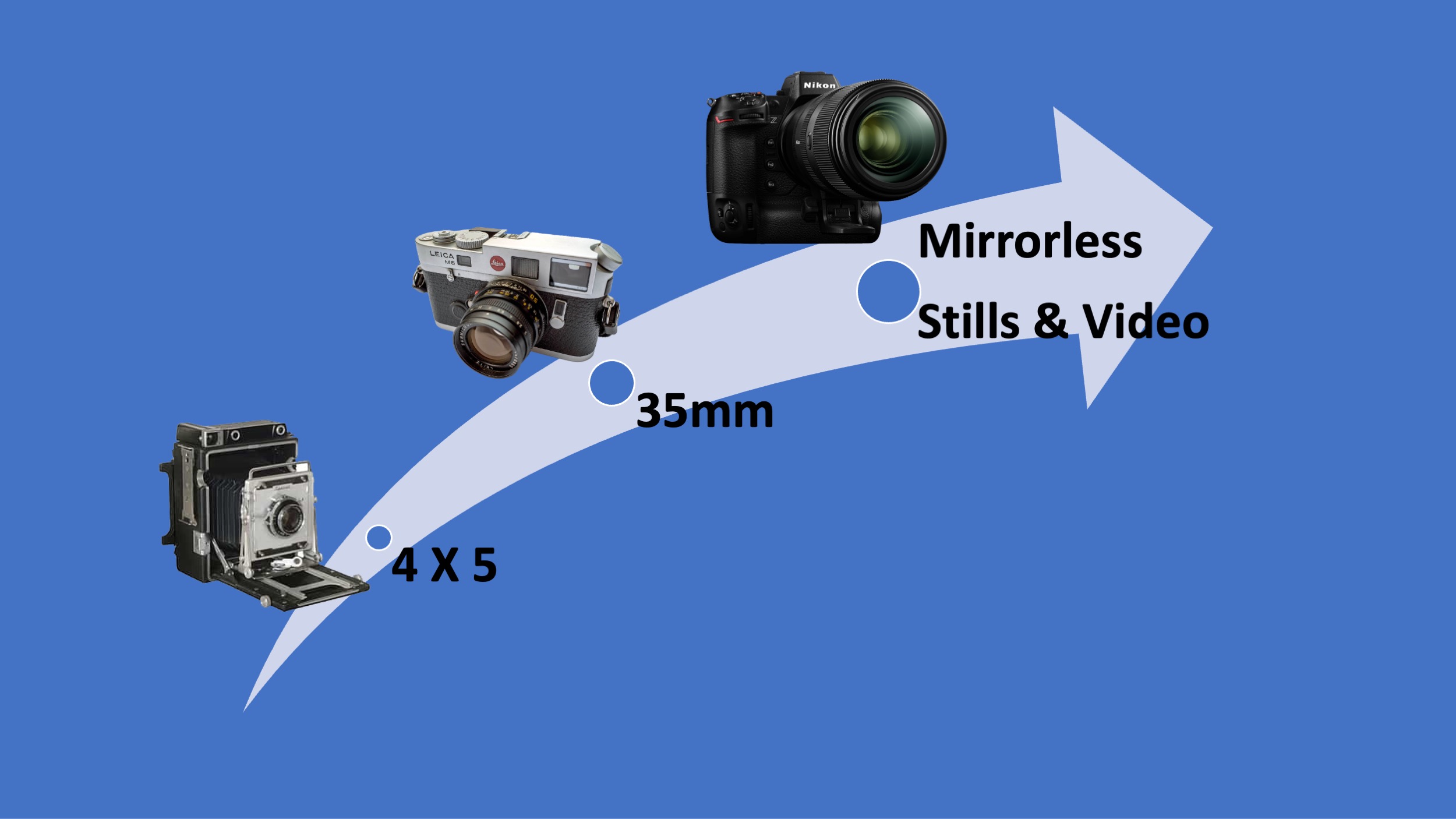
In photojournalism, transitioning from large format cameras like the 4×5 to more portable 35mm cameras marked a significant turning point. Photographers could move more freely, quickly capturing candid moments and intimate details. This shift enabled photojournalists to fully immerse themselves in their subjects’ worlds, resulting in more affluent, compelling storytelling.

Consider the work of legendary photojournalist Henri Cartier-Bresson, whose mastery of the 35mm Leica camera allowed him to pioneer the genre of street photography. His iconic images, captured with stealth and precision, offered glimpses into the lives of people from all walks of life, showcasing the beauty and complexity of the human experience.

Similarly, the era of Kodachrome film brought challenges and constraints for photographers, particularly those working for publications like National Geographic. With its limited latitude and sensitivity to light, Kodachrome demanded meticulous planning and timing. Photographers often had to rely on the golden hours of morning and evening light to achieve the vibrant colors and dynamic contrasts that defined the magazine’s visual aesthetic.

Yet, despite these limitations, photographers like Steve McCurry and David Alan Harvey produced timeless images that transported viewers to far-flung corners of the globe, capturing moments of beauty and resilience in the most unlikely places.

The advent of digital photography revolutionized the storytelling landscape once again, offering storytellers unprecedented freedom and flexibility. Suddenly, the constraints of film were lifted, allowing photographers to experiment, iterate, and innovate like never before. With digital capture, storytellers could push the boundaries of creativity, exploring new techniques and perspectives without fearing wasted film or missed opportunities.

Moreover, the affordability of digital cameras and editing software democratized storytelling, making it accessible to a broader range of storytellers. No longer bound by the prohibitive costs of film and darkroom equipment, aspiring storytellers could hone their craft more quickly and effectively, accelerating their learning curve and expanding their creative horizons.

Today, the storyteller’s toolkit is more expansive and versatile. With the rise of social media and online platforms, storytellers can instantly reach audiences across the globe, sharing their narratives with unprecedented immediacy and impact. From Instagram stories to YouTube vlogs, the possibilities for storytelling are virtually limitless, transcending traditional boundaries of time and space.

However, amidst this technological abundance, one fundamental truth remains unchanged: the power of storytelling lies not in the tools we use but in the stories we tell. Whether through photographs, videos, or any other medium, the essence of storytelling lies in our ability to connect, inspire, and move our audiences on a profound emotional level.

As storytellers, we must never lose sight of this fundamental truth. While technology may shape how we tell our stories, ultimately, the strength and substance of those stories will endure the test of time. So, let us embrace the possibilities that technology affords us, but let us never forget that at the heart of it all lies the timeless art of storytelling.

Embracing the art of storytelling is paramount in today’s ever-evolving landscape of visual communication. In an era where technology provides us with an abundance of tools and platforms, the actual currency of our industry lies in our ability to craft compelling narratives that resonate with our audience. To thrive in this dynamic environment, one must possess technical proficiency and a deep understanding of the principles of storytelling.

Becoming a proficient storyteller requires more than technical skill; it demands a keen eye for detail, a compassionate understanding of human nature, and a relentless pursuit of authenticity. As storytellers, we must immerse ourselves in the stories of others, learning to empathize with their struggles, hopes, and dreams. By recognizing the universal themes that unite us all, we can create narratives that transcend cultural boundaries and resonate with audiences on a deeply emotional level.

I understand that compelling storytelling begins with empathy and insight. I believe in the power of narrative to inspire change, spark conversation, and foster connection. Whether working with a nonprofit organization, a business, or a creative individual, my approach remains the same: listening, learning, and crafting stories that speak to the heart.

When crafting a story, we adhere to a simple yet powerful framework:

a) Specific Person: Every story revolves around a central protagonist whose experiences and journeys are the narrative’s focal point. By humanizing our stories through the lens of individual experience, we create a connection that resonates with our audience personally.

b) Specific Challenge: A compelling story is driven by conflict and resolution as the protagonist confronts and overcomes obstacles along their journey. We can create narratives that offer insight, inspiration, and hope by identifying our audience’s challenges.

c) Specific Imagery: Visual storytelling relies on the power of imagery to evoke emotion, convey meaning, and immerse the audience in the world of the narrative. From striking photographs to cinematic sequences, each image serves as a window into the story’s soul, inviting viewers to experience its depth and complexity.

d) Specific Feelings: Ultimately, the goal of storytelling is to evoke emotion—to make our audience laugh, cry, think, and feel. By tapping into the universal language of human emotion, we can create narratives that resonate with our audience on a visceral level, leaving a lasting impression long after the story has ended.

In essence, storytelling is not just a skill—it’s a mindset, a way of seeing the world through others’ eyes. By embracing the art of storytelling, we can harness the power of technology to elevate our craft, amplify our message, and inspire positive change in the world. At Stanley Leary, we are committed to empowering storytellers to unleash their creative potential, one story at a time.

Tagged :

Exploring Online Photo Storage Solutions: Understanding Recent Changes

Reading Time: 3 minutes

As a photographer and storyteller passionate about helping others showcase their work, I’ve always been invested in finding the best online photo storage solutions. Recently, while assisting a fellow photographer in setting up their online archive and sharing platform, I stumbled upon a significant change: PhotoShelter’s Pro version for new users transitioned from offering unlimited storage to capping it at 500GB. This shift, effective April 1, 2024, prompted me to delve deeper into alternative options to ensure photographers can access the storage they need to showcase their portfolios effectively. In this exploration, I compared popular platforms like SmugMug, Flickr, and Zenfolio, alongside backup solutions such as IDrive and Backblaze, to help fellow photographers confidently navigate this evolving landscape.

Managing and sharing your vast collection of photos can be daunting in today’s digital age. Whether you’re a professional photographer looking to showcase your portfolio to clients or an enthusiast who wants to share memories with friends and family, finding the right online photo storage solution is critical. In this blog post, we’ll compare three popular platforms, SmugMug, Flickr, and Zenfolio, and quickly look at backup options for RAW files with IDrive and Backblaze.

SmugMug:

With SmugMug, you get a robust platform designed specifically for photographers. Their pricing structure is straightforward: $45 per month for unlimited JPEG storage, with additional RAW storage charges based on the space you need. For instance, 512GB of RAW storage costs $3 per month, while 1TB of storage costs $5. SmugMug offers customizable galleries and extensive privacy controls, making it ideal for professionals who want to securely showcase their work to clients.

Flickr:

Flickr, owned by SmugMug, offers a more budget-friendly option at $5.99 per month or $49.99 per year. While it doesn’t support RAW photos, it provides unlimited JPEG storage. Flickr offers a Pro unlimited storage plan for users who exceed the 1000 photo/video free storage limit, making it a viable choice for those with extensive collections of images.

Zenfolio:

Zenfolio targets photographers who need unlimited storage and advanced e-commerce capabilities. Their Pro Suite plan offers unlimited storage for $16 per month, with additional charges for RAW storage at USD .085 per GB per month. Zenfolio provides tools for creating customizable websites, selling prints, and managing client galleries, making it suitable for photographers who want to streamline their online presence and sales process.

Backup Options for RAW Files:

For photographers who prioritize backing up their RAW files securely, options like IDrive and Backblaze offer reliable solutions:

IDrive:

IDrive provides flexible backup solutions for one user across multiple computers. Their plans start at 5TB for $69.95 for the first year, with subsequent years priced at $99.50. They also offer a 10TB plan for $104.65 for the first year, making it a cost-effective option for users with extensive storage needs.

Backblaze:

Backblaze offers a straightforward backup solution with unlimited data and drives for a single user. Priced at $9 per month or $99 per year, it’s affordable for those who prioritize simplicity and reliability in their backup strategy. However, it’s important to note that Backblaze requires external hard drives to be connected and scanned at least once every 30 days to keep them backed up.

Conclusion:

When choosing an online photo storage solution, consider your specific needs as a photographer or enthusiast. SmugMug, Flickr, and Zenfolio each offer unique features and pricing structures tailored to different use cases. Whether you prioritize unlimited storage, RAW file support, or advanced customization options, there’s a platform that fits your requirements.

Additionally, implement a reliable backup strategy with services like IDrive or Backblaze to ensure the safety and accessibility of your precious photo collections. Remember, those are for archiving only.

Tagged :

From Noise to Nuance: Exploring the World of Denoise Software for Photographers

Reading Time: 4 minutes


In the fast-paced world of digital photography, staying ahead of the curve often means embracing new tools and technologies that enhance the quality of our images. One such tool that has become indispensable for photographers is denoise software. Whether you’re a seasoned pro or an enthusiastic hobbyist, incorporating Denoise software into your workflow can make a world of difference in the clarity and polish of your photos.

Let me take you on a journey through my experiences with Denoise software, from struggling with noisy RAW files to discovering the power of advanced denoising algorithms like DxO PureRAW 4.

When I first got the Nikon Z9 in December 2021, I was thrilled with its performance. However, I quickly realized that Lightroom struggled to interpret the RAW files, especially at high ISOs, as it would later be able to interpret. The resulting images were marred by distracting noise, robbing them of the crispness and detail I desired. It was a frustrating setback until I stumbled upon DxO PureRAW 2, which provided a much-needed solution and delivered pleasing results even at ISO 25600.

Just as I was settling into my newfound denoise bliss, Lightroom unveiled its denoise feature just a week later. Naturally, I was curious to see how it stacked up against my trusted PureRAW. The convenience of having denoise capabilities integrated directly into my primary editing software was undoubtedly appealing, and I gave it a fair shake.

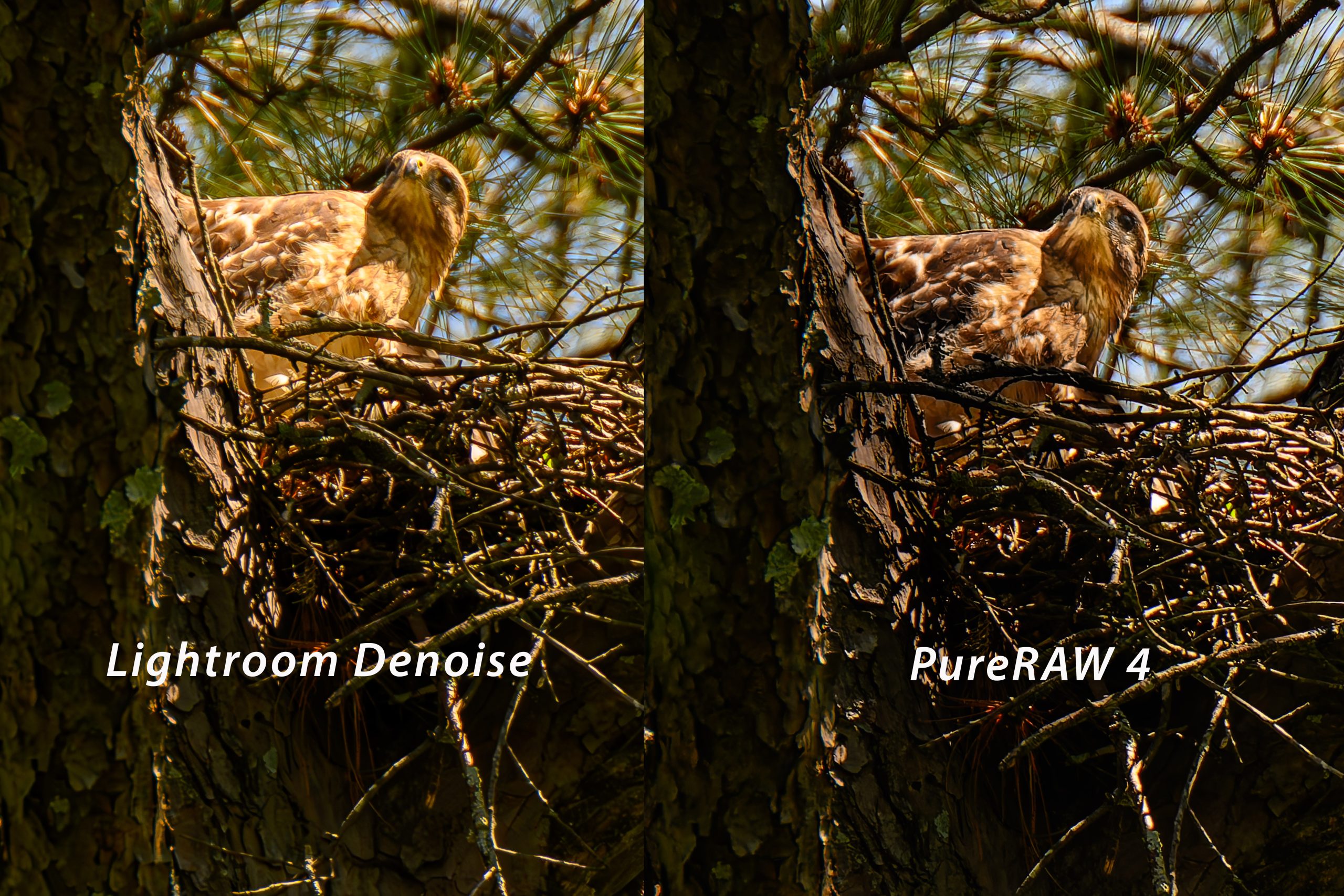
However, despite Lightroom’s advancements, I wanted even more nuanced control and superior results. Even when shooting at semi-high ISOs like 3600 while photographing Red-Shouldered Hawks in my backyard, I was disappointed with the Lightroom Denoise.

Fast-forward to yesterday, when I decided to take the plunge and upgrade to DxO PureRAW 4. With promises of further enhancements and optimizations, I eagerly reprocessed some of my previous work done in Lightroom to put PureRAW 4 to the test.

Breaking Barriers: PureRAW 4’s Compatibility Breakthrough with Nikon RAW NEF (HE) Files

In my journey with Denoise software, I encountered hurdles with earlier versions of DxO PureRAW, particularly versions 2 and 3, such as their compatibility with Nikon RAW NEF (High Efficiency) files. As a Nikon shooter, this posed a significant challenge, as the NEF (HE) format is designed to conserve storage space while maintaining image quality—a win-win for photographers looking to optimize their workflow without sacrificing performance.

Unfortunately, PureRAW 2 and 3 fell short in this regard, as they were unable to process NEF (HE) files, leaving me with no choice but to resort to uncompressed RAW formats. While this resulted in higher-quality images, it also came with a hefty trade-off in file size, with uncompressed RAW files ballooning to a staggering 120 MB compared to the more manageable 32 MB of compressed NEF files.

This posed a dilemma for me. While PureRAW’s denoising capabilities were undeniable, the prospect of dealing with significantly larger file sizes was a major deterrent. I seemed to be faced with a choice between superior image quality and practicality—a compromise that I was reluctant to make.

Enter DxO PureRAW 4, a game-changer in every sense of the word. PureRAW offered compatibility with Nikon RAW NEF (HE) files for the first time, opening up a world of possibilities for Nikon shooters like myself. This meant I could finally enjoy the benefits of denoise processing without sacrificing the efficiency and convenience of the NEF (HE) format.

This breakthrough was nothing short of revolutionary for my workflow. By allowing me to process the smaller NEF (HE) files directly, PureRAW 4 eliminated the need for cumbersome uncompressed RAW formats, streamlining my editing process and saving valuable storage space. The missing piece of the puzzle finally made PureRAW a viable and indispensable tool in my arsenal.

In essence, PureRAW 4 not only raised the bar in terms of denoising performance but also demonstrated a commitment to meeting photographers’ evolving needs. By listening to user feedback and addressing critical pain points such as file format compatibility, DxO has once again reaffirmed its position as a leader in image processing software.

For Nikon shooters like myself, leveraging the power of PureRAW while retaining the efficiency of NEF (HE) files is a game-changer. It’s a testament to the relentless pursuit of innovation and excellence that drives DxO—and a clear indication that the best is yet to come.

The difference was immediately apparent. Side-by-side comparisons revealed clarity and refinement that surpassed what I had achieved with Lightroom’s denoise feature. The details in the hawks’ feathers were crisper, the shadows smoother, and the overall image quality noticeably improved.

But what exactly sets denoise software like DxO PureRAW apart from the rest? It all comes down to these tools’ sophisticated algorithms and meticulous processing. By analyzing RAW files at a fundamental level, PureRAW can tackle noise reduction at its source, resulting in cleaner images that retain more detail and texture.

Of course, PureRAW is just one of several denoise options available to photographers. Lightroom and Topaz Photo AI also offer powerful denoising capabilities, each with strengths and advantages. The key is finding the right fit for your specific needs and preferences. I often see the difference between Lightroom Denoise, Topaz Photo AI, and, as of yesterday, DxO PureRAW 4.

So, if you love shooting photos and are passionate about capturing every detail with clarity and precision, I highly recommend trying Denoise software. For true pixel peepers like myself, DxO PureRAW 4 is worth a closer look.

Ultimately, denoise software can be a game-changer, whether shooting in low light, pushing the limits of your camera’s ISO capabilities, or striving for the best possible image quality. It’s a small but mighty tool that can make a difference in the outcome of your photos, helping you achieve the stunning results you’ve always dreamed of.

Tagged :

Creating JPEG Images from Video: A Comparison of Photo Mechanic and Adobe Premiere

Reading Time: 3 minutes

As a professional storyteller and brand builder, part of my craft involves capturing moments in both still and moving images. Often, I need to extract a single frame from a video to use as a standalone image. In this blog post, I’ll share my experiences using Photo Mechanic and Adobe Premiere Pro for this task.

Photo Mechanic: Quick and Simple

Let’s start with Photo Mechanic, a renowned tool among photographers for its speed and efficiency in managing and culling images. While primarily designed for photos, it also offers a handy feature for extracting video frames.

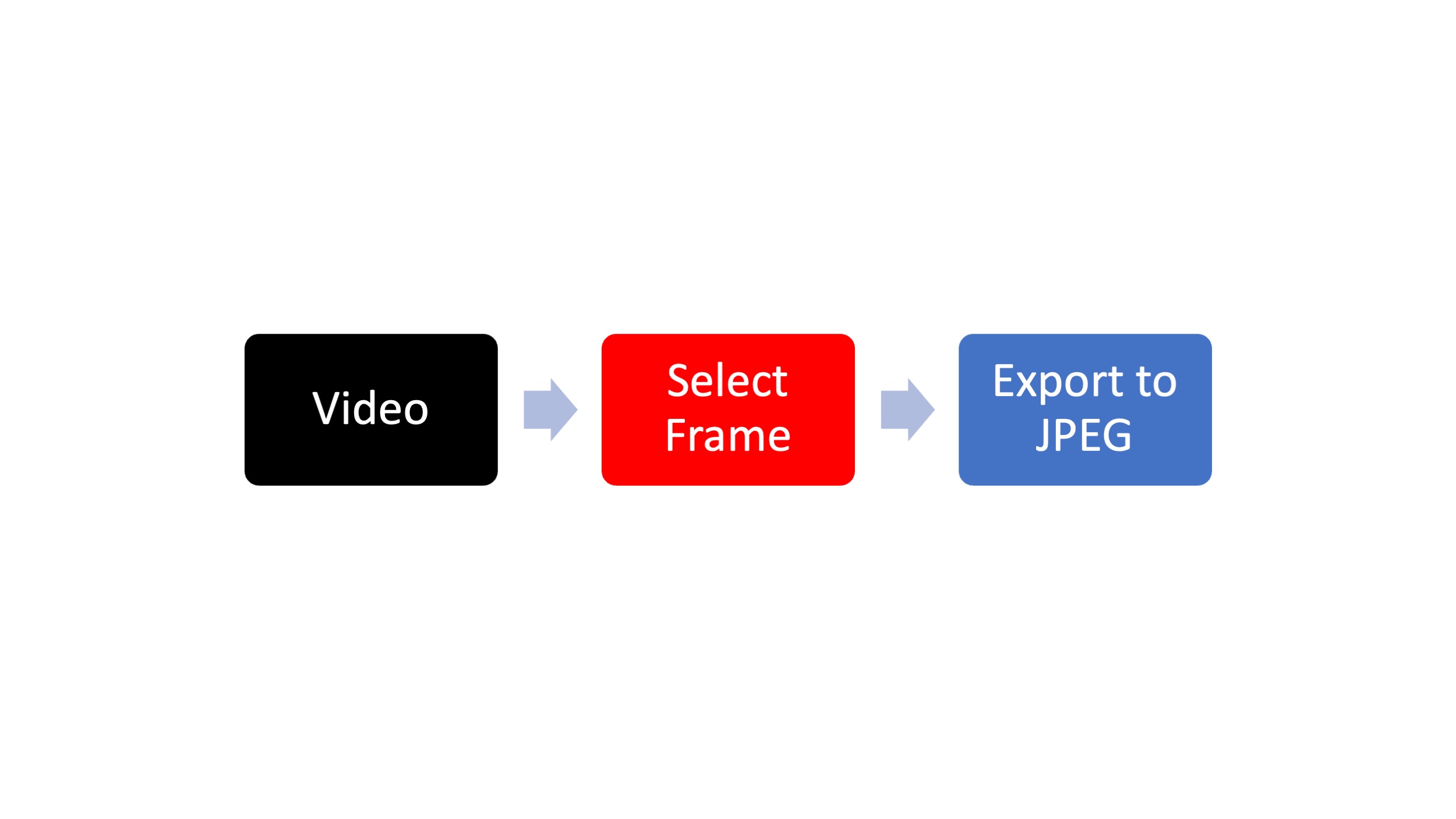
Using Photo Mechanic is straightforward. You scrub across the video until you find the desired frame, then press ‘S’ to mark it. After that, it’s a matter of clicking ‘Save’ and choosing your preferred settings for the JPEG export. The first time you do this, you’ll need to configure the settings according to your preferences, including selecting quality, adjusting size, and specifying the save location.

One of the benefits of Photo Mechanic is its simplicity. However, during my experience using it on my Macbook Pro with Apple’s M1 chip and 32 GB of RAM, I noticed that scrubbing through the video wasn’t as smooth as it could be, especially compared to Adobe Premiere Pro.

Adobe Premiere Pro: Versatility and Integration

On the other hand, Adobe Premiere Pro, a powerhouse in video editing software, offers a similar feature for extracting frames from videos. Positioning the play head at the desired frame, clicking the camera icon, or shortcut of pressing Shift+E allows you to capture the frame effortlessly. You can then name the frame, choose where it saves, and even import it directly into your Premiere project.

What sets Premiere apart is its seamless integration with video editing workflows. Since I often edit videos in Premiere, being able to extract frames without switching between programs is incredibly convenient. Additionally, I found that Premiere’s performance was superior when scrubbing through the video, making the process more efficient overall.

Choosing the Right Tool for the Job

Ultimately, the choice between Photo Mechanic and Adobe Premiere Pro depends on your specific workflow and preferences. If you’re primarily a photographer who occasionally needs to extract frames from videos, Photo Mechanic is a reliable option that gets the job done. However, if video editing is a significant part of your work and you’re already using Premiere, leveraging its capabilities for frame extraction makes sense.

Since video editing is an integral part of my storytelling process, I prefer using Adobe Premiere Pro for extracting frames. Its smooth performance and seamless integration with my editing workflow make it my ideal choice.

In addition to its frame extraction capabilities, another significant benefit of using Adobe Premiere Pro is its robust suite of editing tools, particularly for color grading. Unlike Photo Mechanic, Premiere allows you to manipulate your footage’s color, contrast, and overall look to achieve the desired aesthetic. This is especially valuable for those who shoot in flat profiles or RAW formats, as it enables precise control over the final image. Whether aiming for a cinematic look, enhancing the mood of a scene, or ensuring consistency across your project, Premiere’s advanced color grading features empower you to elevate the visual storytelling experience. So, if color grading is essential to your video production process, Adobe Premiere Pro offers the comprehensive tools you need to achieve professional results seamlessly.

Final Thoughts

Whether you’re a photographer, videographer, or both, having the right tools at your disposal can significantly streamline your workflow. Both Photo Mechanic and Adobe Premiere Pro offer efficient ways to extract frames from videos, allowing you to capture those perfect moments and incorporate them into your storytelling arsenal.

So, whether you’re scrubbing through footage in Photo Mechanic or seamlessly extracting frames in Adobe Premiere Pro, remember that the goal remains to capture and share compelling stories that resonate with your audience. You can choose the tool that best fits your needs and workflow and let your creativity take center stage.

Tagged :

Enhancing Photography Workflow with Nikon’s NX Tether 2.0 & Photo Mechanic Plus

Reading Time: 4 minutes

In the fast-paced world of professional photography, every second counts. Whether on a high-profile commercial shoot or a creative studio session, having the right tools to streamline your workflow can make all the difference. Nikon’s NX Tether 2.0 is one such tool, with a plethora of new features and enhancements that revolutionize the way photographers interact with their cameras and clients.

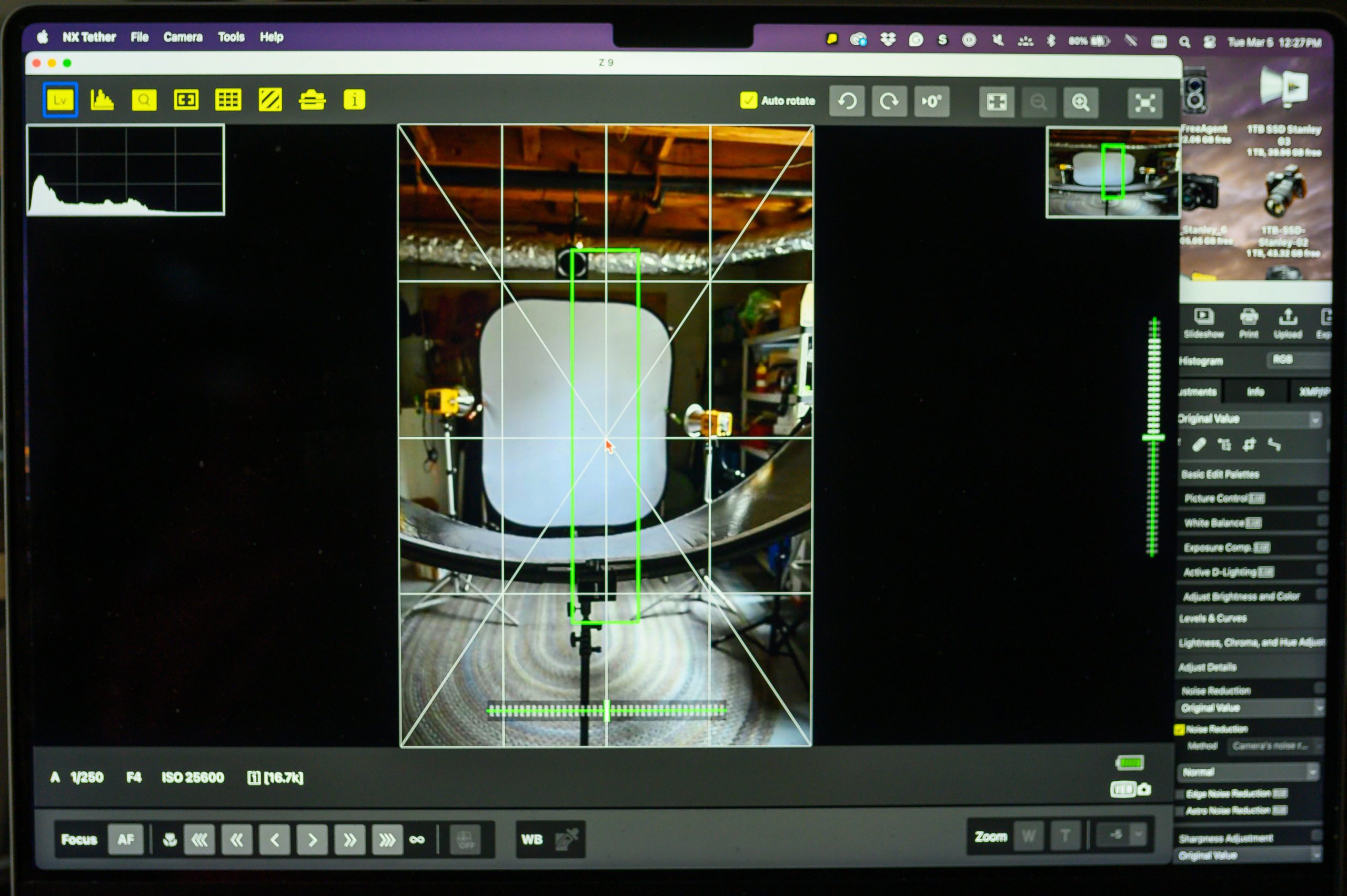
One of the standout features of NX Tether 2.0 is its support for remote live view, video capture, and fully-featured wireless control with compatible Nikon cameras. This means photographers can check focus, lighting, and composition on a larger screen in real-time, quickly making on-the-fly adjustments. Gone are the days of being tethered by cables – with NX Tether, photographers can enjoy the freedom of wireless control, allowing for greater flexibility and creativity.

NX Tethering

For photographers like myself, who rely on tethering for client sessions, NX Tether’s wireless capabilities open up a world of possibilities. Using a compatible Nikon camera with a built-in wireless transmitter or an optional transmitter, I can shoot wirelessly as if physically tethered. This enhances efficiency and reduces the risk of accidental damage caused by tripping over cables – a common occurrence in busy studio environments.

How to Connect Nikon Z9 Wireless Tethering

I’ve integrated NX Tether into my workflow alongside Photo Mechanic Plus’s Live View Ingest, allowing me to display live captures on a large 55″ TV connected to my MacBook Pro. This setup enables my clients and I to view photos in real-time, providing instant feedback and ensuring that every shot meets their expectations. It’s a game-changer for collaboration and efficiency on set, allowing for seamless communication between all parties involved.

NX Tethering

But NX Tether isn’t just about convenience – it’s about empowering photographers and art directors to work together more effectively. On larger productions where collaboration is critical, having a tethered monitor allows art directors to oversee every aspect of the shoot, from lighting and composition to hair, makeup, and styling. With NX Tether’s wireless capabilities, art directors can now have real-time access to the images, providing invaluable feedback and guidance throughout the shoot.

Photo Mechanic Plus Live Ingest

I am using Photo Mechanic Plus with the NX Tethering so I can view the RAW files that have had filenaming changed and metadata included.

In NX Tether, I choose to have all the files sent to the computer.
You tell Photo Mechanic Plus what folder to look in for new photos. You then tell it where to put the images [folder]. Renaming and metadata are all possible, just as when you ingest into Photo Mechanic Plus.

Of course, effective collaboration requires a balance of creative input. While the art director plays a crucial role in setting the overall vision, it’s essential to allow the photographer creative freedom to execute their vision. Fostering a collaborative environment with clear roles and responsibilities can avoid conflicts and allow the creative process to flourish.

In conclusion, Nikon’s NX Tether 2.0 is a game-changer for photographers and art directors. Its support for remote live view, wireless tethering, and fully-featured control opens up new possibilities for collaboration and efficiency on set. Integrating NX Tether into your workflow allows you to streamline your process, enhance communication, and ultimately deliver stunning results for your clients.

Tagged :

Why Photo Mechanic Plus Outshines Lightroom in Archiving and Searching for Photos

Reading Time: 3 minutes

Managing, archiving, and searching for images efficiently is paramount in photography. As a professional photographer, ensuring my workflow is streamlined and effective is essential to delivering high-quality work to my clients. In this pursuit, I’ve come to rely heavily on Photo Mechanic Plus for its unparalleled capabilities, especially when compared to Adobe’s Lightroom, particularly in one significant aspect.

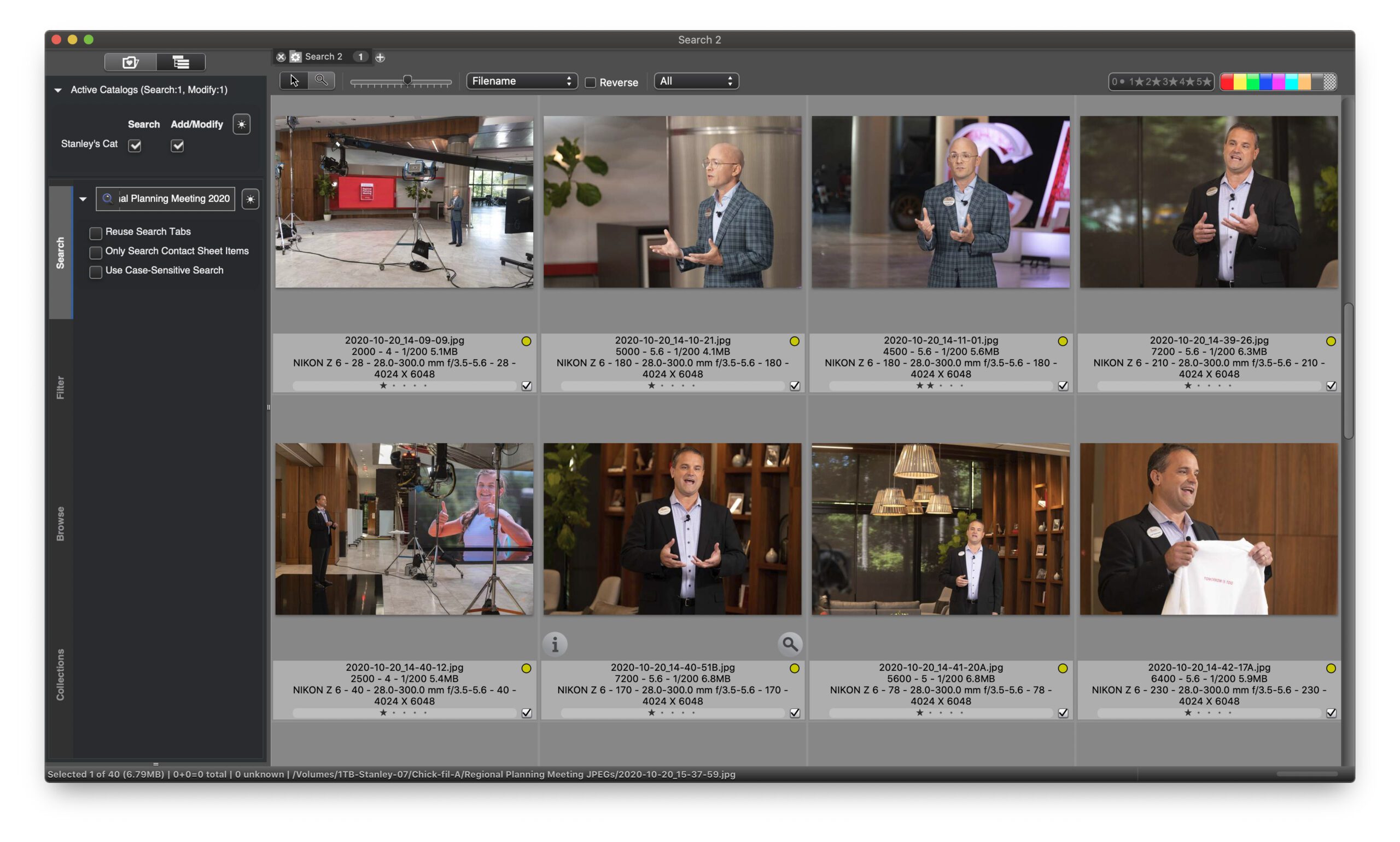
Let’s paint a scenario: I’ve just completed a project, meticulously editing and refining a collection of RAW images to perfection. Now, my client requires a selection of these images in JPEG format. In a typical Lightroom workflow, the cataloging system is predominantly based on the RAW files imported into the catalog. Therefore, when it comes time to export JPEGs for the client, they reside on an external hard drive, disconnected from Lightroom’s organization.

This scenario introduces a significant inconvenience: searching through Lightroom’s catalog to retrieve the edited JPEGs for client delivery. Why should I go through the hassle of re-exporting images or navigating through Lightroom’s interface when the JPEGs are readily available elsewhere?

This is where Photo Mechanic Plus emerges as the hero of my workflow. Unlike Lightroom, Photo Mechanic Plus allows me to effortlessly ingest and cull RAW images. Once I’ve completed this initial culling process, I seamlessly import the selected images into Lightroom for further organization and editing, leveraging its robust features such as face recognition.

However, Photo Mechanic Plus truly shines in its ability to handle post-editing tasks efficiently. After editing and exporting the images to JPEG format, I turn to Photo Mechanic Plus for keywording using structured keywords. This step is crucial for enhancing my images’ searchability and discoverability, ensuring they are easily accessible whenever needed.

Once keywording is complete, Photo Mechanic Plus seamlessly integrates with my PhotoShelter account, allowing me to upload and share the images with my client effortlessly. By providing access to my PhotoShelter account, I grant my clients the ability to browse, select, and download the images they require, all without the need to navigate through Lightroom’s catalog or rely on re-exported files.

This streamlined workflow saves me valuable time and effort and enhances the client experience by providing quick and easy access to the needed images. In a fast-paced industry where efficiency is critical, Photo Mechanic Plus proves to be an invaluable tool for photographers seeking to optimize their workflow and deliver exceptional results.

In conclusion, while Adobe Lightroom remains a powerful tool for editing and organizing images, its limitations in post-editing tasks and client delivery make it less than ideal for photographers who demand efficiency and flexibility in their workflows. Photo Mechanic Plus fills this gap admirably, offering a comprehensive solution for seamlessly archiving, searching, and sharing images. If you want to take your photography workflow to the next level, Photo Mechanic Plus is undoubtedly worth exploring.

Editor Note: Once the images are up on PhotoShelter, they are searchable for the client. The search fields they can address are the Captions and keywords. The advantage of Photo Mechanic Plus is any metadata such as the EXIF [camera shooting data] is also searchable. You can search by camera, lens, serial number, aperture, ISO, shutter speed, date, time, and even more with Photo Mechanic Plus.

Tagged :

Creating a Unique Group Photo: Behind the Scenes of the YWAM School of Photography Class

Reading Time: 4 minutes

As a photography instructor at the YWAM School of Photography, I always look for creative ways to teach my students about lighting, composition, and teamwork. This week, I decided to challenge myself and my class by attempting something unconventional for our group photo: having each student hold their own Godox V860IIN flash and point it at themselves. At the same time, I triggered them with the Godox X1NT transmitter. Here’s a glimpse into how we made it happen.

The Concept

The idea behind this group photo was to capture a memorable moment and provide a hands-on learning experience for my students. Having each student hold their flash and adjust its position and power settings would give them practical knowledge about lighting and control. Additionally, it would add an element of creativity and individuality to the final image.

Planning and Preparation

Before the shoot, I discussed the concept with my class and demonstrated how they would hold and position their flashes. We also examined the importance of communication and teamwork to ensure everyone’s flashes were pointed in the right direction and synchronized with the trigger.

Execution

On the day of the shoot, we gathered. I positioned student, holding their Godox V860IIN flash. I carefully positioned myself \with the Godox X1NT transmitter, ready to trigger the flashes. All flashes are triggered in manual mode at the lowest setting of 1/128. Camera settings: NIKON Z 9, NIKKOR Z 24-120mm f/4 S, Mode = Manual, ISO 1250, 1/400, ƒ/7.1, (35mm = 24)

Trial and Error

As with any experimental shoot, we encountered some challenges along the way. Coordinating the timing of the flashes and ensuring everyone was illuminated correctly required several trial runs. Additionally, one student didn’t have the same Godox flash, so I used a Flashpoint XPlor 600 HSS TTL to light them separately in the background.

Row 1: Thema Black, Allan Robbins, Cherdic Dharma, Anna Milne, & Fred Tesone
Row 2: Vegard Andersen, Dennis Fahringer, Hania Moody, Chris Küsel, & Lisa Groves

Final Result

After a few attempts, we finally achieved the desired effect. The group photo captured the unique personalities of each student, with their flashes adding dynamic lighting to the scene. The student lit separately with the Flashpoint XPlor 600, which added an extra dimension to the composition, creating visual interest and depth.

Lessons Learned

This experience taught us valuable lessons about collaboration, problem-solving, and creativity in photography. We expanded our skills and grew as artists by stepping out of our comfort zones and trying something new. Moreover, the process fostered a sense of camaraderie among the students as they worked together towards a common goal.

Conclusion

Creating the group photo for the YWAM School of Photography class was not just about capturing a moment in time—it was about the journey of exploration and discovery. We pushed conventional photography’s boundaries through experimentation and teamwork and created something unique. As an instructor, witnessing the enthusiasm and growth of my students fills me with pride, and I look forward to many more creative endeavors together in the future.

Tagged :

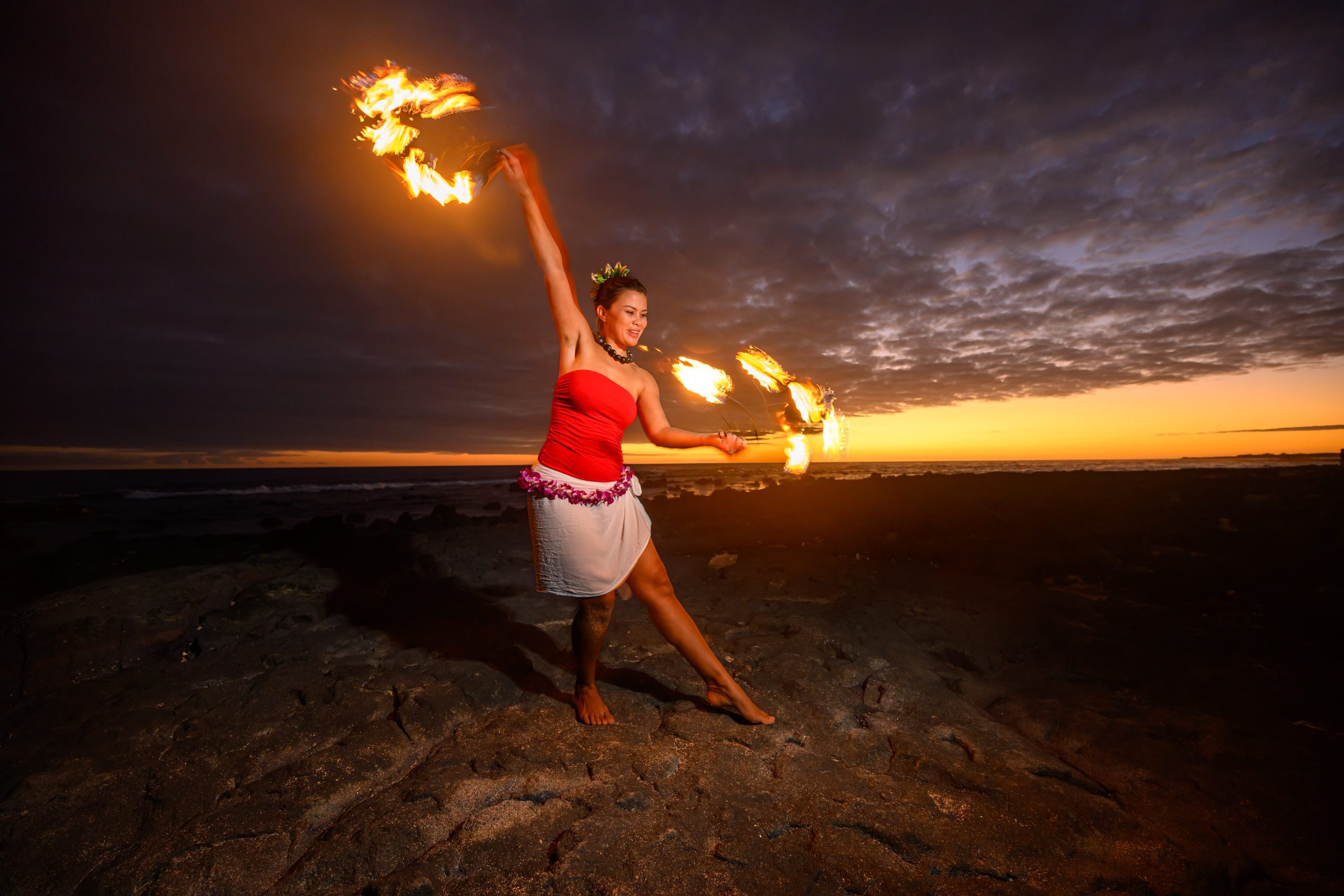
Capturing the Magic: Lighting a Lady Fire Dancer at Sunset in Kona, Hawaii

Reading Time: 3 minutes

There are few settings as enchanting as a sunset on the beaches of Kona, Hawaii. The warm hues of the sky, the gentle sound of waves crashing against the shore, and the vibrant energy of the Hawaiian culture all come together to create a truly mesmerizing experience. As a photographer, moments like these inspire me to push the boundaries of my craft and capture the magic unfolding before me.

Recently, I had the opportunity to photograph a lady fire dancer against the backdrop of a breathtaking sunset. While the natural beauty of the scene was stunning on its own, I knew I needed to use additional lighting techniques to truly highlight the grace and intensity of her performance.

This setup has one HSS With Flashpoint XPlor 600 HSS TTL about 45º to my right and my Nikon Z9 with a 14-30mm ƒ/4 lens on a tripod. The camera was set to ISO 500, 1/20, & ƒ/4.

As the golden hour approached and the sun descended towards the horizon, I positioned myself strategically to take advantage of the soft, warm light. With my camera in hand, I snapped a few initial shots without using any artificial lighting, allowing the natural ambiance of the scene to shine through.

While the images were undoubtedly beautiful, I knew I could enhance the drama and detail by introducing a flash to illuminate the dancer’s face against the dimming light of the sunset. With careful consideration of the positioning and intensity of the flash, I aimed to strike the perfect balance between accentuating her features and preserving the ethereal glow of the twilight hour.

Fire Dancer, Aileen Kunewa [NIKON Z 9, NIKKOR Z 14-30mm f/4 S, Mode = Manual, ISO 64, 1/30, ƒ/4, (35mm = 14)]

As the dancer gracefully moved, I fired a series of shots, each illuminated by my flash’s subtle burst of light. With each click of the shutter, I could see the transformation unfolding before me – her face illuminated with a soft glow, the flicker of the flames casting mesmerizing shadows across the sand.

The contrast between the fiery performance and the tranquil beauty of the sunset was truly captivating, and I felt privileged to be able to capture it through my lens. With each frame, I aimed to convey not just the visual spectacle of the moment but also the emotion and energy that filled the air.

Without the Flash

After the shoot, I took a moment to review the images on my camera, and I couldn’t help but feel a sense of satisfaction. The combination of natural and artificial lighting allowed me to capture the scene’s essence in an authentic and dynamic way.

Fire Dancer, Aileen Kunewa [NIKON Z 9, NIKKOR Z 14-30mm f/4 S, Mode = Manual, ISO 500, 1/20, ƒ/4, (35mm = 14)]

But perhaps the most rewarding part of the experience was seeing the reactions of those around me – the gasps of awe, the smiles of appreciation, and the sense of wonder that filled the air. In a world where distractions abound, moments like these remind us of the power of art to inspire, uplift, and connect us to the world around us.

As I packed up my gear and prepared to leave the beach, I couldn’t help but feel a sense of gratitude for the opportunity to witness and capture such a magical moment. Ultimately, it’s not just about the photos themselves but the stories they tell and the memories they evoke – stories of beauty, passion, and the timeless allure of the Hawaiian sunset.

Tagged :

Photography: Writing with Light

Reading Time: 2 minutes

Introduction:

At its essence, photography is the art and science of capturing moments by harnessing the power of light. The word derives from the Greek words “phōtos,” meaning light, and “graphé,” meaning drawing or writing. It is a poetic and apt description of the medium, encapsulating the fundamental nature of photography as the art of writing with light. As the legendary photographer Ansel Adams once said, “You don’t take a photograph; you make it.” In this blog post, we will delve into the significance of the term photography as “writing with light” and explore how professional photographers wield light as a vital tool in their craft.

Photography: Writing with Light. The phrase “writing with light” beautifully encapsulates the essence of photography. In the hands of a skilled photographer, the camera becomes a tool for crafting visual stories by manipulating and capturing the interplay of light and shadows. The significance of this term goes beyond the mechanical process of taking pictures; it reflects the artist’s ability to use light as a language to convey emotions, narratives, and atmospheres.

The Power of Light in Professional Photography. In professional photography, the quality and control of light are paramount. An essential aspect of any photographer’s toolkit is the ability to shape and manipulate light to achieve the desired results. As renowned photographer George Eastman rightly said, “Light makes photography. Embrace light. Admire it. Love it. But above all, know light. Know it for all you are worth, and you will know the key to photography.”

In a recent assignment, I utilized two Flashpoint XPlor 600 HSS TTL flashes set to 1/128th power. The choice of lighting equipment, combined with the camera and settings (NIKON Z 9, NIKKOR Z 24-120mm f/4 S, Mode = Manual, ISO 1000, 1/200, ƒ/5.6), played a crucial role in achieving the desired visual impact.

Challenges of Natural Light in Large Spaces. While natural light has charm, it often presents challenges in large rooms. The absence of control can lead to unflattering shadows, and the color temperature may limit the dynamic range of the photographs. To overcome these challenges, professional photographers must be adept at managing and manipulating light sources.

Moving from Thermometers to Thermostats

Photographers, artists, and visual storytellers must evolve from mere thermometers—passively recording the existing conditions—to thermostats—actively controlling the environment. This shift involves mastering the art of light manipulation, understanding color temperatures, and employing tools to shape the ambiance. As climate controllers, photographers can enhance moods, highlight details, and create visual narratives that resonate with the audience.

In conclusion, the term “photography” as “writing with light” perfectly captures the essence of this creative medium. With knowledge and equipment, professional photographers can control and shape light to bring their creative vision to life. As the industry evolves, mastering the art of environmental control becomes increasingly vital, transforming photographers from passive observers into active directors of the visual narrative.

Tagged :

Embracing AI Generative: Revolutionizing Photography Beyond Post-Editing

Reading Time: 2 minutes

In the ever-evolving realm of photography, where creativity meets technology, embracing Artificial Intelligence (AI) Generative has become a game-changer for independent photographers. Beyond its traditional role in post-editing, AI Generative is now a powerful tool in business correspondence and content creation for websites and blogs. This paradigm shift resembles the transformative era of the 1980s when Bill Gates and Steve Jobs were shaping the future of personal computing.

The Evolution of AI in Photography

AI Generative has opened up new frontiers for photographers seeking innovation in their craft. While it might seem like an unconventional addition to a photographer’s toolkit, its versatility is indispensable.

1. Post-Editing Precision

AI Generative excels in enhancing post-editing workflows. Automated tools can intelligently analyze an image, adjusting color balance, exposure, and sharpness with unparalleled precision. This allows photographers to focus more on the creative aspects of their work while ensuring the technical details are flawlessly executed.

2. Elevating Business Correspondence

Communicating effectively with clients and collaborators is crucial for any independent photographer. AI-powered language models can assist in crafting professional and engaging emails, proposals, and contracts. By leveraging AI in business correspondence, photographers can maintain a polished image while saving time on administrative tasks.

3. Crafting Compelling Website and Blog Content

In the digital age, a photographer’s online presence is often the first point of contact for potential clients. AI Generative can aid in generating captivating text for websites and blogs, describing the photographer’s portfolio, approach, and artistic vision. This saves time and ensures a consistent and articulate representation of their work.

Examples of Creativity Unleashed

1. AI-Generated Artist Statements

Imagine an AI system analyzing a photographer’s body of work and generating artist statements that eloquently capture the essence of their portfolio. This streamlines the creative process and gives photographers fresh perspectives on their work.

2. Automated Social Media Captions

Creating engaging captions for each post can be time-consuming for photographers juggling multiple platforms. AI Generative can analyze the visual content and generate catchy captions that resonate with the audience, allowing photographers to maintain an active and dynamic online presence.

3. Collaborative Storytelling

AI can be a collaborative partner in storytelling. By providing prompts or themes, photographers can use AI to co-create narratives that complement their visual storytelling. This innovative approach adds depth and intrigue to the overall photographic experience.

A Revolution Reminiscent of the 1980s

The current integration of AI Generative in photography mirrored the transformative era of the 1980s when Bill Gates and Steve Jobs pioneered personal computing. Back then, the personal computer became a tool that empowered individuals and revolutionized industries. Similarly, AI Generative is now empowering photographers, unleashing creativity, and reshaping the landscape of visual storytelling.

In conclusion, embracing AI Generative is not about replacing the artist but enhancing their capabilities. Independent photographers can leverage AI as a creative ally, allowing them to focus on what truly matters – capturing moments, telling stories, and pushing the boundaries of their artistic expression. Just as the personal computer became an essential tool in the 1980s, AI Generative is becoming an indispensable companion for photographers in the 21st century.

Tagged :

Embracing Authenticity in the Age of AI Marketing

Reading Time: 2 minutes

In the ever-evolving marketing landscape, the year 2024 presents a unique challenge for businesses, and the culprit is artificial intelligence (AI). As we reflect on the transformative journey of marketing, from the rise of the internet to the dominance of social media, it’s evident that businesses must now navigate the era of AI-driven content.

A few years back, the focus shifted from traditional advertising to the dynamic world of social media. YouTubers garnered followings comparable to established media, and significant magazines dwindled in size. The media landscape was not shrinking; it was expanding, creating new business opportunities and challenges.

In 2008, Seth Godin’s book “Tribes: We Need You to Lead Us” introduced three foundational ideas: the concept of a tribe, the importance of shared interests and communication within a group, and the necessity of leadership for tribes. Social media platforms like Facebook and YouTube facilitated the creation of tribes through shared interests, rapidly shaping new business models.

However, success attracted imitators, and soon, tribes were inundated with copycats. The focus shifted from the uniqueness of experience to the effectiveness of messaging and the energy a person could inject into a tribe or industry.

Fast forward to today, and we grapple with a new game-changer – AI. With the assistance of AI, individuals can craft messages with production values reminiscent of Hollywood. The question arises: How can an average business thrive in an environment where superior messaging competes against companies delivering the best products?

A simple story about artist Kate Saville that I captured

Standing Out Amidst the Glitz and Glam: The Power of Authenticity

Amid the glitz and glam of AI-generated content, businesses can find their competitive edge through authenticity. Authenticity has become the currency that resonates with audiences seeking genuine connections. Here are key strategies to navigate the challenges posed by AI marketing:

  1. Craft Genuine Stories: Share authentic narratives that reflect the values and ethos of your brand. People connect with stories that evoke emotion and authenticity.
  2. Humanize Your Brand: AI may elevate production values but cannot replicate human connection. Humanize your brand by showing the people behind the business and highlighting genuine interactions.
  3. Engage with Your Community: Building a community around your brand goes beyond transactional relationships. You can actively engage with your audience on social media, respond to comments, and participate in conversations.
  4. Transparency is Key: In an age where AI can simulate perfection, transparency becomes a distinguishing factor. Be open about your processes, challenges, and journey. Consumers appreciate honesty.
  5. Embrace Imperfections: Perfection is not always relatable. Embrace the imperfections that make your brand unique. Authenticity often lies in the genuine, unpolished moments.

In a world where technology constantly raises the bar, standing out is not about competing in a race for perfection. It’s about forging real connections that resonate with your audience more deeply. Authenticity is the timeless key to navigating the complexities of AI-driven marketing.

Tagged : /

Capturing Time and Ensuring Legacy: Preserving Ancestral Photographs for Future Generations

Reading Time: 3 minutes

Introduction: Our family histories are woven with threads that connect us to ancestors who shaped our existence. Ancestral photographs, frozen moments in time, are pivotal in bridging generational gaps and nurturing a profound connection to our roots. Beyond merely cherishing these photographs, it is equally essential to safeguard and identify them for the benefit of future generations.

  1. Preserving Memories: To ensure the longevity of ancestral photographs, consider digitizing them. Scan or take high-quality photos of physical prints and store them in secure digital archives. This preserves the images and makes sharing and accessing them more accessible for relatives scattered across the globe.
  2. Organize and Label: Create a systematic organization for your digital and physical photo collections. Use descriptive file names and organize images into folders by family branches or specific events. Label physical photographs with relevant information such as names, dates, and locations to provide context for future generations.
  3. Share the Stories: Accompany your photographs with detailed stories and anecdotes. Write down the names of individuals, the significance of the moment captured, and any interesting tidbits. This extra layer of information transforms the photographs into a rich narrative, helping future generations understand and appreciate their heritage.
  4. Preserve the Physical Prints: Store them in acid-free, archival-quality materials for physical prints. Keep them away from direct sunlight, extreme temperatures, and humidity. Please regularly look over prints for signs of deterioration and consider consulting with professionals for restoration if needed.
  5. Utilize Technology: Use technology to create digital family trees and albums. Numerous apps and websites allow you to organize, annotate, and share family photographs. This not only enhances accessibility but also facilitates collaboration among family members in identifying individuals in old photos.
  6. Labeling Individuals: Identifying people in photographs is crucial for maintaining a meaningful connection to our ancestry. When marking individuals, be specific with names, relationships, and roles. Consider creating a master list with the names of family members to cross-reference when identifying individuals in group photos.
  7. Collaborative Efforts: Involve family members in the identification process. Host family gatherings where photo albums are revisited, stories are shared, and identifications are made collectively. This collaborative effort enhances accuracy and fosters a sense of shared responsibility for preserving family history.
  8. Document the Unknowns: Not every face or detail may be immediately recognizable. Document unknown individuals or uncertain information, and encourage family members to contribute their insights over time. This ongoing dialogue ensures that the collective knowledge about family photographs continues to grow.
ON THE BEACH: The first wave of Marines takes cover behind the dunes on Saipan beach during the World War II invasion of the Marianas Islands. The soldier kneeling in the sand at far right is Carl Matthews of Texas; second from right is Wendal Nightingale of Skowhegan, Maine; standing is Lt. James Stanley Leary of North Carolina. Neither Nightingale nor Leary made it home from Saipan; both are still missing in action. [Time Life photo by U.S. Marine Sgt. James Burns] On June 15, 1944, during the Pacific Campaign of World War II (1939-45), U.S. Marines stormed the beaches of the strategically significant Japanese island of Saipan to gain a crucial air base from which the U.S. could launch its new long-range B-29 bombers directly at Japan’s home islands.

Conclusion: Preserving ancestral photographs goes beyond mere sentimental value; it is an investment in the cultural legacy of future generations. By adopting these preservation tips and actively identifying individuals in photographs, we contribute to a richer understanding of our roots. Let us embark on this journey to ensure that the faces and stories captured in these images endure, serving as a timeless bridge between our past and future generations.

Tagged :